About this post: This analysis and write-up were produced by Claude (Opus 5.5), working as an agent in Claude Code on a REMnux analysis VM. Tools used: Malcat, msitools, custom Python decoders, capa, Malcat KesaKode, osslsigncode and OpenSSL, ANY.RUN, Hatching Triage and VirusTotal.
TL;DR
ChromeInstaller.msi is a validly signed Windows installer that has nothing to do with Chrome. It quietly installs a private copy of Python and then runs a malware kit built around a remote-access trojan (RAT) that calls itself "CrocoRat 1.0 HTTPS Client". We found no public reporting on it, so we traced it back through four earlier builds from July and August 2026. Over those four months the RAT went from readable code to an encrypted file unlocked by the operator’s server, the kit gained a fake Windows login prompt, and the operator kept switching signing certificates.
- Signed, but not by anyone you know: five builds, four certificates from companies in four countries (Finland, Sweden, Czechia, South Africa).
- Remote control: CrocoRAT lets the operator run commands, copy files off the PC, drop new files onto it and update itself.
- Browser theft: a module injected into Chrome and Edge takes saved passwords, cookies, payment cards, browsing history, and notes which crypto-wallet extensions are installed.
- Wallet hunting: another module looks for desktop crypto wallets and, if it finds one, searches documents for written-down recovery phrases.
- Company PCs get a phishing prompt: on domain-joined machines it uses the genuine Windows credential dialog, titled "Windows Security", which keeps coming back until you type your real password.
- One big caveat: a check in the installer may make it treat every PC as a company PC, in which case the stealer modules never start from this installer (see What we couldn’t confirm).
A Chrome installer that isn’t
The file is a 27.8 MB MSI, the standard Windows installer format. Its signature checks out. The certificate belongs to SOPHISTICATED SOFTWARES (PTY) LTD, a South African company, and was issued by SSL.com in June 2026. A recently issued certificate on an installer named after someone else’s product is a pattern we see again and again with signed malware.
A code-signing certificate is like a tamper seal with a name on it. It tells you who sealed the box, not whether what’s inside is safe. This certificate, and the three used on the earlier builds, have been reported to their certificate authorities (the companies that issue them) and added to the CertGraveyard, a public database of certificates abused to sign malware.
Inside the MSI there are 1,677 files. Almost all of them are harmless: an official "embeddable" build of Python 3.12, pip and a handful of common Python libraries. We checked their built-in file hashes and signatures, and they appear unmodified. The installer copies everything to C:\ProgramData\App\. The malicious part is a few small scripts and data files sitting next to that clean Python.
Why bring your own Python?
Shipping a whole Python runtime makes for a big installer, but it has advantages for the operator. The files are genuine, and the main Python programs and libraries carry Python Software Foundation or Microsoft signatures, so a quick look at the folder shows mostly "clean" files. The real logic lives in Python scripts and encrypted blobs, which many security tools look at less closely than a normal program file.
The scripts are lightly scrambled (shifted characters or base64 encoding), and the most valuable parts are properly encrypted. A small native add-on, which calls itself "PyArmor.pyd" but isn’t the real PyArmor protection tool, holds the key and decrypts the stealer modules in memory when they run.
Step by step
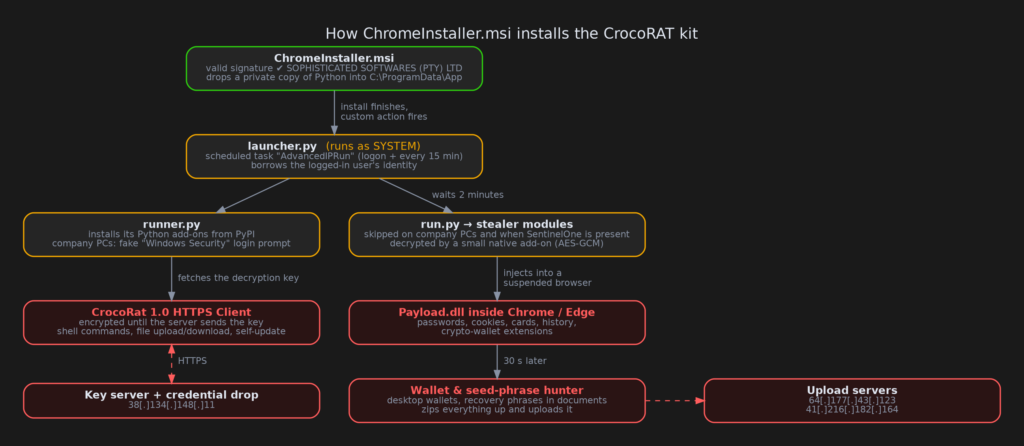
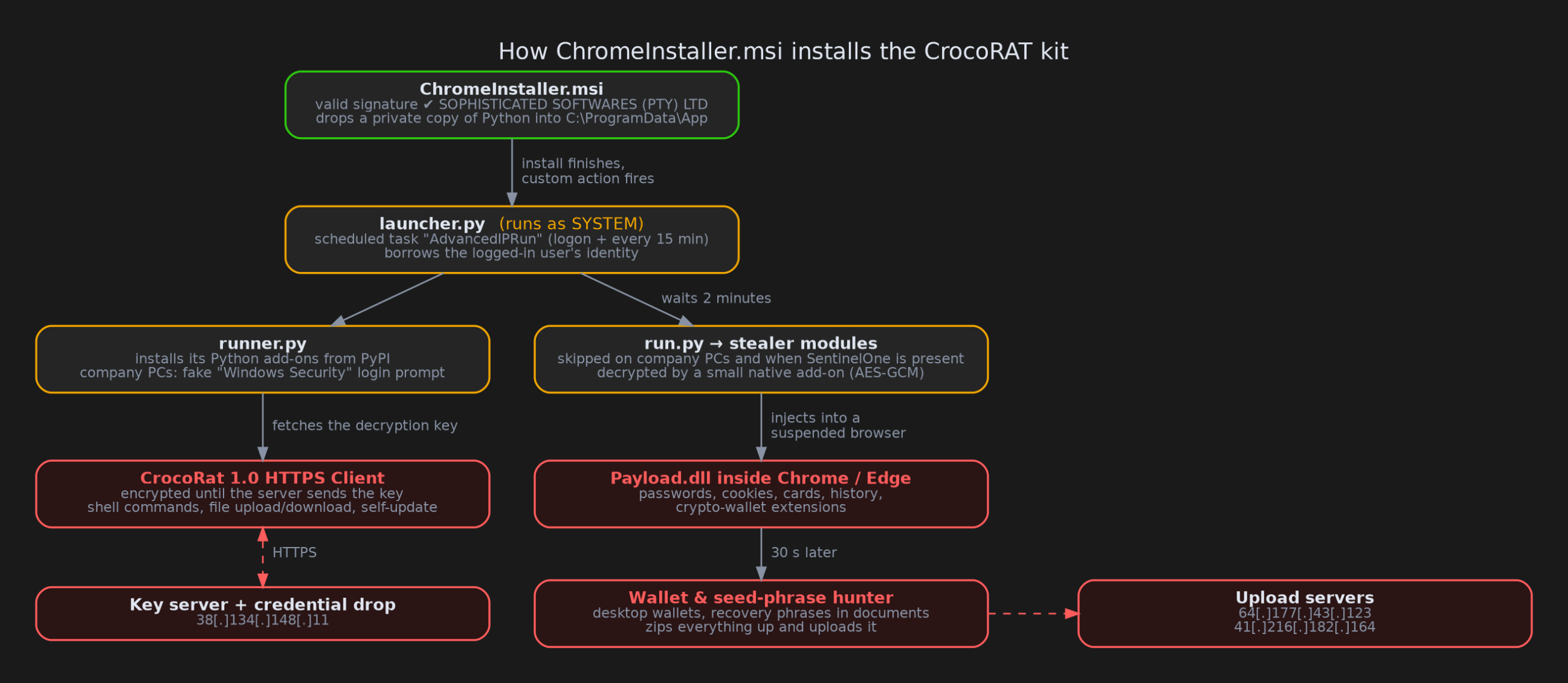
1. The installer runs a script as SYSTEM
At the end of the install, the MSI runs pythonw.exe launcher.py (pythonw is the version of Python that shows no console window). It runs as SYSTEM, the most powerful account on a Windows machine.
From there, the launcher:
- creates a scheduled task called
AdvancedIPRunthat starts the RAT loader every time the user logs on and every 15 minutes after that; - waits for someone to log on, then borrows that user’s identity to start the next stages hidden inside their session (think of it as using the user’s own key card rather than the master key, so the activity looks like it belongs to them);
- on company PCs joined to a domain, starts only the RAT loader;
- on other PCs, waits two minutes and then starts the stealer, unless it finds SentinelOne, an endpoint security product, in which case it skips the stealer.
The task name is a leftover. Earlier builds posed as Advanced IP Scanner, a popular free network tool, and the name made sense then.
2. The RAT loader and the fake login prompt
runner.py first makes sure it has the Python add-ons it needs. They aren’t loaded from the bundled copies, so it downloads them from PyPI, the official Python package site. A PC that can’t reach PyPI never gets past this step, which is also a useful thing to watch for: a Python process in ProgramData installing packages is unusual.
On domain-joined and Entra ID machines (Entra ID, formerly Azure AD, is Microsoft’s cloud sign-in service for organisations), it then shows a real Windows credential dialog titled "Windows Security" with the text "Please confirm your identity to continue". Because it’s the genuine Windows dialog, it looks exactly right. It keeps pulling itself to the front, and it reappears every few seconds until the password typed in is actually correct, which the script checks against Windows itself. The verified username and password are then sent to the operator’s server.
Then it fetches the RAT. The RAT ships inside the installer as an encrypted file, encrypted_client_1.bin, but the key isn’t in the installer. The loader asks the operator’s server for it, decrypts the RAT in memory and starts it. If the server doesn’t answer, the RAT never runs.
3. CrocoRAT itself
Because the October RAT is locked behind that server-side key, we couldn’t read it directly. Two of the July builds, however, shipped the same RAT unencrypted, with the same name and the same start-up function the October loader expects. That’s how we know what it most likely does:
- registers the PC with the operator’s server and checks in for orders, every 10–20 seconds while the operator is active and every 10–20 minutes otherwise;
- runs any command the operator sends;
- sends files from the PC to the operator, and writes files the operator sends;
- changes folder, reports its IP address, updates itself to a new version or shuts down.
That’s a small feature list, but "run any command" plus file transfer is enough to do almost anything on the machine.
4. The browser stealer
On non-company PCs without SentinelOne, run.py decrypts and starts the stealer modules.
The first one starts Chrome and Edge in a suspended state, meaning the browser process exists but is frozen before it does anything. It then copies a DLL (a Windows code library) into the frozen browser and starts it there. This is called process injection: the malicious code runs inside a trusted program, a bit like a stranger slipping into a trusted employee’s uniform, so everything they do looks like the employee’s work.
Running inside the browser matters. Modern Chrome and Edge lock their saved passwords and cookies with a feature called App-Bound Encryption, which only lets the browser itself unlock them. Code injected into the browser gets around that. The DLL, which appears to be built from a public open-source tool for exactly this job, collects from each browser profile:
- saved passwords and cookies (cookies can let an attacker log in as you without a password);
- saved payment cards and IBANs (international bank account numbers);
- browsing history;
- sign-in tokens;
- which of about 90 crypto-wallet browser extensions are installed (MetaMask, Phantom, Rabby, OKX, Keplr, Trust Wallet and others).
5. The wallet hunter and upload
Thirty seconds later, a second module gathers everything up. It also records the computer name, a process list and the screen resolution. There’s a screenshot step, but in this build it’s switched off: the "screenshot" file contains a single letter.
It then looks for desktop crypto wallets: Exodus, Atomic, Electrum, Monero, Wasabi, Ledger Live, Trezor, Coinomi and more. Only if it finds signs of a wallet does it go further, searching the user’s folders and the C: drive for seed phrases. A seed phrase (or recovery phrase) is the list of 12 or 24 words that can rebuild a wallet on any device, so anyone who has it owns the funds. It reads text files, Word documents, PDFs and backups looking for them.
Finally it zips everything up and uploads it, in 10 MB pieces, to one of the operator’s servers. If it found a wallet, a second archive with the wallet files and documents goes to another server. Then it deletes its working files.
Four months, five builds
Hashes from earlier sightings led us to four earlier builds on VirusTotal. They let us watch the kit develop.

- July. Packaged as MSIX (Windows’ newer app-package format) pretending to be Advanced IP Scanner, then "OmniSpeech AI Detect" with Advanced IP Scanner’s icons. The RAT was barely hidden, and the server addresses and campaign names (
PROD3,TESTGROUP) were readable in the code. The packaging was sloppy: one build referred to modules it didn’t include, and another shipped a password-protected zip that its installer may not be able to open (we didn’t recover the password). The July builds already carried an encrypted stealer, but we couldn’t decrypt those older modules to compare them. - August. The RAT became an encrypted file whose key comes from the server. From here on, the RAT’s server address can’t simply be read from the file. This build shipped without the stealer modules.
- October. A switch from MSIX to a classic MSI, the SYSTEM launcher, the fake login prompt and the SentinelOne check. The loader now looks for up to eleven encrypted RAT files, which may mean different payloads for different campaigns or customers, though that’s an inference.
The certificates changed from Finland (Certum) to Sweden (SSL.com, used for both 21 July builds), Czechia (Certum) and South Africa (SSL.com). The three servers used by the July and August builds all sit with the same hosting provider; the October servers are elsewhere. Comments in some of the scripts are in Russian, which is a weak hint about the authors and nothing more.
What we couldn’t confirm
Some honest limits:
- The October RAT stayed encrypted. Its key is only handed out by the operator’s server, and we don’t contact live attacker servers. The description above comes from the unencrypted July clients. The October version carries the same name and start-up function, but it may have changed.
- The stealer may never start from this installer. The check that tells company PCs apart from home PCs runs as SYSTEM during install. For the SYSTEM account, Windows usually reports a different "domain" value than for a normal user. If that’s the case here, the launcher treats every PC as a company PC, starts only the RAT loader and never runs the stealer: a bug on the operator’s side. Settling this needs a test on a real Windows machine. The stealer code is real and looks complete (we read it but didn’t run it), and it could still be started later, for example through the RAT.
- The sandbox ran out of time. In ANY.RUN, the installer was still copying its 1,677 files when the 60-second run ended, so the malicious scripts were on disk but never ran. The resulting "suspicious" score of 52 understates this sample. Existing Triage runs of the July builds didn’t reach the RAT either.
- We don’t know how it’s delivered. Nothing in the file says how victims get it. A "ChromeInstaller" suggests a fake download page or ad, but that’s a guess.
- No attribution. Parts of the browser DLL share code with other stealers, which is common for this kind of tool and doesn’t point to a shared operator. We don’t link CrocoRAT to any known group.
Advice
For everyday users: get Chrome from google.com/chrome, nowhere else, and be wary of "installers" from ads or search results. A valid signature only tells you who paid for a certificate, not whether the program is honest. If a "Windows Security" box suddenly asks for your password right after you install something, don’t type it in; on a work PC, call your IT team.
For defenders:
- Look for
pythonw.exerunning fromC:\ProgramData\App\,C:\ProgramData\advanced-ip-scanner\app\orC:\ProgramData\trservice\. - Look for the scheduled task
AdvancedIPRun, especially on machines that don’t use Advanced IP Scanner. - Alert when a Python process starts
chrome.exeormsedge.exe, and when a Python process outside your developer tooling installs packages from PyPI. - Treat an unexpected credential prompt owned by
pythonw.exeas an incident, and reset any password that may have been typed into it. - Block the IP addresses below.
- If you find this on a home PC, assume browser passwords, cookies and any wallet whose recovery phrase was stored on the machine are compromised: change passwords from a clean device and move funds to a new wallet.
IOCs
Indicators of compromise (IOCs) are the hashes, addresses and other traces you can search for in your own logs.
| Type | Value |
|---|---|
| SHA256 (ChromeInstaller.msi, Oct) | de35dd440f4b55682b015290ce207b944b95ea8d4e2ff23023bcbd025c31d9a2 |
| SHA256 (MSIX, 14 Jul) | 77e4df8122d4fd0bcb7e04623ed479d2c90841ccaa0c6ad9cfc342f9d622860d |
| SHA256 (MSIX, 21 Jul) | 907da6987c3fd2115fd62c8dbcba9837cbdeb8dd00851265c601a93261184343 |
| SHA256 (MSIX, 21 Jul) | 98939c94abb5a8db0dcee4bd319b399f8410ebc837c935b9706751244fdf610c |
| SHA256 (MSIX, 13 Aug) | 7b2d729e6912e4374298cdf92ac5ae5e1160f12ad80e852dabd4f9db75cfbda5 |
| SHA256 (browser DLL) | d928b532f3244c0f9d2b459f39054f0c23850f795dac50a51d3b3a795aa79a0b |
| SHA256 (decryptor add-on) | 8b167cb0fe53c839902bd8936ec384bb9fcfa7c8ae81299d3671394607d7c0b7 |
| SHA256 (launcher.py / runner.py / run.py) | 75108e48f55e715d105059acd81f9db1003b4ed39df5b929a9b5331c3e3b0a64, 1c05972a1ae4f8c4f46468637f1a80fe08784d60e112ff6740bad5f3a35817dc, 9dd26653fdcbcf44889471c3d6f5e30b679abbc77f0cf93a78f88e1d3efbc8ee |
| RAT key server + credential drop (Oct) | 38.134.148[.]11 |
| Stolen-data upload (Oct) | 64.177.43[.]123, 41.216.182[.]164 |
| RAT key server (Aug) | 103.56.84[.]221 |
| RAT servers (Jul) | 132.243.209[.]131, 23.26.156[.]59 |
| Scheduled task | \AdvancedIPRun |
| Install folders | C:\ProgramData\App\, C:\ProgramData\advanced-ip-scanner\, C:\ProgramData\trservice\ |
| Fake prompt | "Windows Security" / "Please confirm your identity to continue", owned by pythonw.exe |
| Certificates | SOPHISTICATED SOFTWARES (PTY) LTD, SSL.com 473d28e38b9bc50abe922c40c214810c; RUBIN – CZ s.r.o., Certum 51026bebc877e3fd0a00f6670c780b5a; JB Alpha Digital AB, SSL.com 2bff385a538994844803b05524bffbb0; 1090 Fishing Mapp Oy, Certum 38415a82bcded4b2a8a4d8394f7ebb55 |
| Marker / named pipe | .identity_verified file after a successful phish; pipe named <browser>-<uuid> between Python and the injected browser DLL |
| Sandbox | ANY.RUN b12879d3-63c6-4d2e-bcd4-f5597e13b966 |
Wrapping up
CrocoRAT isn’t sophisticated, but it’s being actively developed: in four months it went from a readable script with its server address in plain sight to an encrypted, server-keyed RAT with a credential phisher, and its signing certificate kept changing, from four different companies so far. That steady rotation of legitimate-looking signers is exactly why a valid signature shouldn’t be the reason you trust an installer.
Hat tip to MalwareHunterTeam for spotting this one.
Thanks for reading, and stay safe.