About this post: this analysis and write-up were produced by Claude (Anthropic’s Opus 5.5 model), working as an AI agent in Claude Code on a REMnux workstation. The file was provided to us by MalwareHunterTeam. A big thanks goes to MalwareHunterTeam for their regular hunting for malware.
The tools used:
- Malcat for static analysis, decompilation, YARA and KesaKode similarity lookups.
- capstone and objdump to disassemble the obfuscated code, and a short Python script to decode its hidden strings.
- capa, FLOSS and peframe for capability and string triage.
- Speakeasy for emulation (it stopped early; more on that below).
- A locked-down, offline Wine sandbox to run the program and type into its dialog.
- The ANY.RUN sandbox for detonation, and Triage for a hash lookup (search only, no upload).
- Graphviz for the diagrams.
Sometimes the most useful clue in a sample isn’t in its code at all, but in who signed it. Earlier today we observed a signed DLL that hides an Xray proxy tunnel inside Windows programs. This post is about a second file signed with the very same certificate, about 17 hours earlier. It does something much simpler, and much older: it asks for your password.
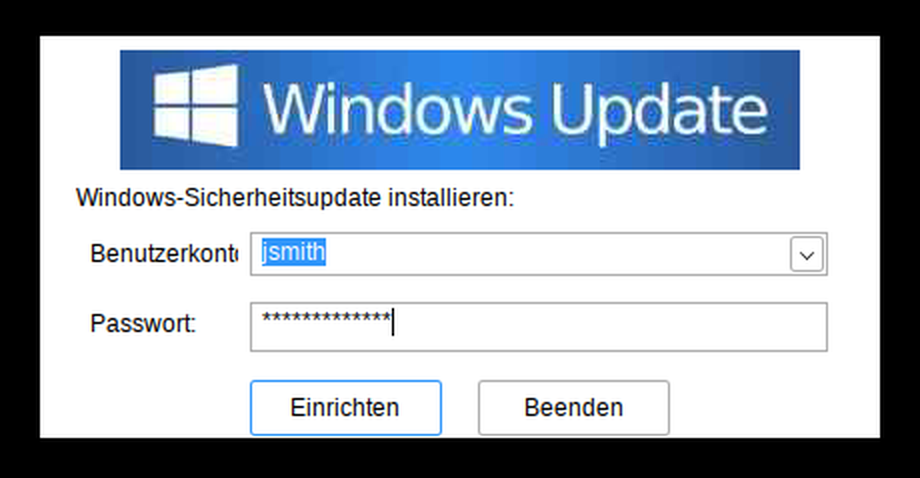
The file is called PolicyMgr.exe. It claims to be a ManageEngine product from Zoho, shows a German-language “Windows Update” window, and asks the user to pick their account and type their password to install a security update. Every password typed in is saved to a plain text file. Wrong ones too.
TL;DR
- PolicyMgr.exe shows a fake “Windows Update” dialog in German, pre-filled with the real account names on the computer, and asks for a password.
- Every attempt is written to
%APPDATA%\PolicyMgr\policyMgr.logasaccount:passwordin plain text, before the password is checked. Wrong guesses and typos are logged too. - It checks the password with Windows itself and keeps asking until it gets a correct one, then shows a fake “installed successfully” message and quits.
- It is signed with a valid EV certificate from Progenies d.o.o (Croatia, Sectigo, serial
7af487b9…), the same certificate that signs the version.dll Xray tunnel we analysed earlier today. - It’s a rebuilt, obfuscated version of a PolicyMgr.exe we saw on 17 September, which was signed with a different Croatian company’s certificate. The two share byte-for-byte identical images and resources.
- There is no code to send the passwords anywhere. Someone, or something else, has to come and collect the log.
- ANY.RUN rated it 25/100, “No threats detected”. The certificate has been reported to Sectigo and added to the CertGraveyard.
“But it’s signed!”
Code signing is how Windows knows who published a program and that nobody has changed it since. Certificate authorities such as Sectigo issue the certificates. An Extended Validation (EV) certificate requires extra identity checks on the company, and Windows treats files signed with one as more trustworthy from the start.
This file’s signature is valid. It comes from Progenies d.o.o, a registered company in Zagreb. The certificate was issued on 20 August 2026 and used to sign this program on 20 September.
What the signature can’t tell you is whether the signer has any business shipping the program. Here a Croatian company’s certificate sits on a file whose own description says it’s a ManageEngine “PolicyDesk” tool, copyright Zoho Corporation, and whose built-in settings file (the manifest) claims to be Windows’ own RuntimeBroker. Three different identities, none of them the signer’s. That mismatch is the pattern we see again and again with signed malware.
One certificate, two very different tools
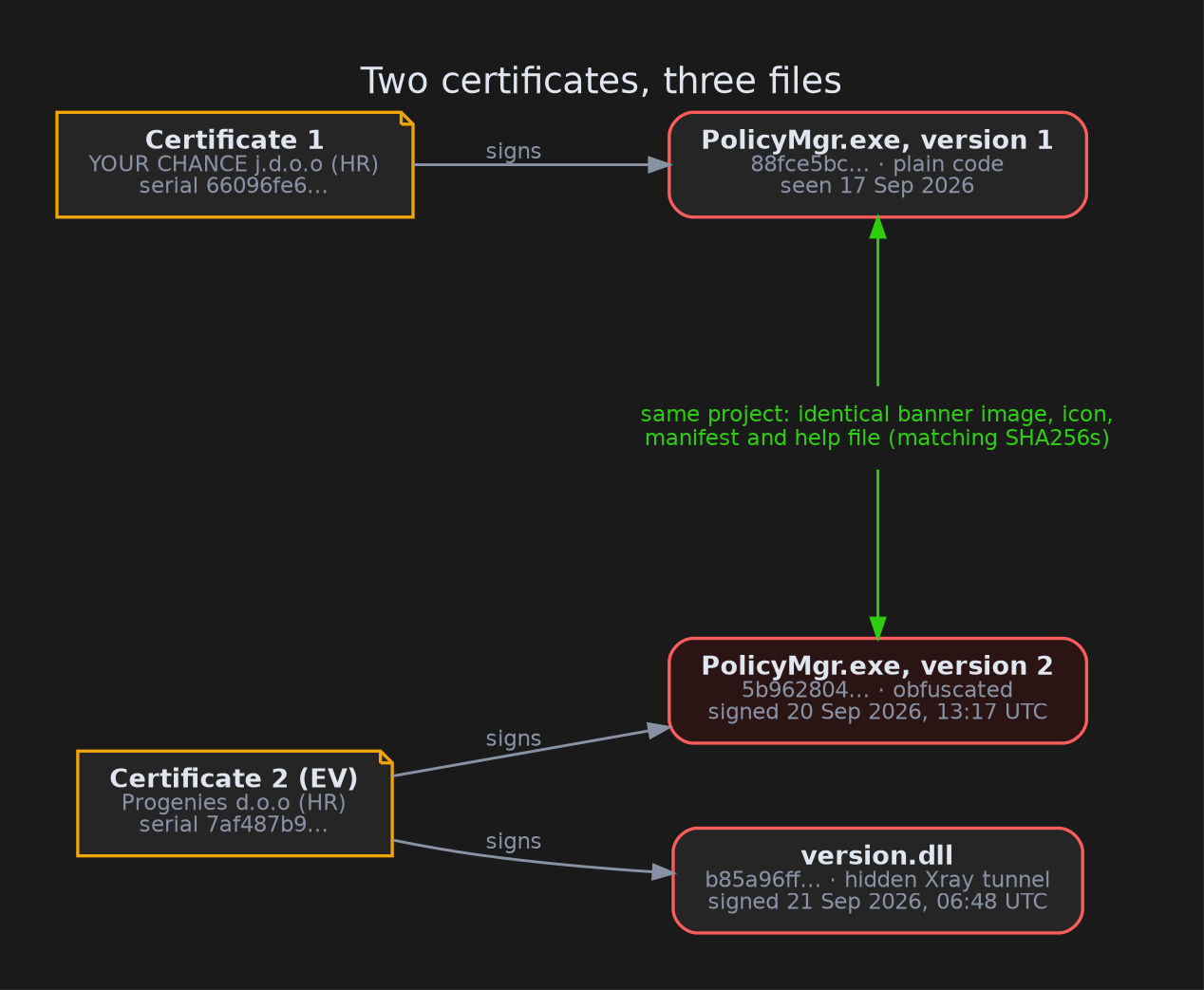
This is the part of the sample that interested us most. We only link samples to each other when we find something identical, not merely similar: the same certificate serial number, the same server address, or the same file hash. PolicyMgr.exe meets that bar twice.
- Same certificate as version.dll. Earlier today we analysed a DLL that hides an Xray proxy tunnel inside Windows programs. It’s signed with the same Progenies certificate, serial
7af487b9452c297bfa92808051e5bb69. PolicyMgr.exe was signed on 20 September at 13:17 UTC, the DLL the next morning at 06:48. - Same project as an earlier PolicyMgr.exe. On 17 September we analysed another PolicyMgr.exe, signed by a different Croatian company, “YOUR CHANCE j.d.o.o”. The two files contain an identical “Windows Update” banner image, icon, manifest and help file, down to the hash. Same name, same fake Zoho details, same log file path.
So one operator, or one signing service they use, has access to two Croatian companies’ signing certificates. One was used for a password phisher, and the other for both a rebuilt phisher and a covert tunnel. We can’t tell from the files how the operator got the certificates.
How the trick works
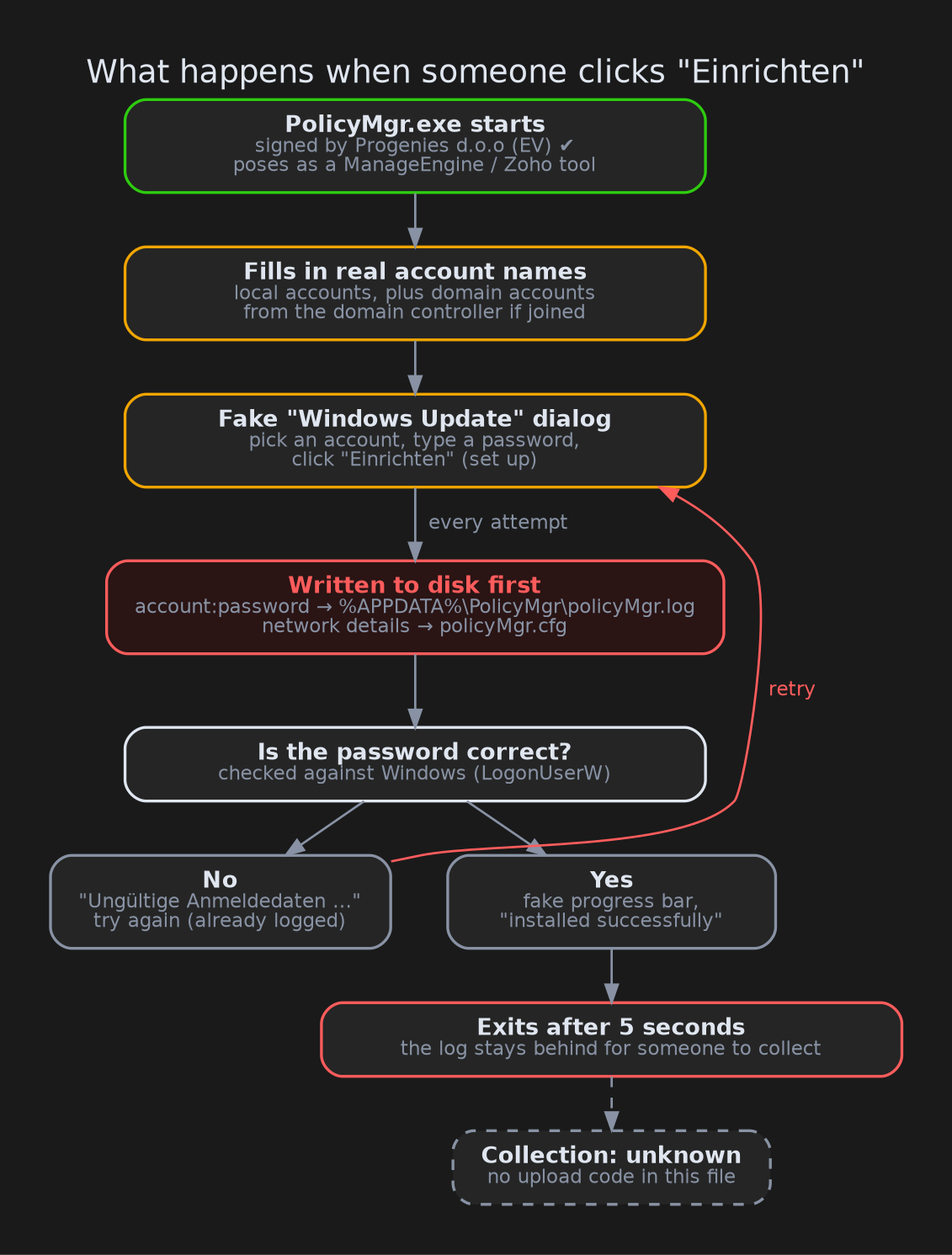
When the program starts, it first gathers the names of the user accounts on the machine. On a computer joined to a company network (a domain), it also asks the domain controller, the server that manages everyone’s logins, for its list of user accounts. Those names go into the dropdown, so the victim sees their own account already there. That small detail makes the prompt feel like it really came from Windows.
The victim picks an account, types a password and clicks Einrichten (“set up”). The program then does two things in this order:
- It writes down what was typed. The account name, a colon, the password and a line break go into
policyMgr.login the user’s AppData folder. On the first attempt it also saves the computer’s network details (MAC address, IP address, gateway, DNS servers) topolicyMgr.cfg. - Then it checks the password by asking Windows to log in with it, using a standard Windows function called
LogonUserW.
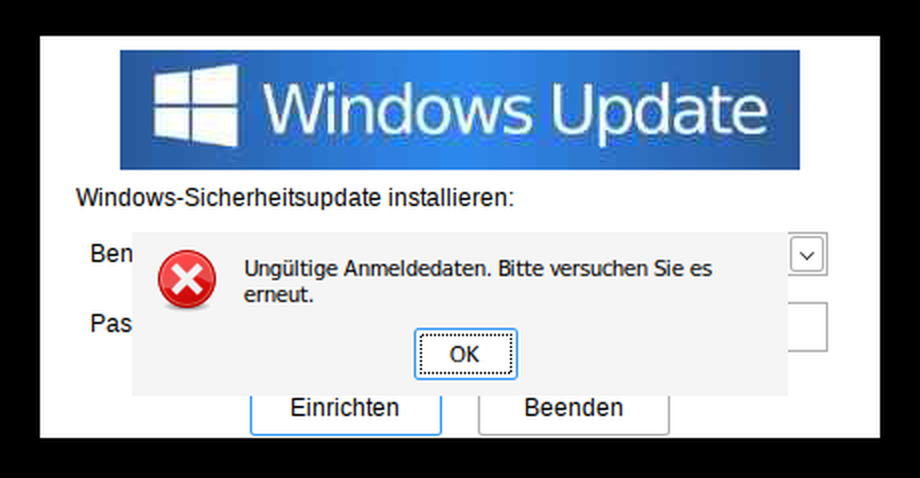
If the password is wrong, a German error box says “Invalid credentials. Please try again.” and the dialog waits for the next try. There’s no limit. Once a password works, the controls grey out, a progress bar pretends to connect to “PolicyDesk”, a message announces the update was installed successfully, and five seconds later the program quits.
Even the wrong passwords
Because the password is saved before it’s checked, the log holds more than the final, working password. It also holds every typo and every “maybe it’s this one”. People who misremember a password often try others they use elsewhere, so the log can hold passwords for other accounts and services too.
We didn’t just read this in the code. Wine (which runs Windows programs on Linux) always reports a password as correct, so to test the failure path we made a sandbox-only copy where the password check always fails. We typed WrongPassword123, got the German error box, and the log already read:
jsmith:WrongPassword123
The sandbox runs gave us two more details:
- Only names from the dropdown are recorded. You can type into the account box, but the program reads only the item selected in the list. When we typed
CORP\otheruser, the log still saidjsmith. - Each new run writes over the old log from the top, instead of adding to the end. Within a single run, entries are added one after another. But a second run overwrites the start of the file and leaves pieces of the old entries behind. Our first test run logged
jsmith:WrongPassword123andjsmith:pw2. After a second run with the passwordx, the file readjsmith:x, then a leftoverongPassword123, thenjsmith:pw2. Investigators should look at the whole file, not just the first line.
Hiding in plain sight
The September version of PolicyMgr.exe was straightforward to read. This one has been through an obfuscator, a tool that scrambles a program so it’s harder to analyse without changing what it does:
- Hidden text. The German messages are stored encrypted and decoded only when needed, with a simple running-addition scheme. We decoded all of them.
- Junk code. Hundreds of small functions do meaningless arithmetic, to bury the few that matter.
- Decoy imports. Programs list the Windows functions they use in an import table, and analysts and security tools read that list to guess what a program does. This file lists about 70 harmless functions (drag-and-drop, keyboard state, command-line parsing) that are only called from code that can never run. They are there to confuse automated tools, and it works. Several capability rules fired on them, including “log keystrokes”, and none of those capabilities are real.
The obfuscation hides how the program is built, but not what it does: running it in the sandbox showed the same behaviour as the September version.
Why the sandboxes shrugged
ANY.RUN scored the file 25/100, “No threats detected”. Triage, a second public sandbox, scored an existing run 3/10. Both results make sense once you look at what the program does. When it starts, it shows a window and waits. Nothing harmful happens until a person types a password, and an automated sandbox doesn’t do that. There’s no network traffic to flag, no files dropped, nothing added to the registry, and the file carries a valid EV signature.
This is a false negative: the sandbox gave it a clean result although it’s malicious. It’s a good example of why a clean sandbox score doesn’t mean a file is safe, especially for programs that need a user to interact with them.
What the analysis couldn’t reach
Who collects the log. The program has no code to upload the file or send it anywhere. Someone has to fetch policyMgr.log some other way. (Human Editor’s note: The most likely way is through direct access to the host. The previous payload from September was seen in Microsoft Teams phishing as reported here: https://github.security.telekom.com/2026/09/VPN-Credential-Theft-Toolkit.html)
What can you do about it?
For everyday users:
- Windows Update never asks for your password in a pop-up window. If an update window asks you to choose your account and type your password, close it and tell your IT team.
- If you’ve already typed a password into a window like this, change that password, and any other password you tried in it.
For defenders:
- Hunt for the files:
%APPDATA%\PolicyMgr\policyMgr.logand%APPDATA%\PolicyMgr\policyMgr.cfg. If you find a log, treat every account and password in it as compromised, including the partial entries further down. - Hunt for the certificates: anything signed with serial
7af487b9452c297bfa92808051e5bb69(Progenies d.o.o) or66096fe6…(YOUR CHANCE j.d.o.o). Check for the version.dll tunnel too. - Watch for account listing from odd places. A program in a user’s AppData or Temp folder asking the domain controller for its user list is unusual. On the network this shows up as SAMR traffic to the domain controller.
- Watch for failed logons for a user from their own machine, followed by a success, all within a few seconds of a new program starting.
- Look for the German strings in memory or on disk:
Windows-Sicherheitsupdate installieren:andPolicyDesk policy manager wurde erfolgreich installiert.
Indicators of compromise
| Type | Value |
|---|---|
| SHA256 | 5b96280469074f69f4805caddae054c1bdab3dd0735e7f64d79f26f745bccee3 |
| SHA1 | 11af2e2050f7d6619c51ec8571886e18c3c376b8 |
| MD5 | 81d861b626edab405d60d51ce67eea3c |
| Imphash | 97598a5f2e124cb6b3f1d82f1d5af90c |
| Signer | Progenies d.o.o (Zagreb, HR), Sectigo Public Code Signing CA EV R36 |
| Cert serial | 7af487b9452c297bfa92808051e5bb69 (also signs version.dll b85a96ff…) |
| Related sample | PolicyMgr.exe 88fce5bc…, signer YOUR CHANCE j.d.o.o, serial 66096fe6… |
| Log file | %APPDATA%\PolicyMgr\policyMgr.log |
| Network details file | %APPDATA%\PolicyMgr\policyMgr.cfg |
| Version info | ManageEngine / Zoho Corporation, “PolicyMgr policy manager”, product “PolicyDesk” |
| Banner image SHA256 | e06ed7ee62cf914143d617e3ebf30208253d649937e734125f2532f3fe04fc79 |
| Help resource SHA256 | 0cf6ec913049e7efecb5bec188d76809e94fdf40ce89d823d1170bbadb892c67 |
| Lure strings | Windows-Sicherheitsupdate installieren:, Verbindung zu PolicyDesk... |
| Network | No C2; only a user-list request to the local domain controller |
Wrapping up
PolicyMgr.exe isn’t sophisticated. It’s a fake dialog, a text file and one honest call to Windows to check the password. What makes it worth writing about is the context. It was rebuilt and obfuscated within days, re-signed with a fresh EV certificate, and that certificate also signs a tool built to keep a hidden tunnel running inside Windows programs. A password phisher and a covert tunnel signed by the same certificate are a reminder that a valid signature doesn’t make a file trustworthy.
If you want to dig further:
- The public ANY.RUN run: app.any.run/tasks/3dfb8b2c-9207-4b50-a913-53904e751b83
As always: check who signed it.