About this post: Thanks to MalwareHunterTeam for flagging this sample. This analysis and write-up were produced by Claude (Opus 5.5), working as an agent in Claude Code on a REMnux analysis VM. Tools used: Malcat, capstone, Ghidra (headless), FLOSS, capa, osslsigncode and ANY.RUN.
TL;DR
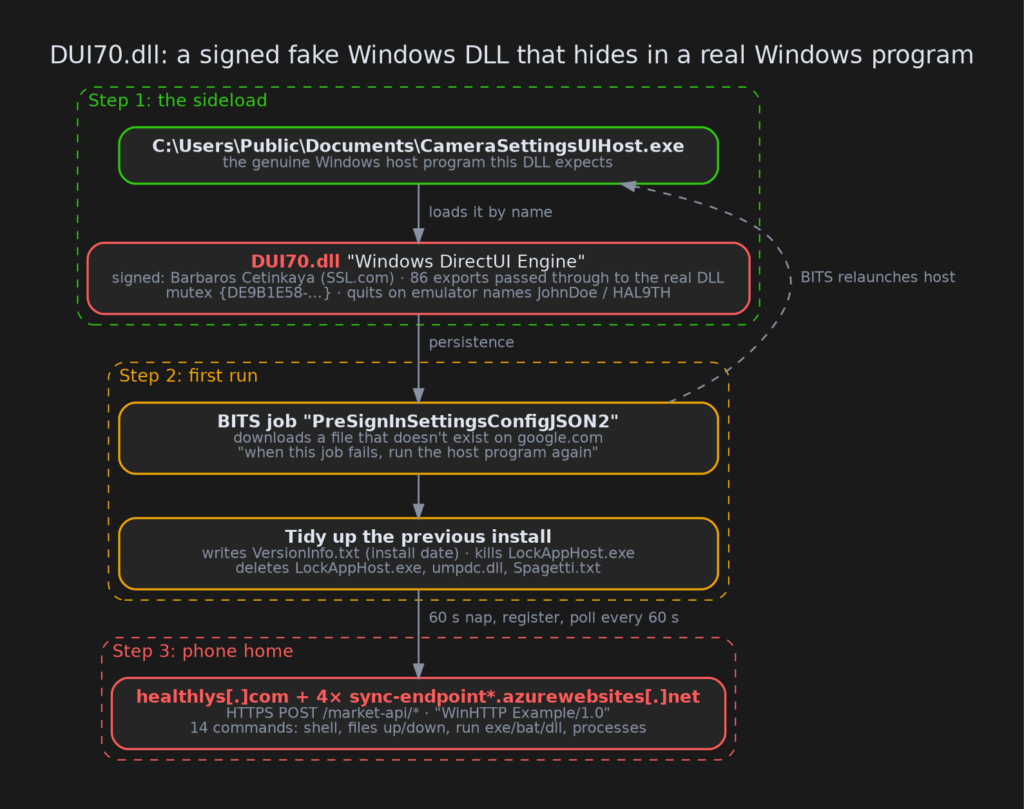
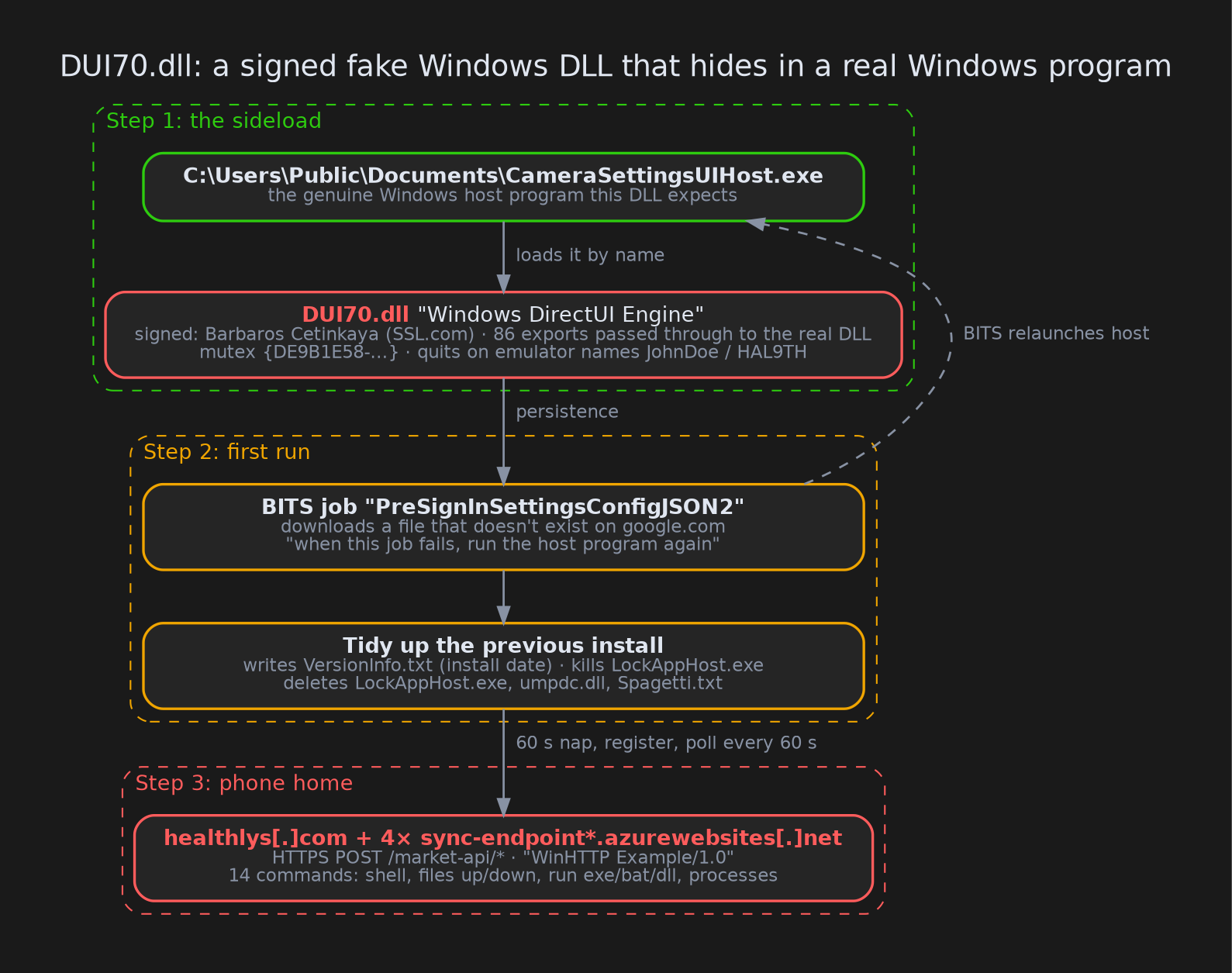
DUI70.dll claims to be Microsoft’s "Windows DirectUI Engine," but it was signed with a code-signing certificate issued to an individual, Barbaros Cetinkaya. Its job is to be loaded by a genuine Windows program sitting in a public folder. From there it quietly sets up a Windows download job (BITS) that is designed to fail, because the file it asks for doesn’t exist. Every time BITS hits that failure, it relaunches the host program, and the DLL with it. Once it has settled in, the DLL becomes a remote-control backdoor that talks to the attacker over normal-looking HTTPS.
- Disguise: Microsoft version info, and every legitimate DirectUI function passed through to the real DLL, so the host program keeps working.
- Signature: SSL.com certificate for "Barbaros Cetinkaya" (serial
237DD9C69CE233B0CF24AA24AA803DA4), valid and not revoked at the time of writing. - Persistence: a BITS job named
PreSignInSettingsConfigJSON2, borrowing the name of a job OneDrive really creates, with a "run this when done" command line. - Control: 14 commands, including a remote shell, file upload and download, running programs or DLLs, process listing and killing.
- C2:
healthlys[.]complus foursync-endpoint*.azurewebsites[.]netfallbacks. All five names were dead (NXDOMAIN) when we checked.
But it’s signed!
Code signing is meant to tell you who published a file. Here the "who" is a private individual in Germany, while the file’s own properties say "Microsoft Corporation." Real Windows DLLs are signed by Microsoft, never by a person.
We see this mismatch constantly in signed malware: a freshly issued certificate used to sign something pretending to be someone else’s product. Windows doesn’t stop a signed DLL from loading just because the names don’t line up, which is exactly what the attacker counts on. We’ve reported the certificate to the CA and added it to the CertGraveyard.
Hiding inside a real program
DLL sideloading is a bit like slipping a forged page into someone else’s binder. Windows programs load helper DLLs by name, and they often look in their own folder first. If you copy a genuine program into a folder and put a malicious DLL with the right name next to it, the genuine program loads the malicious one.
This DLL expects to live in C:\Users\Public\Documents\ next to CameraSettingsUIHost.exe, a genuine Windows program; that path is hard-coded in the malware. To keep the host program working, all 86 of its functions are simple forwarding signs that point to the real C:\Windows\System32\dui70.dll. The malicious code runs the moment the DLL is loaded, before any of those functions are used.
Before doing anything else it makes sure only one copy is running, using a mutex (a system-wide "occupied" sign) named {DE9B1E58-4F54-4DD1-A750-037D38D27F65}. It also quits if the user is named JohnDoe or the computer HAL9TH, names used by Windows Defender’s built-in emulator. Every string and every Windows function name inside the DLL is scrambled with simple XOR tricks so a quick look reveals nothing.
Asking Windows to babysit it
BITS (Background Intelligent Transfer Service) is the Windows service that downloads updates quietly in the background. A BITS job can also carry a "notify command line": a program Windows runs when the job finishes or fails.
On first run, the DLL creates a BITS job called PreSignInSettingsConfigJSON2. OneDrive uses a very similar job name, PreSignInSettingsConfigJSON, so anyone glancing at the BITS queue might shrug. The job asks for https://google.com/PreSignInSettingsConfigJSON2.json, which doesn’t exist, so the download always fails. When it fails, Windows dutifully runs the notify command, which is the host program, which loads the DLL again.
A notify command line has two parts: a program to run and an optional string of arguments. In this case it’s just the host program with no arguments:
| Setting | Value |
|---|---|
| Program | C:\Users\Public\Documents\CameraSettingsUIHost.exe |
| Arguments | none |
| Runs when | the job finishes, fails or is changed |
On first run the DLL simply fills in the path of whichever program loaded it. When it rebuilds the job later, it uses the hard-coded path above. Legitimate BITS jobs rarely set a notify command line, so one that points at a program in C:\Users\Public stands out.
The DLL never tries to fix the failed job. Later launches leave it alone, and a second copy simply exits if one is already running. The broken job is the persistence. As we understand BITS, it checks failed jobs again whenever the service starts, so the notify command should also run after a reboot. That turns a failed download into a run-at-startup mechanism without a Run key, scheduled task or service. Our sandbox run only showed the first relaunch, so we haven’t watched this happen across a restart.
In the public ANY.RUN run we saw both halves of this: the BITS service checked that Google URL, and the BITS service started the host program (in that test, rundll32.exe) on its own. The DLL also writes the install date to C:\Users\Public\Documents\VersionInfo.txt. Thirty days later it cancels and recreates the job, which keeps it from expiring.
Cleaning up after itself
The first run also does some housekeeping that tells us this isn’t the first thing installed on a victim machine. It terminates any running LockAppHost.exe, then deletes LockAppHost.exe, umpdc.dll and Spagetti.txt from the same Public Documents folder.
That pattern looks like an earlier sideload pair (a genuine program plus a malicious umpdc.dll) being replaced by this one. It could be an earlier stage or simply an older version of the same toolkit. We don’t have those files, so we can’t say more.
Phoning home
After a 60-second nap, the DLL registers with its server over HTTPS. It sends an ID made from its own file’s timestamp, the user name, and the machine’s IP addresses. It then asks for work every 60 seconds.
Everything goes to paths that look like an online shop’s API, such as /market-api/consumers and /market-api/products/batch, using the telltale user agent WinHTTP Example/1.0, copied straight from Microsoft’s sample code. The messages themselves are just hex-encoded text inside the HTTPS connection.
The first server is healthlys[.]com. If that fails, it rotates through four Azure App Service names, sync-endpoint, sync-endpoint-1, -2 and -3 on azurewebsites[.]net. Using Azure’s own domain makes the traffic blend in with legitimate cloud apps.
What the attacker can do
The command list is a classic remote-access toolkit:
| Command | What it does |
|---|---|
| 1, 2 | Report computer name / user name |
| 3, 5 | List a folder |
| 4 | Download a file from the server onto the PC |
| 6 | Delete a file |
| 7 | Upload (steal) a file from the PC |
| 8 | Run a file: .exe directly, .bat/.cmd through cmd.exe /C, .dll by loading it |
| 9 | List drives |
| 10 | Change how often it checks in |
| 11 | Run a shell command and send back the output |
| 12 | List running processes |
| 13 | Kill a process |
| 14 | Move or rename a file |
Commands 4 and 8 together mean the operator can push and launch anything they like, so this backdoor is also a door for whatever comes next.
What we couldn’t see
We never saw this backdoor talk to its server. In the sandbox, rundll32 unloaded the DLL while its background thread was still running, roughly ten seconds in, and that crashed the process. The DLL also waits a full minute before its first call home, longer than the sandbox ran.
When we checked, none of the five server names resolved any more, so we don’t know what the operators sent to victims. We also don’t have the earlier umpdc.dll stage that this DLL cleans up after, and we found no public reporting that ties this toolkit to a known family.
Advice
For regular users:
- A Windows component in
C:\Users\Public\Documents(or anywhere outsideC:\Windows) is a red flag. - A file that says "Microsoft" but is signed by a person’s name is not from Microsoft.
For defenders:
- List BITS jobs for all users (
bitsadmin /list /allusers /verboseorGet-BitsTransfer -AllUsers). Look forPreSignInSettingsConfigJSON2, or any job with a notify command line pointing outsideC:\Windows. - Hunt for
DUI70.dll,umpdc.dll,CameraSettingsUIHost.exe,LockAppHost.exe,VersionInfo.txtorSpagetti.txtinC:\Users\Public\Documents. - Flag HTTPS POSTs with the user agent
WinHTTP Example/1.0to/market-api/paths. - Block or alert on the serial
237DD9C69CE233B0CF24AA24AA803DA4.
IOCs
| Type | Indicator |
|---|---|
| SHA256 (DUI70.dll) | adf0957559b8914b125ef263959f2882481df3b5dd0472888bf07e4e455a5d34 |
| Signer | Barbaros Cetinkaya (SSL.com), serial 237DD9C69CE233B0CF24AA24AA803DA4 |
| C2 | healthlys[.]com |
| C2 | sync-endpoint[.]azurewebsites[.]net |
| C2 | sync-endpoint-1[.]azurewebsites[.]net |
| C2 | sync-endpoint-2[.]azurewebsites[.]net |
| C2 | sync-endpoint-3[.]azurewebsites[.]net |
| URI paths | /market-api/consumers, /market-api/products/batch, /market-api/media/c, /market-api/media/d, /market-api/categories, /market-api/blogs |
| User-Agent | WinHTTP Example/1.0 |
| BITS job | PreSignInSettingsConfigJSON2 |
| Mutex | {DE9B1E58-4F54-4DD1-A750-037D38D27F65} |
| Files | C:\Users\Public\Documents\DUI70.dll, C:\Users\Public\Documents\VersionInfo.txt, C:\Users\Public\Downloads\PreSignInSettingsConfigJSON2.json |
Wrapping up
Nothing here is exotic: a forwarding DLL, a borrowed Windows program, a BITS job and a shop-themed web API. Put together, though, they make a backdoor that looks like Microsoft, runs inside a real Windows binary, and is restarted by a Windows service. If you have more samples signed by this certificate, or the umpdc.dll stage, we’d love to see them. As always, check your BITS queue.