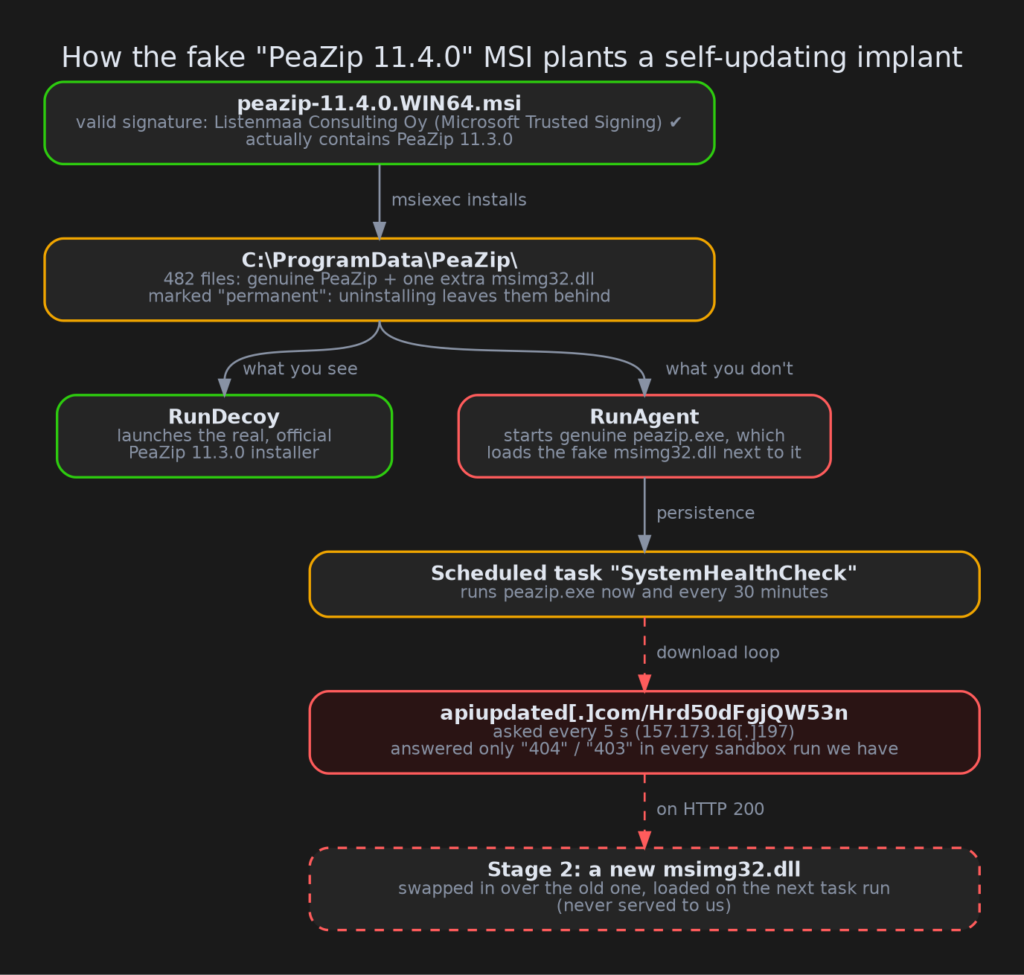
About this post: Thanks to MalwareHunterTeam for flagging this new payload. This analysis and write-up were produced by Claude (Opus 5.5), working as an agent in Claude Code on a REMnux analysis VM. Tools used: Malcat, msitools, Binary Refinery, osslsigncode, Python (pefile, capstone), FLOSS, capa, a sandboxed Wine setup, tshark, ANY.RUN and Triage.
TL;DR
peazip-11.4.0.WIN64.msi presents itself as an installer for PeaZip, the popular free archive manager. It carries a valid code-signing certificate. When you run it, it does start the real PeaZip setup, but in the background it also plants a fake system DLL next to the genuine peazip.exe. That DLL registers a scheduled task, then keeps asking a server for a "new version" of itself, which it would swap in and run every 30 minutes.
- Lure: a Windows Installer (MSI) package claiming to be PeaZip 11.4.0, built three days after the real 11.4.0 release. PeaZip doesn’t publish MSI packages at all, and this one actually contains 11.3.0.
- Trick: DLL sideloading. A fake
msimg32.dllsits next to the genuine, unmodifiedpeazip.exe. - Persistence: a scheduled task called
SystemHealthCheck. The installed files are marked "permanent", so uninstalling the MSI leaves them behind. - C2:
hxxps[://]apiupdated[.]com/Hrd50dFgjQW53n(157[.]173[.]16[.]197), polled every five seconds. - Signer: Listenmaa Consulting Oy, via Microsoft Trusted Signing, serial
330008A0F38650BE3ECB9900AC00000008A0F3.
But it’s signed!
Code signing tells Windows who published a file. A valid signature means the file hasn’t been changed since it was signed, and that someone (here Microsoft’s Trusted Signing service) verified the identity of the signer. It says nothing about whether the signer is honest, or whether they have anything to do with the product.
PeaZip is written by Giorgio Tani in Italy. This package is signed by "Listenmaa Consulting Oy", a Finnish company name, with a certificate valid from 18 to 21 October 2026. It was used on 20 October. We have reported more than 2,500 signed malware samples, and a fresh certificate in one company’s name signing another company’s product is a pattern we see again and again. The certificate has been reported to Microsoft and added to the CertGraveyard.
473 real files and one fake
An MSI is essentially a small database plus a compressed archive of files, and both can be opened without running anything. Of the 482 files inside, 473 are byte-for-byte identical to the ones in the official PeaZip 11.3.0 installer. So is the copy of that installer bundled in the package: its hash matches the one published on PeaZip’s GitHub release page.
The odd ones out are a handful of leftovers from a real installation (an uninstaller and four shortcuts), and one file that has no business being there: msimg32.dll.
The installer’s custom actions, its little "run this program after copying files" steps, don’t even try to hide. They’re called RunAgent and RunDecoy:
RunDecoystarts the genuine PeaZip installer, so you see a perfectly normal setup wizard.RunAgentquietly starts the genuinepeazip.exefromC:\ProgramData\PeaZip\.
The real program, the wrong DLL
msimg32.dll is a small Windows library for drawing gradients and transparent images. PeaZip uses one function from it, GradientFill. When a program asks for a DLL, Windows checks the program’s own folder before System32. Put a file with the right name next to the program, and that file is loaded instead. This is called DLL sideloading. It’s like leaving a fake letter in someone’s own mailbox: they open it without a second thought because it arrived where they expect.
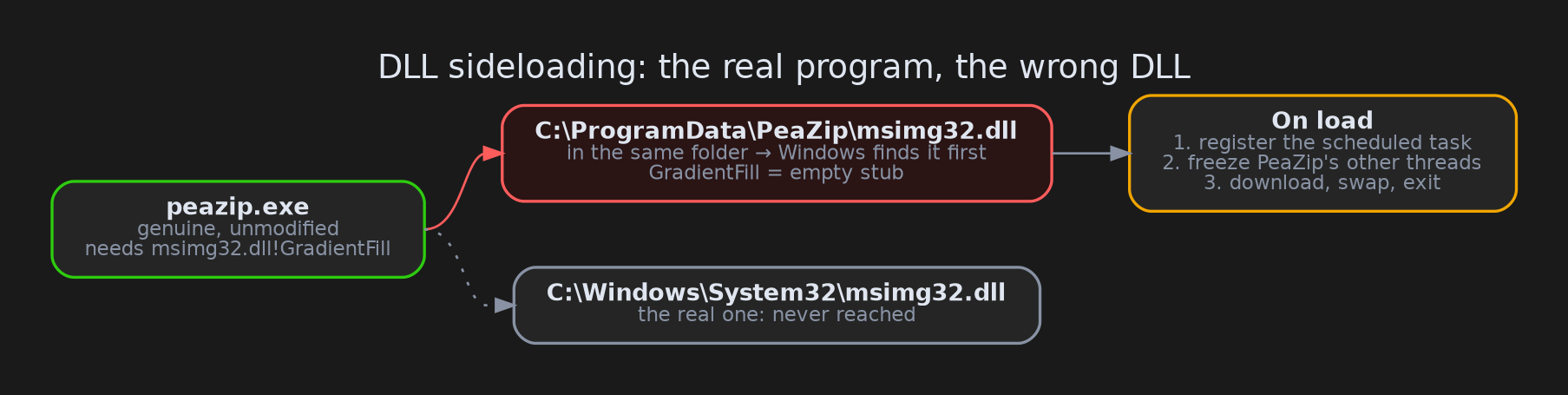
The fake DLL offers the functions PeaZip expects, but they do nothing. The real work happens the moment it loads. It hides its text strings with a small homemade cipher and looks up the Windows functions it needs by hash instead of by name, so a quick string scan shows very little. Once decoded, the strings tell the story: a URL, a user agent self_update/1.0, a filename thumbs.db, and a task called SystemHealthCheck.
A task that pretends to keep you healthy
On load, the DLL creates a scheduled task named SystemHealthCheck, described as "System health maintenance task." Its trigger is called SignatureUpdateTrigger, as if it were antivirus housekeeping. It starts immediately, then runs C:\ProgramData\PeaZip\peazip.exe every 30 minutes, forever, with no time limit and no battery restrictions.
Every time PeaZip starts, the fake DLL is loaded again. The task is the engine; the DLL is the driver.
Update yourself, then disappear
Next, the DLL freezes all of PeaZip’s other threads, so no PeaZip window appears. Then it starts asking hxxps[://]apiupdated[.]com/Hrd50dFgjQW53n for a file, every five seconds. It even switches off part of the usual HTTPS certificate checking. When the server finally answers with "200 OK":
- The download is saved as
thumbs.db, a name most people associate with harmless Windows thumbnail caches. - The running
msimg32.dllis moved out of the way into the temp folder. thumbs.dbis renamed tomsimg32.dll.- The process kills itself.
At the next task run, PeaZip loads the new DLL. In other words, this first file is a self-updater: its job is to replace itself with whatever the operator wants to run next. Because PeaZip needs that GradientFill function to start at all, the next stage almost certainly has to be another fake msimg32.dll, a new build of the same implant.
There is no check on what the server sends back. Any "200 OK" page would be renamed to a DLL, which would break the implant. That’s a small gift to anyone who takes over the domain.
Uninstalling doesn’t help
Each file in an MSI belongs to a component, and components can be marked as permanent: Windows Installer leaves them behind when the product is removed. Here, 481 of 483 components are permanent, including the fake DLL and the PeaZip copy that loads it. If you uninstall "PeaZip" from Settings, the folder, the DLL and the scheduled task stay.
The same factory as a fake PuTTY
We’d seen this installer’s skeleton before. A fake PuTTY MSI we analysed a day earlier has exactly the same structure:
RunAgent/RunDecoycustom actions with identical settings- components named
CmpCleanupandCmpDecoy - a registry value
Decoy=1 - the same permanent-components pattern
- a leftover
Software\NodeJSregistry key, which makes sense for that Node.js-based PuTTY loader and none at all for PeaZip
The signer, server and payload are all different, though, and the PeaZip build carries a bot-like tag, owen_bot_release_peazip_peazip. We think both came out of the same MSI-building kit, possibly a service used by more than one operator.
The four shortcuts also gave away the builder’s machine: a VirtualBox VM called desktop-f5u0tiv where PeaZip was installed on 16 October.
What we couldn’t see
We never got stage 2. In every sandbox run available to us (two Triage runs and one ANY.RUN run on 23 October), the server answered the first five requests from each sandbox with "404 Not Found" and everything after that with "403 Forbidden". The request contains no victim ID, so the server can only decide based on things like the visitor’s IP address. Either nothing was staged yet, or the server only delivers to visitors it likes. We didn’t contact the server ourselves.
Advice
For regular users:
- Download PeaZip only from its official site or GitHub releases. PeaZip ships
.exe,.msixand portable.zipfiles, not.msi. - If you installed this package, uninstalling isn’t enough. Delete
C:\ProgramData\PeaZip\and the scheduled taskSystemHealthCheck(Task Scheduler, top-level folder). Better still, clean or reinstall the machine.
For defenders:
- Alert on
msimg32.dllloading from anywhere other thanSystem32/SysWOW64, especially fromC:\ProgramData\. - Hunt for the scheduled task
\SystemHealthCheckwith actionC:\ProgramData\PeaZip\peazip.exe, and the registry keyHKCU\Software\CustomTest\owen_bot_release_peazip_peazip. - Block
apiupdated[.]comand157[.]173[.]16[.]197, and look for the user agentself_update/1.0. - Flag unsigned DLLs named
msimg32.dllthat export a function calledSelfUpdate.
IOCs
| Type | Value |
|---|---|
| SHA256 (MSI) | a8d7e195089b11db3c3c362a4f81b0eb6dc502f204993b73ef37ae0947306a35 |
| SHA256 (fake msimg32.dll) | 24990cf8916ef624e98cc5461e4e8ac8844fc2cfaca3c49522904a0ad2c0be69 |
| URL | hxxps[://]apiupdated[.]com/Hrd50dFgjQW53n |
| IP | 157[.]173[.]16[.]197 |
| User agent | self_update/1.0 |
| Scheduled task | \SystemHealthCheck ("System health maintenance task.", trigger SignatureUpdateTrigger) |
| Paths | C:\ProgramData\PeaZip\msimg32.dll, C:\ProgramData\PeaZip\thumbs.db |
| Registry | HKCU\Software\CustomTest\owen_bot_release_peazip_peazip (Installed, Decoy) |
| Builder machine | desktop-f5u0tiv, MAC 08:00:27:EE:8B:B8 (from .lnk metadata) |
| Signer | Listenmaa Consulting Oy, Microsoft ID Verified CS EOC CA 03, serial 330008A0F38650BE3ECB9900AC00000008A0F3 |
| Sandbox | Triage 261023-l3hynsxvbt, ANY.RUN 6448d752 |
The bundled peazip.exe and peazip-11.3.0.WIN64.exe are the genuine PeaZip files. Don’t block them by hash.
Wrapping up
Nothing in this package is technically new. It’s a real program, a fake DLL beside it, a scheduled task with a reassuring name, and a signature that makes it all look official. What stands out is the packaging: a ready-made MSI template that turns any popular free tool into a delivery vehicle, plus a first stage designed to replace itself on demand. If you’ve seen the SystemHealthCheck task, the owen_bot_release_ registry key or this certificate elsewhere, we’d love to hear about it. Stay safe, and get your tools from their real homes.