About this post: The file for this analysis was shared by MalwareHunterTeam. (Thanks always for sharing these.) This analysis and write-up were produced by Claude (Opus 5.5), an AI model by Anthropic, working as an agent in Claude Code on a REMnux analysis VM. Tools used:
- Malcat
- Binary Refinery (NSIS extraction), 7-Zip and an asar extractor
- ILSpy (.NET decompilation), with Python for file parsing
- capa
TL;DR
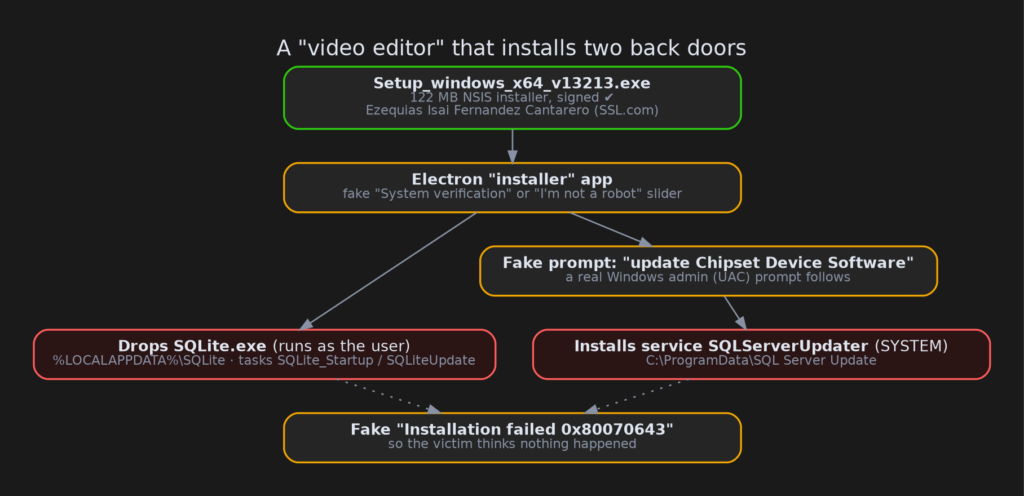
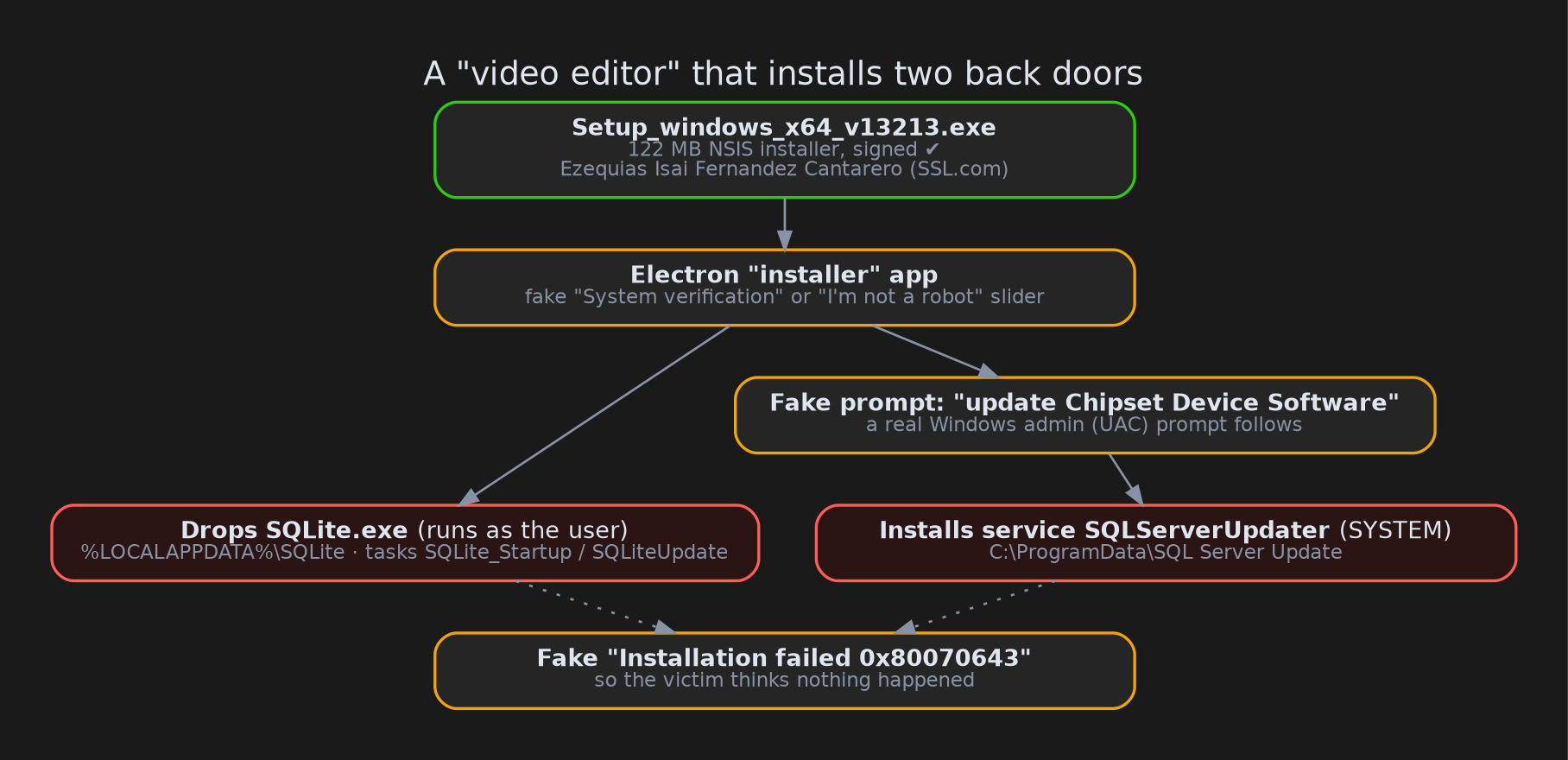
Setup_windows_x64_v13213.exeis a 122 MB Windows installer that claims to be a “Video editor component installer”. It is signed with a certificate issued by SSL.com to an individual.- It shows a fake “I’m not a robot” check, then asks you to “update Chipset Device Software”. That request is just a pretext to get administrator rights.
- Behind the scenes it installs two separate back doors. One is a Windows service running with full SYSTEM rights. The other is a program running as the logged-in user. Both regularly ask their servers what to download and run next.
- At the end it shows a fake “Installation failed” error, so the victim believes nothing was installed.
- One of the back doors also sends its activity log to a Telegram bot.
But it’s signed!
Code signing is a digital seal on a program. It says “this file came from this identity and hasn’t been changed since”. Windows and many security tools trust signed files more, so a signature is valuable to attackers too.
This installer is signed by Ezequias Isai Fernandez Cantarero, through an SSL.com certificate issued to an individual on 1 July 2026. The file was signed on 7 August 2026. A certificate in a private person’s name, used to sign a product that doesn’t exist from a “company” called VideoEditor, is a pattern we see again and again with signed malware. The signature proves who obtained the certificate. It does not prove the program is safe.
The certificate has been reported to SSL.com and added to the CertGraveyard.
Nesting dolls: what’s inside the installer
The outer file is an NSIS installer. NSIS is a popular free tool for building Windows setup programs. This one was made with electron-builder, a tool that packages desktop apps built with web technology.
When it runs, it unpacks an Electron app into a temporary folder. Electron apps are essentially a web page with a built-in Chrome browser, so they can show convincing interfaces. The app’s real logic lives in a file called app.asar. That is a simple archive of JavaScript, and we could read it directly.
Inside app.asar are two more ZIP files. These hold the two back doors.
Stage 1: a fake installer with a lot of acting
The Electron app does several things, mostly hidden behind friendly screens:
- Asks a server which screen to show. It contacts
hydra-app-err[.]club, sending the installer’s name, which includes the build tagv13213. Depending on the answer, the victim sees either a fake “System verification” page or a fake “Please confirm you’re not a robot” slider. Either way, the infection continues. - Fingerprints the computer. It sends the machine’s unique ID, user name, language, Windows version and processor type to
hydra-dropper[.]club. - Drops the first back door. It downloads
SQLiteNoPass.zip, or uses a copy bundled in the installer if the download fails, and unpacks it into aSQLitefolder. It sets up two scheduled tasks to keepSQLite.exerunning: one at every logon and one every 20 minutes. - Asks for admin rights with a cover story. A window says “Administrator action required — To continue, update Chipset Device Software”. When the victim agrees, a real Windows UAC prompt appears. UAC is the “Do you want to allow this app to make changes?” dialog. Approving it lets the installer register the second back door as a Windows service. If the victim declines, it falls back to scheduled tasks running as the user.
- Plays out a fake failure. It shows a “Driver installation” progress bar for 20 seconds, then “Installation failed — Failed to install Chipset Device Software … Error code: 0x80070643”. That is a real Windows Update error code, picked to look believable. The victim closes the window thinking nothing happened. In fact, both back doors are now in place.
Stage 2a: an “updater” with SYSTEM rights
The first back door is a .NET program installed as a Windows service called SQLServerUpdater (“SQL Server Updater”). It is named to blend in with Microsoft’s database software. Because it runs as a service with the admin rights the victim just granted, it runs as SYSTEM, the most powerful account on a Windows machine.
The code is written to look like an ordinary software updater. Every two minutes it does the following:
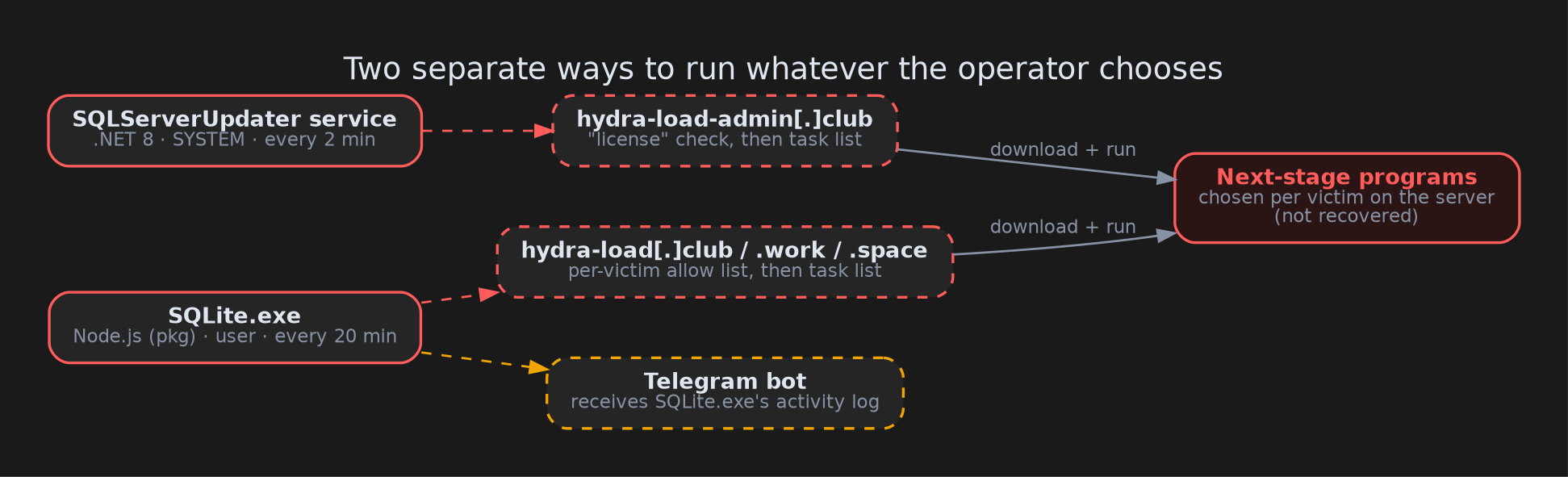
- It sends a “license key” and the machine’s identity to
hydra-load-admin[.]club. If the server doesn’t approve this particular machine, it does nothing. The operator decides machine by machine when the back door wakes up. - Once approved, it builds a profile of the computer and saves it. The profile covers Windows version, admin status, user and computer name, language, screen resolution, CPU, RAM and graphics card.
- It asks the server for an “update plan”: a list of files to download and how to run them.
- Each step runs through a hidden command prompt, with SYSTEM rights. A step can also be a ZIP that overwrites the service’s own folder. That includes its settings file, which the service reloads while running. So the operator can move the back door to new servers or replace its code remotely.
In short, it’s a remote control that can run any program as SYSTEM. It only looks like an updater.
Stage 2b: a second back door, in case the first one goes away
The second back door, SQLite.exe, is a 37 MB program built with pkg. Pkg is a tool that bundles a Node.js script together with the Node.js runtime into a single Windows program. The script itself is stored only as compiled bytecode, so it can’t simply be read the way the Electron app could.
To make it look legitimate, its folder is filled with real Qt and SQLite library files, like the free tool “DB Browser for SQLite”. SQLite.exe doesn’t actually use any of them. They’re window dressing.
Here’s what it does:
- It relaunches itself in the background with a hidden window. It also tries to create a scheduled task named like Microsoft Edge’s updater (
MicrosoftEdgeUpdate_<random>), with a small VBScript as fallback. - It contacts the first server that answers out of
hydra-load[.]club,hydra-load[.]workandhydra-load[.]space. Having three domains means taking one down isn’t enough. - The server checks whether this machine is on its allow list, and if so hands back a list of programs.
SQLite.exedownloads each one into%LOCALAPPDATA%\MicrosoftEdgeUpdate\and starts it. - It sends a log of everything it did to a Telegram bot: machine ID, servers tried, files downloaded and how they were started.
We ran this component in a sandbox with no internet access, pointed at a fake server we controlled. It behaved as the code suggested: it fetched our harmless test files, logged that it started them, and tried to post its log to Telegram. Those requests never left the sandbox.
Why two back doors?
The two programs share no code. They run under different accounts and talk to different servers. Removing one, or blocking one set of domains, leaves the other working. Combined with the per-machine approval and the computer profile, this looks like a platform built to deliver other malware on demand.
Both stages use the same unusual browser identification string (User-Agent) and identify victims the same way. That suggests one author. The developer’s log messages are written in Russian.
What we couldn’t see
- What the back doors actually deliver. The next-stage programs are chosen per victim on the attackers’ servers. We never contact attacker infrastructure, so we don’t know what real victims receive. It could be a password stealer, ransomware, adware or anything else.
- Whether the servers are live. For the same reason, we didn’t check.
- Every corner of
SQLite.exe. Its script exists only as bytecode. We learned its behaviour from its text strings and from watching it run, so some rarely used branches are known only from those strings. - A public sandbox run. At 122 MB, the installer was too large for ANY.RUN’s upload limit.
- The family name. We found no matches in YARA rules, Malcat KesaKode or Triage. We call it the “hydra-load” loader after its domains. It has nothing to do with the Android “Hydra” banking trojan or the THC-Hydra password tool.
Advice
For everyday users:
- A “video editor component” or “driver update” you didn’t go looking for is a red flag, signed or not.
- Be wary of any installer that shows a “prove you’re not a robot” check. Real installers don’t need one.
- If an install “fails” right after asking for admin rights, assume it didn’t really fail. Check for the service and folders listed below.
For defenders:
- Hunt for the
SQLServerUpdaterservice, theC:\ProgramData\SQL Server Updatefolder (and…_backup_*copies next to it), andSQLite.exerunning from a user’sAppData\Local\SQLitefolder. - Look for scheduled tasks named
SQLite_Startup,SQLiteUpdate,SQLServerUpdater_*andMicrosoftEdgeUpdate_<random>. That last one runswscript.exe, which the real Edge updater never does. - Watch for
SQLServer.UpdaterService.exestartingcmd.exe. That’s the moment it runs a next-stage program. - Block the domains below and flag the User-Agent
Mozilla/5.0 (Windows NT 10.0; Win64; x64) Chrome/123 Safari/537.36. Real Chrome always includes “AppleWebKit” in its User-Agent; this one doesn’t. - If the service ran with SYSTEM rights, don’t trust a cleanup: the operator could have run anything. Reimage the machine.
IOCs
| Type | Value |
|---|---|
| Installer SHA256 | 1437ba3685c2b5ad95a3e09c47c2dee0e3adf3aa3b4a11f425a14d0631d4c9c0 |
| app.asar SHA256 | d652a7414e8f6335fa0579a3b6613ba8bce9eff694cb859736c1565e43dbdfa0 |
| SQLServer.UpdaterService.dll SHA256 | 3771634c792921fe6cfe9965c218e10a5c56146afc3faaf47ae6e744bade6cc3 |
| Updater.Common.dll SHA256 | b0bb7fc249224b498ed9285d53c6856afaf97113c5f758713baabab5b046ac85 |
| SQLite.exe SHA256 (bundled copy) | 8607773bdec60142f6b4ff79fbb29d296e9881f70c173d4e69da0b268f799d7f |
| Lure / fingerprint domains | hydra-app-err[.]club, hydra-dropper[.]club |
| Back-door servers | hydra-load-admin[.]club, hydra-load[.]club, hydra-load[.]work, hydra-load[.]space |
| Telegram | bot 8540031489, chat -1004352605529 |
| User-Agent | Mozilla/5.0 (Windows NT 10.0; Win64; x64) Chrome/123 Safari/537.36 |
| Service | SQLServerUpdater |
| Scheduled tasks | SQLite_Startup, SQLiteUpdate, SQLServerUpdater_OnLogon_User, SQLServerUpdater_Every20Minutes_User, MicrosoftEdgeUpdate_<random> |
| Folders | C:\ProgramData\SQL Server Update, %LOCALAPPDATA%\SQLite, %LOCALAPPDATA%\MicrosoftEdgeUpdate |
| Cert | Ezequias Isai Fernandez Cantarero, SSL.com Code Signing Intermediate CA RSA R1, serial 7bf5e26ce882ae1c5ba03045e6fea073 |
Wrapping up
Nothing in this installer is technically new. The effort went into the acting: a robot check, a believable driver update, a progress bar and a convincing error message, all to cover two back doors that wait for instructions. If a “failed” install ever asked you for admin rights first, it’s worth checking for the service and folders above.
Thanks for reading, and stay safe.