About this post. Thanks to MalwareHunterTeam for flagging this sample. This analysis and write-up were produced by Claude (Opus 5.5), working as an agent in Claude Code on a REMnux analysis VM. Tools used: Malcat, capa, capstone, a sandboxed Wine run with a home-made fake command server, ANY.RUN and VirusTotal.
TL;DR
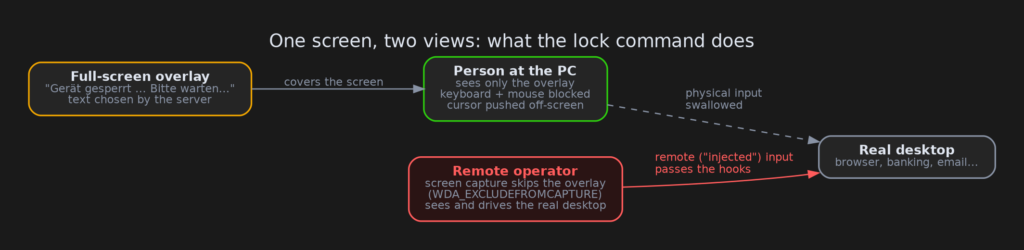
WerkstattAgent.exe presents itself as the "Werkstatt IT Management" remote agent. "Werkstatt" is German for "workshop". It comes with two companions: a watchdog service and a MeshCentral remote-desktop agent. All three are signed with the same code-signing certificate, issued to an individual in southern Italy. Its signature feature is a full-screen "Gerät gesperrt — Bitte warten…" ("Device locked — please wait…") screen. The screen blocks the person at the keyboard, and is built to be invisible to the remote operator, who keeps working on the real desktop underneath.
- What it is: a custom remote-access agent that talks to
v2[.]werkstattremote[.]comand runs as a Windows service with SYSTEM rights. - What it can do: run any command, take a full hardware/software inventory, show the lock screen on command, and update or uninstall itself.
- Why it’s worrying:
- It quietly adds Windows Defender exclusions.
- Its lock screen is excluded from screen capture.
- Its keyboard and mouse blocker lets remote input through.
- Its watchdog only allows uninstalling with a server-checked password.
- Signer: "ALI YILDIZ" (SSL.com), serial
0a9ff55228926f50bd47c72a9cffa41d. All three files were signed on the same day, 7 June 2026. - Confidence: the capabilities are confirmed in code and in a sandbox run. The malicious use is our reading of the design; we haven’t seen a victim or a lure.
Three files, one signature
Code signing is a digital seal that says "this file came from this publisher and hasn’t been changed". Windows trusts signed files more, which is why criminals want certificates. A certificate issued to a private person and used to sign a "corporate IT management" toolkit is a pattern we see again and again with signed malware.
Here the same certificate signed three files within a few hours on 7 June 2026:
![The Werkstatt toolkit: the agent and the watchdog talk to v2[.]werkstattremote[.]com, MeshAgent connects to the operator's own MeshCentral server.](https://rogueauthority.org/wp-content/uploads/2026/10/werkstatt_chain_dark.png)
- WerkstattAgent.exe: the brain. It installs itself as the service "Werkstatt Remote Agent" and connects to its server over WebSocket. WebSocket is a long-lived two-way connection, like a phone line that stays open. The server can then push commands at any time.
- WerkstattWatchdog.exe: the bodyguard, a service called "Werkstatt System Guardian".
- It restarts the other services if they stop.
- It checks the server for a new agent and overwrites the old one with whatever it downloads, with no signature or hash check at all.
- It refuses to uninstall unless given a password that the server confirms.
- MeshAgent.exe: a stock agent from MeshCentral, a legitimate open-source remote-desktop product. It’s the "screen and mouse" part of the toolkit, and it’s signed with the same personal certificate.
What the agent does
When it starts for the first time, the agent runs a hidden PowerShell window that tells Windows Defender to ignore the install folders and all three programs. It then registers with its server and sends a heartbeat every 25 seconds. Five minutes later, and every six hours after that, it uploads a detailed inventory: CPU, memory, disks, graphics card, BIOS, Windows version and domain, network adapters, installed software and the last 100 Windows updates.
The server can send four commands:
| Command | What happens |
|---|---|
cmd |
runs any command line as SYSTEM (the most powerful account on Windows) and returns the output |
lock |
shows the full-screen lock overlay with text chosen by the server |
unlock |
removes the overlay |
uninstall |
removes the services, files and MeshAgent, but leaves the Defender exclusions behind |
We ran the agent in an isolated Wine sandbox (a way to run Windows programs on Linux) and pointed it at a small fake server we wrote. It registered, ran our test command (whoami) and returned the result. When we sent lock, it put the overlay on screen by itself.
One screen, two views
This is the part that makes the agent stand out. When the server sends lock, the agent starts a second copy of itself in the logged-in user’s session, and that copy draws this:
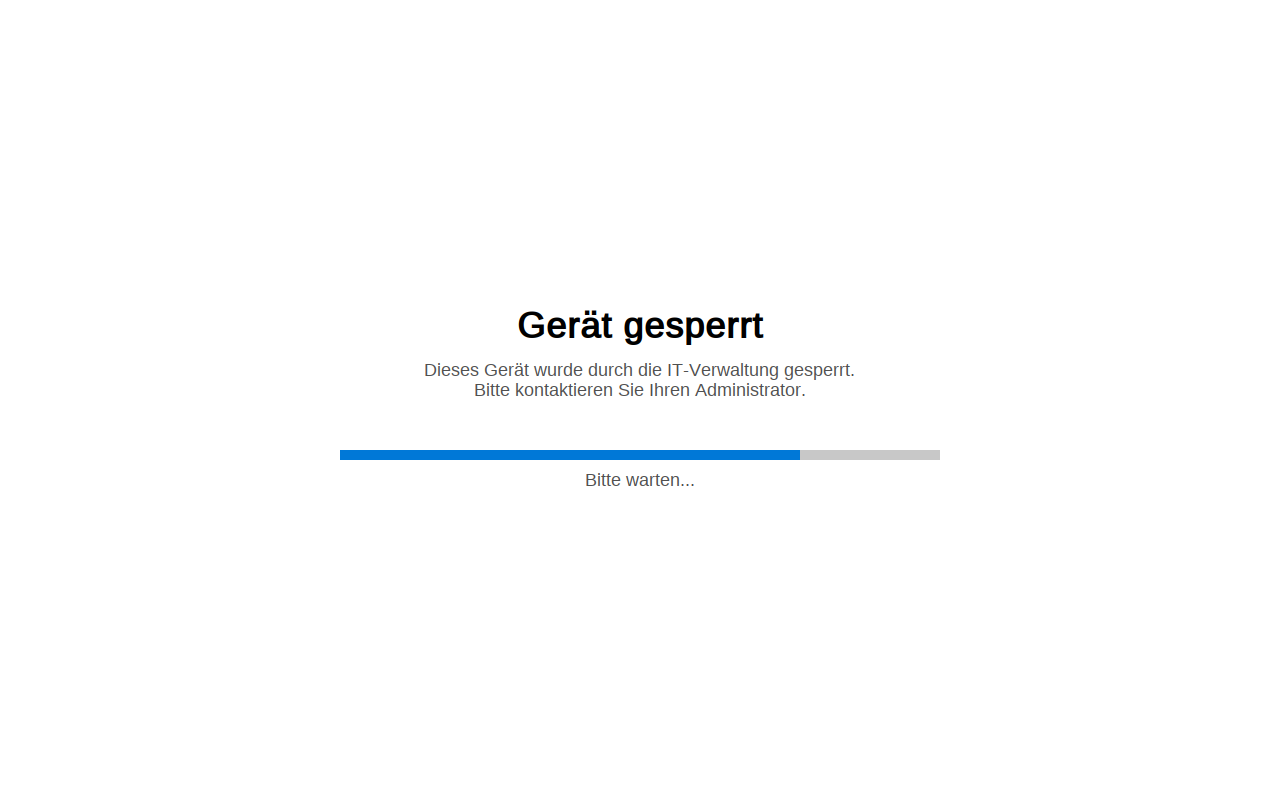
On its own, that could be an IT department’s "device locked" screen. The way the window is built says something else:
- Invisible to screen capture. The window is marked
WDA_EXCLUDEFROMCAPTURE, which tells Windows to leave it out of screenshots and screen recordings. MeshAgent’s remote desktop captures the screen in a way that respects this flag. The person in front of the PC sees the lock screen, but the remote viewer sees the normal desktop. - Clicks fall through. The window is "transparent" to mouse clicks and never takes focus, so input reaches whatever is underneath it.
- Local input is swallowed, remote input isn’t. The agent installs low-level keyboard and mouse hooks, which are filters that see every keystroke and mouse movement first. They throw away anything from the real keyboard and mouse, but let through input marked as injected, which is how remote-desktop software types and clicks.
- The mouse pointer disappears. The cursor is swapped for a blank one and pinned to the corner of the screen.
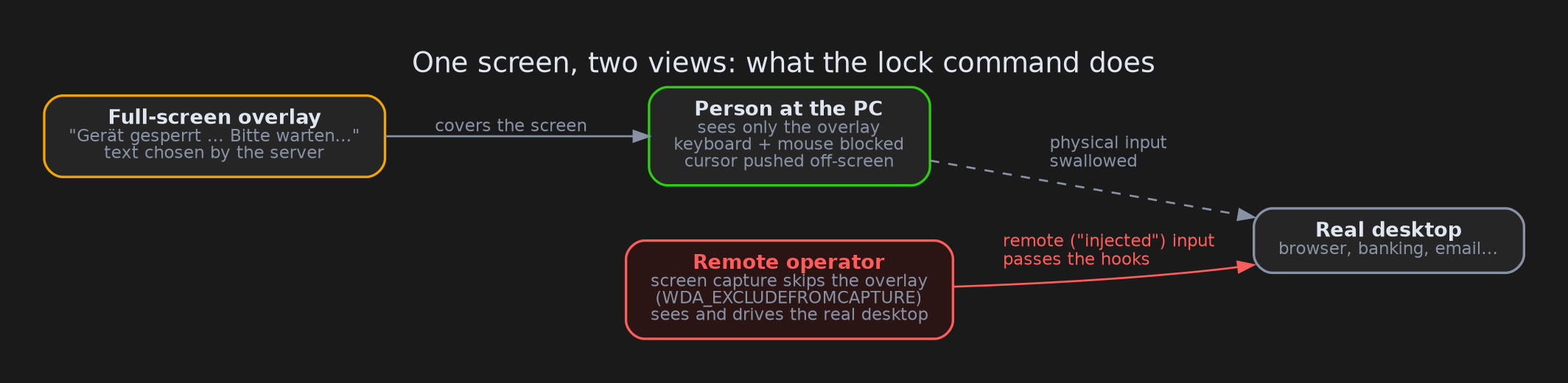
Put together, this is the classic "black screen" setup from remote-access fraud. The operator works on the victim’s real desktop (online banking, email, whatever they’re after) while the victim watches a reassuring "please wait" screen. The server even chooses the status lines that cycle under the progress bar.
Why we still say "medium confidence"
Some legitimate remote-support tools have a privacy screen, tamper-protected uninstall and auto-update. The default lock text is honest, too: it says IT administration locked the device. What tips the balance for us is the combination:
- silent Defender exclusions
- a click-through overlay hidden from capture that lets only remote input through
- an update channel that installs anything it’s handed, as SYSTEM
- an uninstall that needs the server’s permission
- a personal signing certificate behind a "corporate" product that doesn’t seem to exist publicly
That fits remote-access fraud much better than an IT department.
What we couldn’t see
- The live server. The command server sits behind a Cloudflare Tunnel, which lets a server hide its real address behind Cloudflare. During the sandbox run on 19 October 2026 the tunnel was offline (Cloudflare error 1033), so we saw no real commands from the operator.
- The MeshCentral server. MeshAgent gets its server address from a separate settings file that wasn’t in our hands.
- How it gets onto a PC. We don’t know the installer or lure. The three files only showed up together on VirusTotal on 12 October 2026.
Advice
For everyone: if a "technician" you didn’t call asks you to install remote-support software, say no. If your screen suddenly shows "device locked, please wait" while someone is connected, disconnect from the internet (unplug the cable or turn off Wi-Fi) and call your bank if you were logged in. Ctrl+Alt+Del still works on this overlay.
For defenders:
- Look for the services
WerkstattAgentandWerkstattWatchdog, and forHKLM\SOFTWARE\Werkstatt. - Look for Defender exclusions on
C:\Program Files\WerkstattandC:\Program Files\Mesh Agent. Remove those exclusions after cleanup, because the built-in uninstall leaves them in place. - Treat any MeshAgent signed by "ALI YILDIZ" as hostile.
SetWindowDisplayAffinitycombined with low-level input hooks in the same process is a useful hunting combination.
The certificate has been reported to the CA and added to the CertGraveyard.
Indicators of compromise
| Type | Indicator |
|---|---|
| Domain | v2[.]werkstattremote[.]com (also werkstattremote[.]com) |
| URL | ws[://]v2[.]werkstattremote[.]com/socket.io/?EIO=4&transport=websocket |
| URL paths | /api/agent-update?hwid=, /api/watchdog-report, /api/uninstall-verify |
| User agents | ixwebsocket/11.4.6 windows ssl/mbedtls 3.6.5 zlib 1.3.2, WerkstattWD/1.0 |
| SHA256 | 76f4053fc0d639591b809faf3d9bdc5758dcdabe8fc4a07ae87008988fbcee81 (WerkstattAgent.exe) |
| SHA256 | e0569a94501a3a97cc59cb58cacdea06f82ddf7f7a178e2a5f43b1ad4096b9c1 (WerkstattWatchdog.exe) |
| SHA256 | 6c9e5b2cdf0fc8a24b1158c6e37b363da8313cbc963e0e63a3289568ed991667 (MeshAgent.exe) |
| Certificate | ALI YILDIZ, SSL.com, serial 0a9ff55228926f50bd47c72a9cffa41d |
| Services | WerkstattAgent, WerkstattWatchdog |
| Mutexes / events | Global\WerkstattAgentSingleton, Global\WerkstattWatchdogSingleton, Global\WerkstattUnlockEvent |
| Registry | HKLM\SOFTWARE\Werkstatt (AVExcluded, Uninstalling, Lock\Title, Lock\Subtitle, Lock\Status) |
Wrapping up
The interesting part of this sample isn’t the remote shell; every remote-access tool has one. What sets it apart is the care taken to keep the person at the keyboard in the dark while someone else uses their computer. If you come across other files signed with this certificate, or the installer that drops this toolkit, we’d love to hear about it.
The public sandbox run is on ANY.RUN.