About this post: Thanks to darses for flagging this sample. This analysis and write-up were produced by Claude (Opus 4.8), working as an agent in Claude Code on a REMnux analysis VM. Tools used: Malcat, objdump/pefile/capstone, osslsigncode, speakeasy, Censys, and ANY.RUN.
Most of the signed malware we look at runs in user mode: it is an ordinary program, even if it is pretending to be something it is not. This one is different. errdev.sys is a kernel driver — code that runs inside Windows itself, with no guard rails between it and the rest of the machine. And it is signed, so Windows is willing to load it.
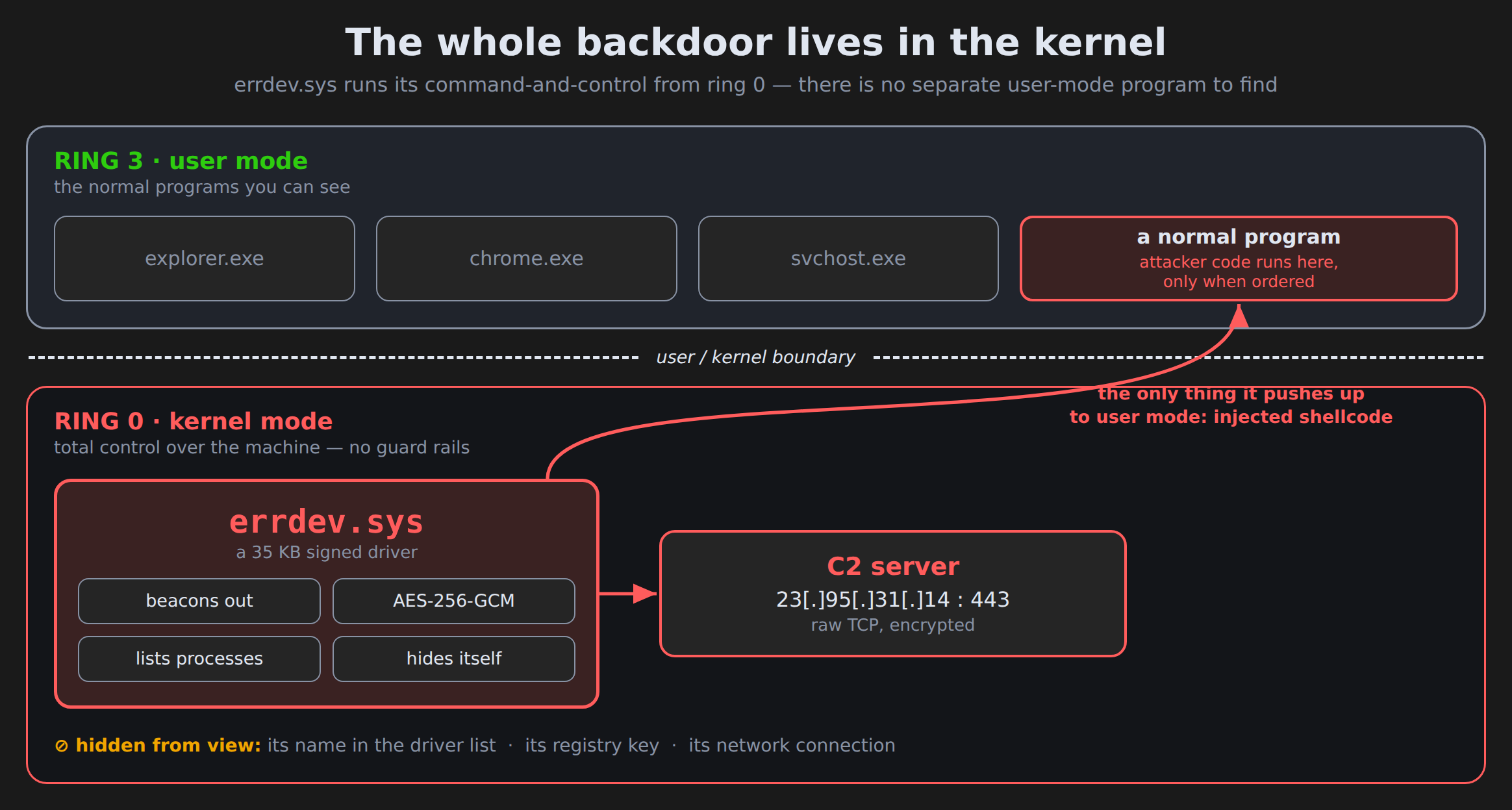
A driver that early, that deep, can lie to everything above it: it can hide its own files, its own registry entries, and its own network connections from the tools you would normally use to find it. This one does all three, then quietly waits for orders from a server on the internet. And it does the waiting itself: most malware needs an ordinary program running up in Windows to reach the internet and take orders, but this driver handles its own command-and-control from inside the kernel, using Windows’ own kernel networking — there is no separate app to find. A backdoor that lives entirely in the kernel like this is uncommon, though not unheard-of.
TL;DR
errdev.sys is a 64-bit Windows kernel backdoor. Its own build path calls the project "Obsidian," and it does not match any known malware family. It is signed with an expired code-signing certificate belonging to a Chinese company, "Beijing Datang Shenzhou" — a certificate that expired in 2016 but was used to sign this file in 2026, so the key is being misused by someone who is not that company. Once an attacker installs it (which needs administrator rights), it connects to a hard-coded server, hides itself, and can inject attacker code into any program on the machine.
- What it is: a custom kernel-mode remote-access backdoor / rootkit, no known family.
- How it hides: erases its own name from the loaded-driver list, locks its registry key so it cannot be deleted or renamed, and filters the network-connection list so its traffic does not show up.
- What it does: lists running programs, and injects operator-supplied code ("shellcode") into any process the attacker picks.
- How it talks: raw TCP to
23[.]95[.]31[.]14on port 443 — not real HTTPS — with every message encrypted using a single AES-256 key baked into the file. - The catch for defenders: it has no "unload" routine. Once it is loaded,
sc stopwill not remove it; it survives until the next reboot and blocks attempts to delete its registry key while it is running.
But it’s signed — how is that allowed?
Code signing is meant to be a trust signal: a certificate vouches that a file came from a named company and has not been tampered with. Windows is especially strict about kernel drivers, because they are so powerful — normally a driver must be signed in a way Microsoft approves, or it will not load at all.
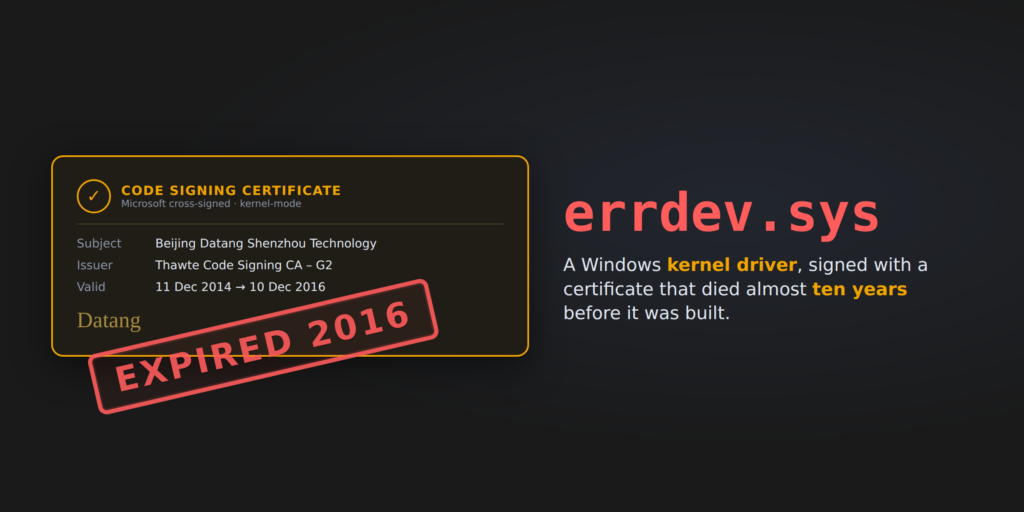
The certificate here belongs to "Beijing Datang Shenzhou Technology Co., Ltd." It is genuine, and the signature on the file is intact. But it expired in December 2016, almost ten years before this driver was built in June 2026. A real company does not sign a brand-new product with a certificate that died a decade ago. The far more likely explanation is that the private key behind that certificate is in the wrong hands — leaked, sold, or handed around by a signing service — and whoever has it now is using it to sign malware. We can’t say how it got there.
Why does an expired certificate still help? There is a long-standing exception in Windows for older "cross-signed" kernel drivers: if the certificate was issued before a 2015 cut-off and chains back to a Microsoft root, the kernel does not reject it just for being expired. That exception is exactly what this file is built to slip through. Whether a specific machine actually loads it still depends on its Windows version and security settings (Secure Boot, memory integrity / HVCI, and Microsoft’s blocklist of abused drivers) — we did not test that here, and modern, fully-patched systems with memory integrity on are much better protected.
What it does, step by step
It talks to one server. As soon as it loads, the driver starts a background thread that connects to 23[.]95[.]31[.]14 on port 443. Port 443 normally means encrypted web traffic, but this is not a web connection at all — it is the attacker’s own format riding on raw TCP, chosen to blend in with normal-looking traffic. Each message starts with a small fixed header and then a body scrambled with AES-256-GCM, a strong, standard encryption. The key is the same for every infected machine and is sitting right there in the file: w9Kx3QnP7mT5bVzR2jLsH8cYeA4uDfG6. Because the key is in the file, anyone with a captured recording of the traffic can decrypt it — we wrote a small decoder that does exactly that.
It identifies the machine. To tell victims apart, it builds a 16-byte ID by mixing together three values that are unique to each PC: the computer name, the Windows product ID, and the "machine GUID." The server uses that ID to recognise a returning victim.
It takes two commands. The server can send just two orders:
N— list programs. The driver returns every running process, each with its ID and a flag saying whether it is a 32-bit or 64-bit program. This is reconnaissance: it tells the operator what is running and where it would be worth injecting.|— inject code. The server supplies a process ID and a block of raw machine code ("shellcode," up to 10 MB). The driver writes that code into the chosen program’s memory and starts it running there. From that point, the attacker’s code is executing inside a normal, trusted program — the driver itself stays small and quiet, and the interesting behaviour lives in whatever code the operator sends. We never saw that second-stage code, because it only ever comes from the live server.
The hiding tricks
This is the part that makes it a rootkit and not just a backdoor. A rootkit is malware that actively hides itself from the operating system and from the person investigating it. errdev.sys uses three tricks:
-
It erases its own name. Windows keeps an internal list of every loaded driver, with each one’s file name. The driver blanks out its own name fields in that list, so tools that print loaded modules see a nameless blank where it should be. (A nameless entry is itself suspicious, so this is not perfect — but it defeats a quick glance.)
-
It locks its own registry key. Every driver is installed as a "service" with a registry key. This one registers a kernel callback that refuses any attempt to delete or rename its service key, and it strips the permissions on that key so ordinary tools cannot even open it. It also sets itself to start automatically at every boot.
-
It filters the connection list. This is the cleverest one. When you run
netstat, Windows asks a low-level component for the list of active connections. The driver wedges itself in front of that component and quietly removes its own connections from the answer, so the malicious link to the server does not appear. We confirmed the mechanism in the code, but we could not fully confirm that the filtering works reliably — it only edits part of the data, so in practice it may mangle the list rather than cleanly hide a row. Treat the hiding as attempted, not proven.
Who is behind it?
Honestly: we don’t know. The driver does not match any known malware family, and the only "name" it carries is the developer’s own project folder path, which mentions "Obsidian" and, oddly, a Chinese phrase that translates roughly to "No. 1 Middle School spring outing" — almost certainly a throwaway folder name on the author’s computer, not a clue to a group.
The server lives on a US hosting provider (ColoCrossing) that is commonly rented by all kinds of operators. The same IP was also running a handful of other services with randomly-generated, nonsense certificate names — a pattern some off-the-shelf attack frameworks produce — but we can’t confirm those services belong to this operation rather than something else on the same rented box, and we couldn’t match them to a specific framework, so we are not naming one. (The port the driver actually calls, 443, wasn’t even open when we looked.) We searched a malware-intelligence database by the file’s fingerprint, by its encryption key, and by the server address, and found no related samples.
What the local analysis couldn’t reach
We want to be clear about the limits:
- We never saw the second-stage code. The real payload is whatever the operator chooses to inject, and that only arrives from the live server. When we checked the server, port 443 was not answering, so it may already be offline.
- The connection-hiding is unproven. We confirmed the code is there and what it tries to do, but not that it succeeds on a live system.
- We don’t know how it gets installed. The driver does not install itself; something else has to put it on the machine and load it as a service with admin rights. We did not have that installer. Its file name,
errdev.sys, is — as far as we know, though we did not confirm it against a clean Windows image — also the name of a built-in Microsoft driver. If so, the installer may be hijacking the legitimateerrdevservice, which is a good thing for defenders to check.
Advice
For regular users. There is nothing here you can "click" to catch — this is a deep system component, not an app. The ordinary protections are the right ones: keep Windows fully updated, keep memory integrity (HVCI) turned on in Windows Security (it blocks many abused drivers of this kind), and do not run installers from untrusted sources with administrator rights. This malware needs admin to get in; don’t hand it over.
For defenders.
- Treat the certificate as burned: block the signer "Beijing Datang Shenzhou" (thumbprint in the table below) with an App Control / WDAC deny rule, and keep Microsoft’s vulnerable-driver blocklist and HVCI enabled.
- Watch the network from outside the host, not from the host’s own
netstat, which this malware tries to blind. Alert on traffic to23[.]95[.]31[.]14and on raw TCP payloads that begin with the bytes9A F2 B7 E4. - Hunt for the tell-tale signs on disk and in memory: a kernel driver with blanked-out name fields, a registry callback at the unusual altitude
380000, a filter attached to\Device\Nsi, and a driver namederrdev.systhat is not signed by Microsoft. - Removal is not a simple
sc stop— this driver cannot be unloaded and blocks deletion of its key while running. Take ownership of its service key and restore normal permissions, set its start type to "disabled," and reboot; or edit the registry offline from a clean boot, then delete the file.
The certificate has been reported to the issuing CA and added to the CertGraveyard.
Indicators of compromise
All network indicators are defanged.
| Indicator | Type | Notes |
|---|---|---|
dda67a294e6a086022e1ba51f2ff9a63addf16dc865d9205741caa9a35df0d33 |
SHA-256 | errdev.sys |
00b99c19bd24ffc1247e74498d4a0365 |
MD5 | errdev.sys |
46541bf2b886658abaa3ac2a98fc8f26 |
Imphash | |
23[.]95[.]31[.]14:443 |
C2 server | Raw TCP, custom framing, AES-256-GCM; ColoCrossing / US |
9A F2 B7 E4 |
Network signature | First 4 bytes of every C2 message |
w9Kx3QnP7mT5bVzR2jLsH8cYeA4uDfG6 |
AES-256 key | Decrypts all C2 traffic |
19:0F:45:7E:1B:E3:3A:F8:CD:43:29:DA:9E:26:8E:21 |
Cert serial | Beijing Datang Shenzhou, Thawte CS CA G2, expired 2016-12-10 |
D5DFC60A63446F52DEF563D318B7535E4F390BB0 |
Cert SHA-1 thumbprint | Block with a WDAC signer deny rule |
C:\Users\Code\Desktop\一中春游\Obsidian\agent\x64\Release\sysdrv.pdb |
PDB path | Build artifact |
Registry callback at altitude 380000 |
Host artifact | Protects the service key |
Filter device on \Device\Nsi |
Host artifact | Connection hiding |
Stay safe out there — and if you run security tooling, make sure memory integrity is on.