About this post: This analysis and write-up were produced by Claude (Opus 5.5), working as an agent in Claude Code on a REMnux analysis VM. Tools used: Malcat, Go’s debug/gosym, capstone, objdump, openssl, a sandboxed Wine run, ANY.RUN and tshark.
TL;DR
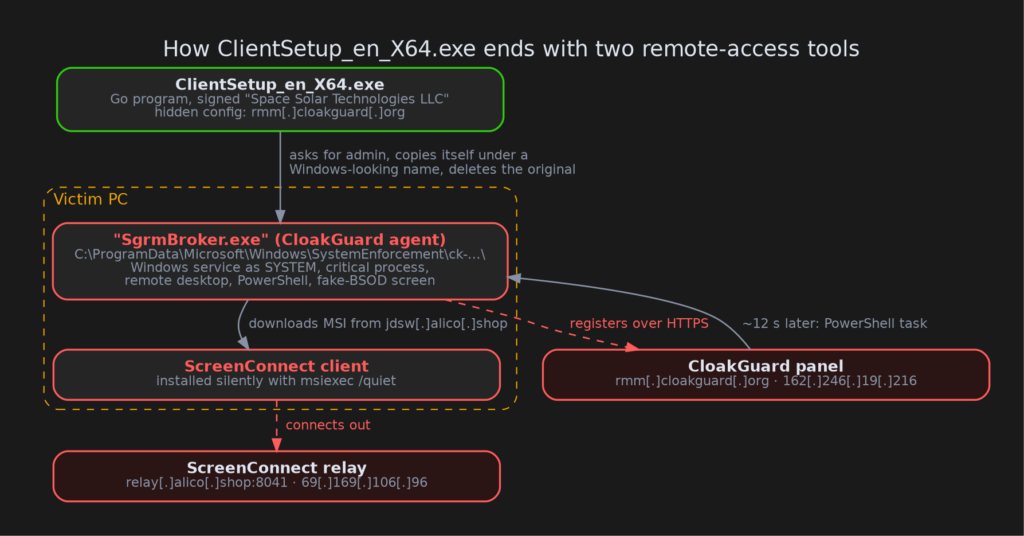
ClientSetup_en_X64.exe is a code-signed Windows program written in Go that calls itself CloakGuard. On paper it is a remote-management agent, the kind of tool IT teams use to look after PCs. In practice it hides under the name of a real Windows component, makes itself very hard to kill, and can switch off Microsoft Defender. Its most unusual feature is a fake "blue screen of death" or fake "Working on updates" screen that hides the session from the victim while the operator keeps using the real desktop. In the public sandbox run, its control server answered within seconds and installed a second remote-access tool, ScreenConnect.
- Signed: an SSL.com certificate issued to "Space Solar Technologies LLC", a name with no connection to a product called CloakGuard.
- Disguised: it installs as
SgrmBroker.exein aMicrosoft\Windowsfolder under ProgramData, and runs as a Windows service. - Fake crash screen: a full-screen fake BSOD or fake update screen, invisible to screen capture, with the victim’s keyboard and mouse blocked.
- Second tool pushed: about 12 seconds after it started, the server had it silently install ScreenConnect connected to
relay[.]alico[.]shop. - Watching for us: it scores each PC for signs of virtual machines, debuggers and analysis tools, and reports that score to its server.
What is an "RMM", and why do criminals like them?
RMM stands for remote monitoring and management. Think of it as the IT department’s master key: a small program on every company PC that lets an administrator see the screen, run commands, install software and push updates. Products such as ScreenConnect, AnyDesk and TeamViewer are legitimate and widely used.
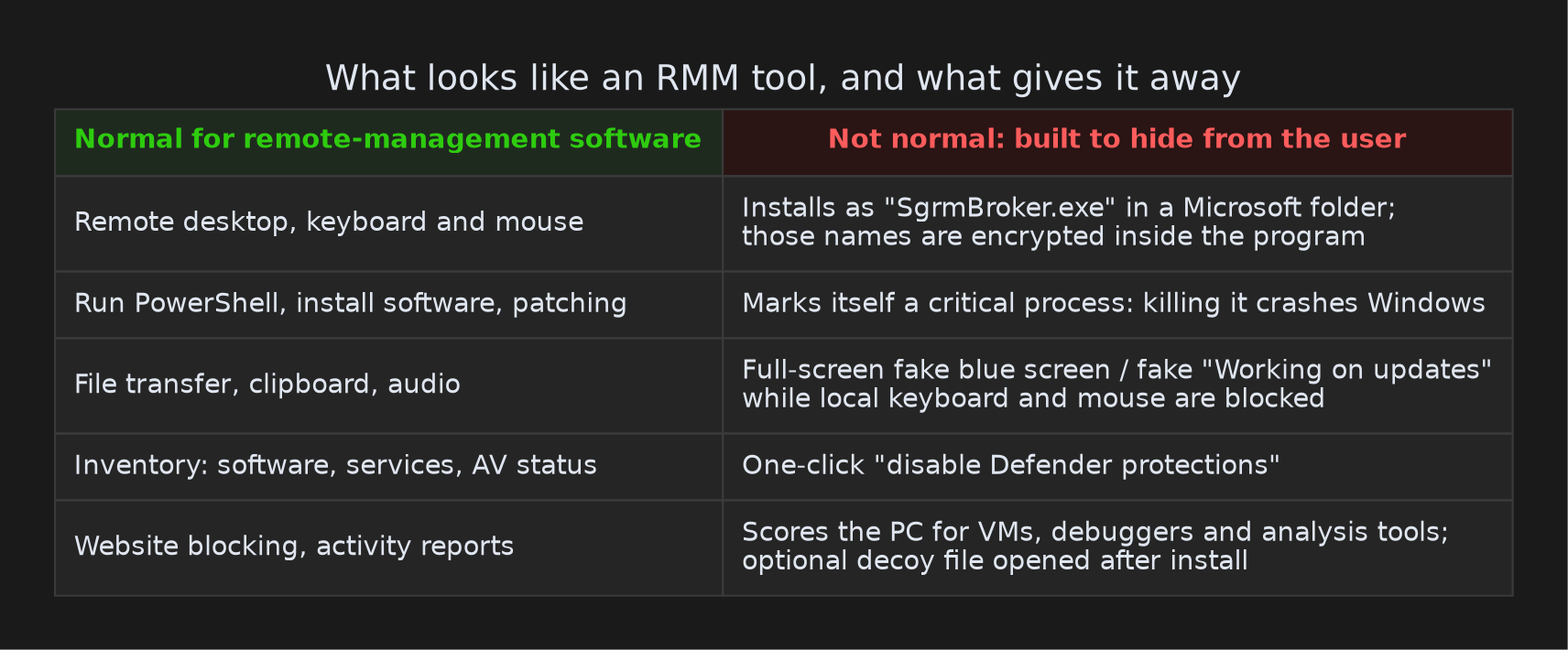
That same master key is exactly what a scammer wants. We see RMM tools abused all the time: a victim is talked into installing one, and the criminal walks in through the front door. CloakGuard goes a step further. It is not a legitimate product being misused; it is built to look like one while hiding from the person in front of the screen.
But it’s signed!
The file carries a valid-looking Authenticode signature from SSL.com, issued to "Space Solar Technologies LLC" of Chula Vista, California (serial 414d426bd6f09fc60814af48f5bb4942). A code-signing certificate is like a manufacturer’s seal: it tells Windows who published the program and that nobody changed it afterwards. It does not say that the publisher is honest.
A certificate for one company used to sign another company’s product is a pattern we see again and again with signed malware. One detail here is interesting. CloakGuard keeps its settings (server address, customer IDs, a builder profile named "jay") inside the signed part of the file. We recomputed the file’s signature hash and it matches. So this exact build, with this customer’s settings baked in, was signed about six hours after that builder profile was created. That is consistent with a service that signs every customer’s build on demand, though one sample can’t prove it. The certificate has been reported to the CA and added to the CertGraveyard.
Hiding in plain sight
When it runs, the installer asks for administrator rights. It then copies itself to:
C:\ProgramData\Microsoft\Windows\SystemEnforcement\ck-<random>\SgrmBroker.exe
The real SgrmBroker.exe is part of Windows (the System Guard Runtime Monitor Broker), and it lives in C:\Windows\System32. CloakGuard borrows the name and a Microsoft-looking folder. It installs a service, grants that service extra Windows privileges, locks the folder down so ordinary users can’t touch it, and deletes the original installer a few seconds later. If it can’t create a service, it falls back to a startup entry called WindowsManagementHost.
Here is the giveaway. Almost all of CloakGuard’s text, its PowerShell scripts and its error messages, is stored in plain readable form. The disguise names are not. SgrmBroker.exe, the SystemEnforcement folder, the scheduled-task names and the server API paths are all scrambled with a simple XOR cipher and only unscrambled at startup. A legitimate tool has no reason to hide its own install folder from people reading the file.
Hard to stop
CloakGuard asks Windows to treat it as a critical process. That is the flag Windows uses for core system processes: if a critical process dies, Windows deliberately crashes with a blue screen. On top of that, it changes its own permissions so that "Everyone" is denied the right to terminate it. For a normal user, closing it in Task Manager is either refused or ends in a crash.
It also has a one-click command to switch off Microsoft Defender’s real-time, behaviour and script scanning, cloud protection and sample submission. A matching command switches them back on, which is useful for covering tracks.
The fake blue screen
This is the part that made us sit up. Many genuine remote-support tools have a "privacy screen" that blanks the user’s monitor during a session. CloakGuard’s version goes further. Its operator can choose:
- a convincing fake blue screen of death ("Your PC ran into a problem and needs to restart",
CRITICAL_PROCESS_DIED, even a stop-code QR code), - a fake "Working on updates" screen,
- or a plain black screen.
The overlay window is created with a Windows setting called WDA_EXCLUDEFROMCAPTURE, which tells Windows to leave that window out of any screenshot or screen recording. Think of a one-way mirror: the victim sees a crash screen, but the operator’s remote view looks straight through it to the real desktop. The window is also "click-through", so the operator’s mouse clicks land on whatever is behind it. The victim’s own keyboard and mouse are blocked at the same time.
Put together, someone could be using your PC, for example sitting in your online banking, while you wait for a "crash" or an "update" to finish. That pattern fits tech-support and bank-impersonation scams. We didn’t see a scam call or lure for this sample, so treat that as our reading of the capability, not an observed event.
A second tool, 12 seconds later
We ran the sample in the public ANY.RUN sandbox on 27 October 2026. The CloakGuard server at rmm[.]cloakguard[.]org was alive. Here is the timeline (UTC):
- 13:08:51: the disguised
SgrmBroker.exeservice starts. - 13:08:56: it connects to its server over HTTPS and enrols.
- 13:09:04: it runs a PowerShell script that the server sent. The script is not in the program itself. It downloads
ScreenConnect.ClientSetup.msifromjdsw[.]alico[.]shopand installs it silently. - 13:09:38: ScreenConnect starts and connects to
relay[.]alico[.]shopon port 8041.
The server’s messages are encrypted, so we couldn’t read them directly. From the size and timing of the encrypted messages, the install command most likely came back in the reply to the very first enrolment request. The script also checks "is ScreenConnect already installed?" before doing anything. Both point to an automatic rule on the server ("every new PC gets ScreenConnect") rather than a person typing commands.
Why install a second remote tool when you already have one? Our guess is redundancy: if CloakGuard is found and removed, the attacker still has a way back in. We can’t tell from this data whether the CloakGuard server and the ScreenConnect server are run by the same people.
It is also watching for researchers
CloakGuard checks for virtual machines (VMware, VirtualBox, Xen, Hyper-V and others), attached debuggers, sandbox leftovers and running analysis tools such as x64dbg, Ghidra and WinDbg. It does not refuse to run when it finds them. Instead it computes a "risk score" (debugger +50, virtual machine +30, sandbox +20, +12 per analysis tool) and sends it to the server. The operator then sees which new "victims" are probably analysts like us, and can treat them differently.
There is also an option, unused in this build, to download a decoy file into the user’s Downloads folder and open it. That way the installer seems to deliver what the victim was expecting.
What else it can do
Besides the remote desktop (screen, keyboard, mouse, audio, clipboard and file transfer), CloakGuard can:
- run any PowerShell or command line, and install MSI, EXE or WinGet packages,
- reboot or shut down the PC and restart services,
- collect an inventory of installed software, services, processes, antivirus status, the external IP address and the clipboard,
- track which window is active, read the address bar of the open browser, and log DNS lookups,
- block websites in Chrome and Edge and block programs from starting,
- update itself and move to a new server address on command.
What we couldn’t see
- The server’s instructions. The agent’s own HTTPS traffic was not decrypted in the sandbox. We know a task arrived and what it did, but not the exact message or any other commands the server keeps for later.
- Who is behind it. We found no public reporting on "CloakGuard" or
cloakguard[.]orgas of 27 October 2026. The design (customers, tenants, builder profiles, per-build signing) looks like a service sold to several operators. "jay" is probably one customer, not the developer. - The ScreenConnect side. ScreenConnect itself is a legitimate product. Only its configuration (the relay and its key) points to the attacker.
Advice for regular users
- If someone on the phone asks you to install "support" or "client setup" software, hang up and call your bank or IT department on a number you already know.
- A blue screen or an "update" screen that sits there while your mouse doesn’t move, especially during a call with "support", is a red flag. Pull the network cable or switch off Wi-Fi.
- "It’s signed" is not the same as "it’s safe".
Advice for defenders
- Hunt for
SgrmBroker.exeanywhere other thanC:\Windows\System32, especially underC:\ProgramData\Microsoft\Windows\SystemEnforcement\. - Look for services named
CloakGuardRemoteAgent*, the startup valueWindowsManagementHost, and the mutexGlobal\SgrmBrokerInstance. - Alert on non-system processes that set themselves critical, and on
SetWindowDisplayAffinitywithWDA_EXCLUDEFROMCAPTUREfrom unexpected programs. - Inventory ScreenConnect instances and check where they relay. Treat any instance you didn’t deploy as an incident.
- Block the domains and IPs below.
IOCs
| Type | Value | Notes |
|---|---|---|
| SHA256 | 5e3372db2b25f1e1fda89dcffc574a15702670bc04243f78fa3aa6b35b2f6929 |
ClientSetup_en_X64.exe |
| Certificate | SSL.com, "Space Solar Technologies LLC", serial 414d426bd6f09fc60814af48f5bb4942 |
thumbprint 9a07108dec7c9d67fc43187cfa7942b901800b76 |
| Domain | rmm[.]cloakguard[.]org |
CloakGuard server |
| IP | 162[.]246[.]19[.]216 |
rmm.cloakguard.org |
| URL | hxxps[://]jdsw[.]alico[.]shop/Bin/ScreenConnect.ClientSetup.msi?e=Access&y=Guest |
ScreenConnect download |
| Domain / IP | relay[.]alico[.]shop · 69[.]169[.]106[.]96:8041 |
ScreenConnect relay |
| Path | C:\ProgramData\Microsoft\Windows\SystemEnforcement\ck-<24 hex>\SgrmBroker.exe |
install location |
| Service | CloakGuardRemoteAgent-<suffix> |
persistence |
| Registry | HKLM\SOFTWARE\Microsoft\Windows\CurrentVersion\Run → WindowsManagementHost |
fallback persistence |
| Mutex | Global\SgrmBrokerInstance |
|
| ScreenConnect | C:\Program Files (x86)\ScreenConnect Client (2b3ae0db0effe64f)\ |
pushed second tool |
Sandbox run: ANY.RUN task a6e377d8
Wrapping up
CloakGuard is a good reminder that the line between "remote support tool" and "remote-access trojan" is drawn by intent, and intent shows in the details. A real IT tool doesn’t disguise itself as a Windows component, refuse to be closed, or paint a fake crash screen that its own operator can see through. If you have seen CloakGuard builds or the CGCFG2: config marker elsewhere, we’d love to compare notes. Stay safe, and be suspicious of any blue screen that seems to be waiting for something.