About this post: Thanks to MalwareHunterTeam for flagging this new payload. This analysis and write-up were produced by Claude (Opus 5.5), working as an agent in Claude Code on a REMnux analysis VM. Tools used: Malcat, ILSpy, a small custom .NET bundle extractor, capa, YARA, osslsigncode and OpenSSL, tshark, and the Hatching Triage sandbox.
TL;DR
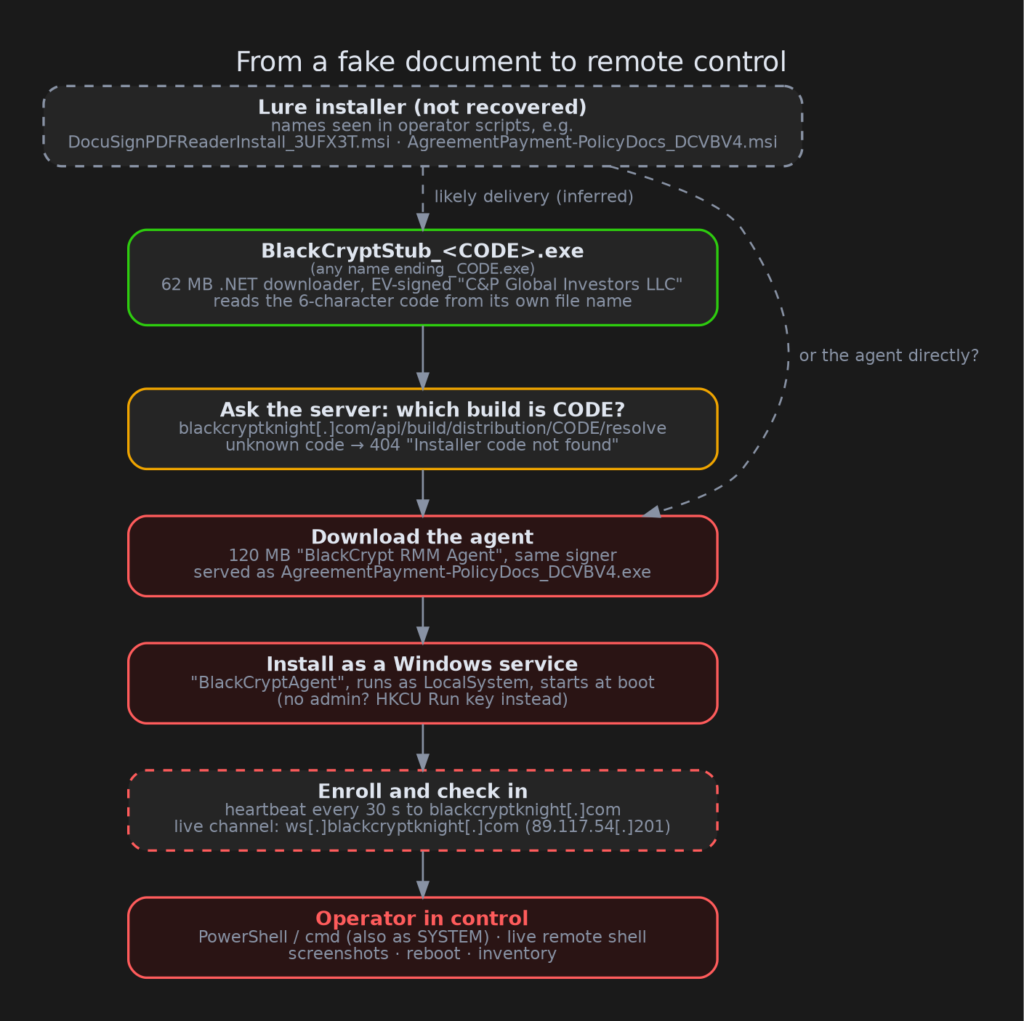
BlackCrypt is two signed programs that pose as IT management software. A small downloader fetches a “BlackCrypt RMM Agent”, which installs itself as a Windows service and gives a remote operator full control of the PC. On paper it could pass for an obscure IT tool. When we let it check in with its server from a sandbox, the operator’s first automatic move was to go looking for the fake DocuSign and Adobe installers that likely start the infection, and hide them.
- Signer mismatch: both files are EV-signed by “C&P Global Investors LLC”, a California investment company, but branded “BlackCrypt Labs Inc”.
- Stage 1, the Stub: reads a 6-character code from its own file name and downloads the matching Agent from
blackcryptknight[.]com. - Stage 2, the Agent: runs commands (including as SYSTEM), opens live remote shells and takes screenshots, with no window, tray icon or uninstall.
- The giveaway: seconds after enrolling, the server sent scripts to hide lures named after DocuSign, Adobe, HSA (Health Savings Account) and payment documents.
- Verdict: malicious, high confidence.
But it’s signed!
Code signing is a digital seal on a program: “this file came from this identity and hasn’t changed since”. An EV (Extended Validation) certificate is the premium kind, issued only after more thorough identity checks, so Windows and some security tools trust it more.
Here, the signer is an investment LLC, but the files are branded “BlackCrypt Labs Inc”. The team behind this blog has reported over 2,500 signed malware samples, and a signer that has nothing to do with the product it signs is one of the most common patterns we see.
This signer has two certificates. We first saw the Stub in September, signed with a DigiCert EV certificate. The newer Stub and Agent are signed with a Sectigo EV certificate for the same company, valid from 22 September 2026, the day after the last DigiCert signature we have. The DigiCert certificate was still valid for months, so it’s odd to get a second one so soon. Both certificates have been reported to their CAs (certificate authorities, the companies that issue them) and added to the CertGraveyard, a public database of certificates abused to sign malware.
There’s also a small irony in the Stub’s own settings file. A developer comment says the Windows permission prompt (UAC, the “Do you want to allow this app to make changes?” box) will show “the verified BlackCrypt Labs publisher”. It won’t: it shows “C&P Global Investors LLC”. The Stub forces that prompt, which is how the Agent ends up with admin rights.
Stage one: a downloader that reads its own name
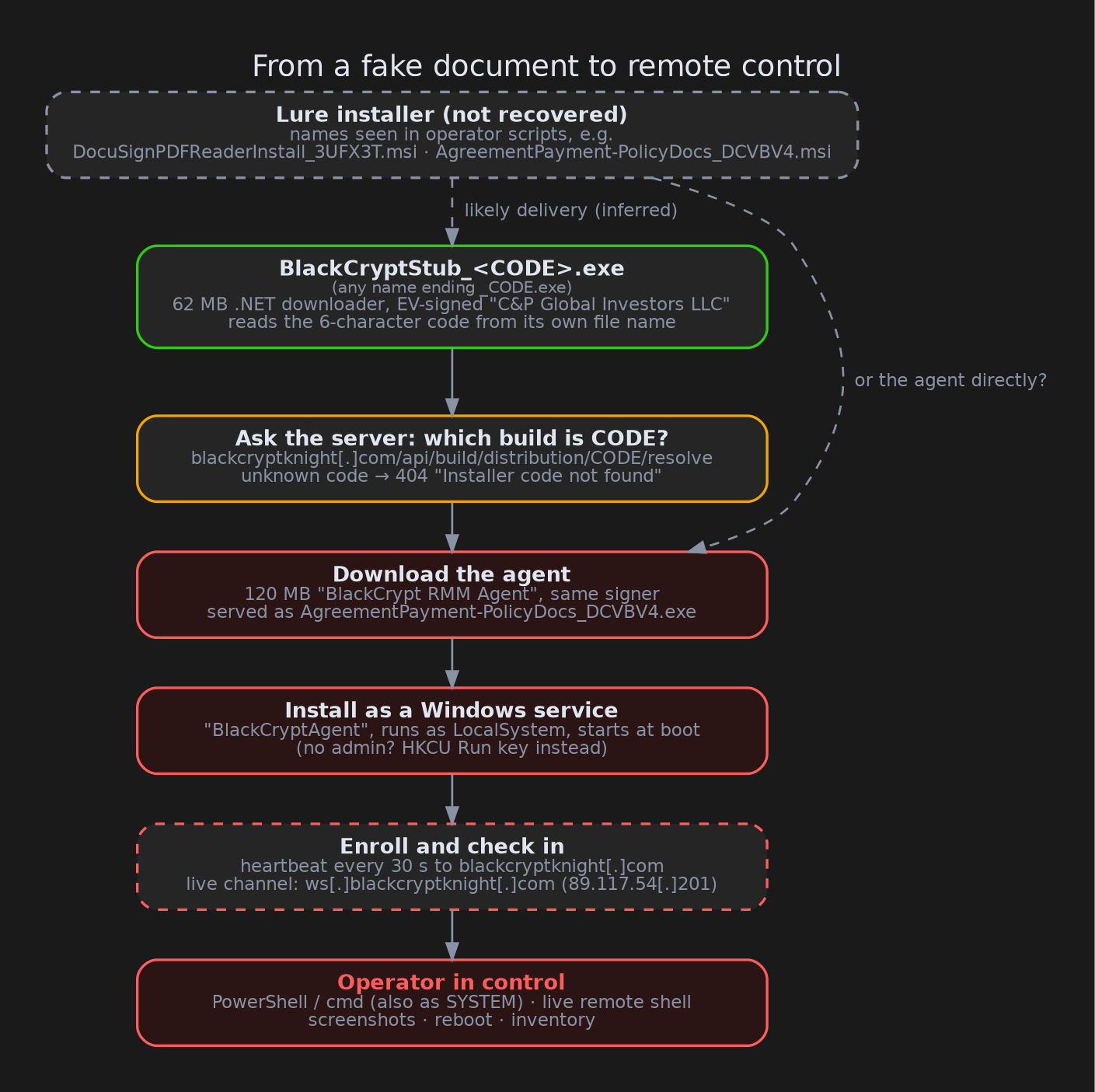
The Stub is tiny at heart. Its real code is a 17 KB .NET program packed together with the whole .NET runtime into one 62 MB file, a “single-file bundle”. It does four things:
- Reads a code from the end of its own file name: any name ending in
_plus six letters or digits, such asBlackCryptStub_DCVBV4.exe. With no code, it shows a “please do not rename the file” error and stops. - Asks
blackcryptknight[.]com/api/build/distribution/<CODE>/resolvewhich build that code belongs to. - Downloads the Agent for the PC’s architecture to a temporary folder.
- Runs it.
Putting the key in the file name is a neat trick against sandboxes. A sandbox usually renames a file (to its hash, or a feed name), so the Stub simply errors out and looks harmless. That’s exactly what happened in an earlier public Triage run. Triage scores run from 1 to 10. That run scored 10 overall only because a static rule flagged the packed .NET file; the behaviour part, where the Stub stopped at its error message, scored just 3. The per-file code also lets the operator issue a separate installer to each “customer” or campaign.
Stage two: an “RMM agent” with no off switch
The Agent is a full remote-management client. When it starts with admin rights, it:
- copies itself to
C:\Program Files\BlackCrypt Labs\BlackCryptAgent\ - registers a Windows service called BlackCryptAgent that runs as LocalSystem, the most powerful account on the machine, and starts at every boot
- without admin rights, falls back to a per-user autostart entry (the
HKCU\...\Runregistry key)
It then enrolls with the server, sending the hostname, user, IP addresses and hardware details. After that it sends a “heartbeat” every 30 seconds and keeps a live WebSocket open, a two-way connection the server can push orders down at any time.
The orders it understands:
| Order | What it does |
|---|---|
powershell_command, shell_command, saved_script_run |
Run any PowerShell, cmd or batch script. If asked, it runs them as SYSTEM through a throwaway scheduled task. |
| Terminal session | A live remote cmd or PowerShell window, streamed over the WebSocket |
capture_screenshot |
Grab the logged-in user’s desktop and upload it |
reboot / shutdown |
Exactly that |
force_reenroll |
Re-register with the server |
Plus a constant stream of inventory: installed software, USB devices, firewall rules, CPU, memory and disk usage.
Real RMM tools do many of the same things. What’s missing here is everything that makes them accountable: no window, no tray icon, no “your PC is being managed” notice and no uninstall command. The vendor has no real public presence either. The only “BlackCrypt” website is the C2 domain itself, blackcryptknight[.]com, which shows a login page that appears to be the operator’s panel. Nothing on it connects to the company that signed the files.
What we couldn’t tell from the code alone
Static analysis left us with a capable remote-control tool from a vendor that doesn’t seem to exist, signed by an unrelated company. That’s suspicious, but a tiny legitimate IT vendor with poor habits could produce something similar. We called it “suspicious, leaning malicious”, and needed to see what the operator actually does with it.
The Agent was too big for ANY.RUN, whose upload limit is 100 MB, so we used the Triage sandbox. We ran three tests:
- The Agent on its own (score 7/10). It installed its service exactly as the code says and checked that the server was up:
{"status":"alive"}. With no code in its name, it stopped there. - The Stub with a made-up code (
AAAAAA). The server answered “Installer code not found”. - The Stub with a real code (
DCVBV4) (score 7/10). VirusTotal lists the file names each sample was seen under, and for files signed with these certificates those names include lures ending in codes like_DCVBV4.
The sandbox meets the operator
The third run went all the way. Triage records the encryption keys for its sandbox traffic, so we could decrypt every HTTPS and WebSocket message afterwards and read the whole conversation.
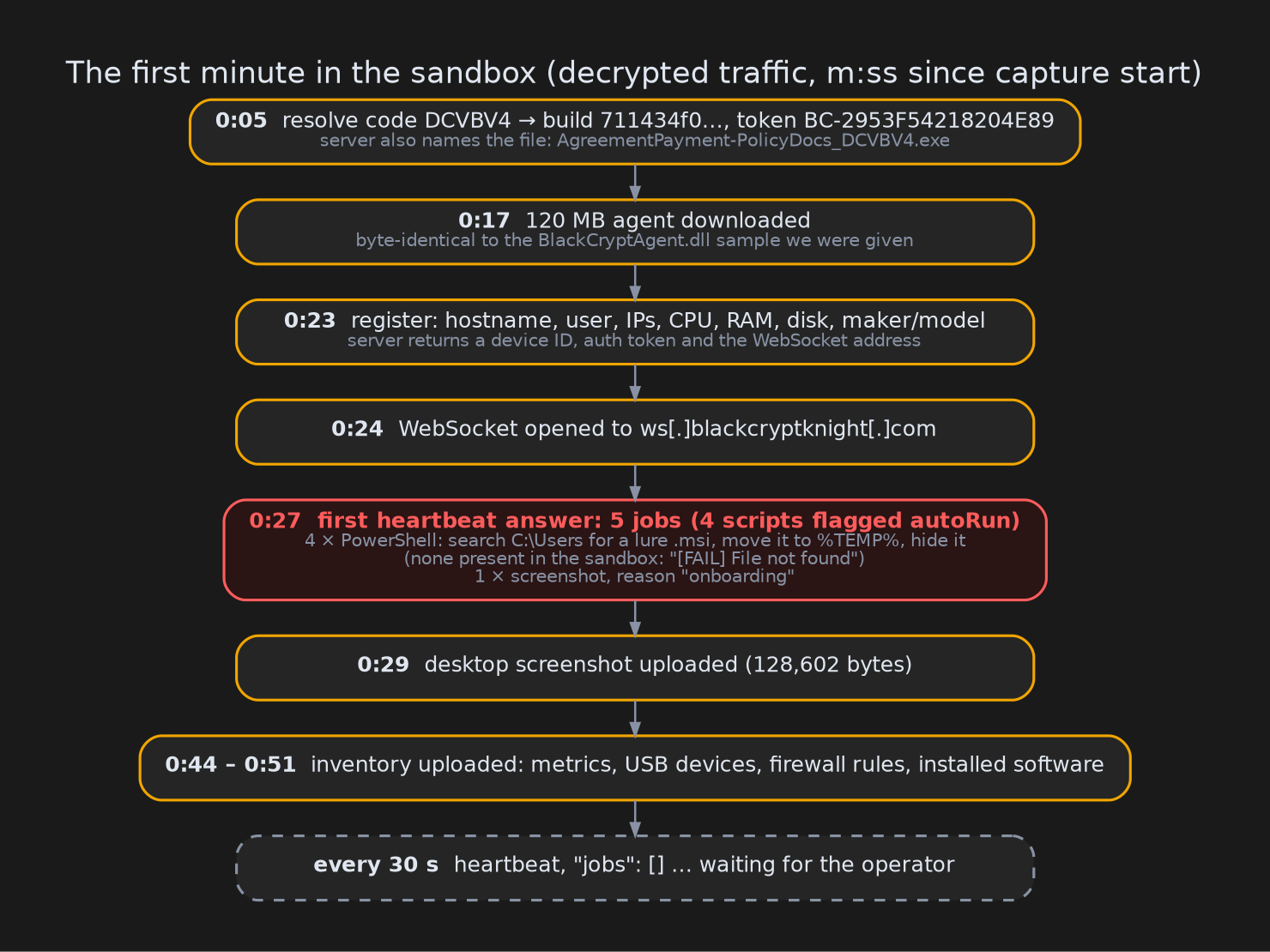
A few things stand out:
- The server named the download
AgreementPayment-PolicyDocs_DCVBV4.exe, a document lure, not an IT tool. The file itself was byte-for-byte identical to the BlackCryptAgent sample we started with. - About four seconds after enrolling, the first heartbeat reply carried five jobs: four scripts flagged to run automatically, plus a screenshot labelled “onboarding”. Four seconds is too fast for a person, and both of our sandbox machines got the same five jobs, which points to an automatic rule for new devices.
- The four scripts were the same PowerShell code with different file names. Each searches every user folder for one file, moves it to the temporary folder and marks it hidden:
$src = Get-ChildItem -Path "C:\Users" -Recurse -Filter "DocuSignPDFReaderInstall_3UFX3T.msi" ... | Select-Object -First 1
if ($src) { Move-Item -Force $src.FullName "$env:TEMP\DocuSignPDFReaderInstall_3UFX3T.msi"
            attrib +h "$env:TEMP\DocuSignPDFReaderInstall_3UFX3T.msi" }
The four files were:
HSA_ConsentDocs_R65EH7.msiDocuSignPDFReaderInstall_3UFX3T.msiAgreementPayment-PolicyDocs_DCVBV4.msiAdobeNewInstallVersion_RLR3KT.msi
These look like the installers a victim would have downloaded and double-clicked: a “DocuSign PDF reader”, an “Adobe update”, “HSA consent documents” and a “payment agreement”. The operator’s first move on a new machine is to search the user folders for those files and hide them. In our sandbox the lures weren’t there, so each script reported “[FAIL] File not found”, but the intent is written right into the script.
No legitimate IT tool needs to find and hide the installer that put it there. That one detail turns “odd RMM software” into remote-access malware. It also gives us the campaign’s themes and three more enrollment codes (R65EH7, 3UFX3T, RLR3KT), one for each lure.
Is it a known family?
KesaKode, Malcat’s service that matches code against known malware, scored the Agent 37% similar to a family called TrustConnect. Genuine TrustConnect samples score 100%. The match came entirely from text strings, not from code.
We compared the decompiled source against two TrustConnect/SoftConnect samples we had analysed before. The designs are different: different message formats, different features (TrustConnect has keyboard and mouse control, BlackCrypt doesn’t), and most of the matched strings don’t even appear in those samples. The overlap looks like generic RMM wording, so we don’t attribute BlackCrypt to TrustConnect. It’s possible newer TrustConnect builds we haven’t seen share more.
What we couldn’t see
- The lure installers themselves. We only know their names from the operator’s scripts and from the file names VirusTotal records for files signed with these certificates. We don’t know whether they carry the Stub, the Agent or something else. The Agent can read the code from its own file name too, so it doesn’t strictly need the Stub. The served file
AgreementPayment-PolicyDocs_DCVBV4.exematches the lure nameAgreementPayment-PolicyDocs_DCVBV4.msiclosely. - What happens after onboarding. The sandbox ran for a few minutes. After the five automatic jobs, the server only sent empty heartbeats. Whatever an operator does by hand later, such as live shells or extra tools, we didn’t observe.
- Who is behind it. Apart from the operator’s login page on the C2 domain, we found no public trace of BlackCrypt Labs, and nothing ties that panel to the certificate’s signer.
- Side effect of testing: our two sandbox machines are now “devices” in the operator’s panel, complete with screenshots of a sandbox desktop.
Advice
For everyday users: a DocuSign document never needs you to install a “PDF reader”, and Adobe updates don’t arrive as email attachments or odd download links. If opening a “document” means running an installer, stop. A valid signature only tells you who paid for a certificate, not whether the program is honest.
For defenders:
- Look for a service named BlackCryptAgent (“BlackCrypt RMM Agent”), the folder
C:\Program Files\BlackCrypt Labs\andC:\ProgramData\BlackCrypt\. The program inside keeps its download name, so expect something document-like, such asAgreementPayment-PolicyDocs_DCVBV4.exe, notBlackCryptAgent.exe. - Look for the mutex (a named lock a program uses to make sure only one copy runs)
Global\BlackCryptRmmAgentSingletonand processes started with--session-task. - Look for scheduled tasks named
BlackCrypt-System-<id>orBlackCryptSessionTask_<id>. - Alert on executables named
*_XXXXXX.exe(6 letters/digits) signed by “C&P Global Investors LLC”. - Block the domains and IP below. The main domain sits behind Cloudflare (a service that hides the real server behind its own addresses), but the WebSocket host resolved to a non-Cloudflare address.
- If you allow RMM tools, keep an allow-list. Any RMM agent your IT team didn’t deploy is an incident.
IOCs
Indicators of compromise (IOCs) are the hashes, domains and other traces you can search for in your own logs.
| Type | Value |
|---|---|
| SHA256 (Stub, new) | f58b67e61ee947afd2e9e45f7ecd392d5fedc8f6b29a3d2ec5a323e38aba253c |
| SHA256 (Agent 4.2.1.36) | 7206a66435b45db34e7772297b192d296e3206bedf0a854f1593717f6545285b |
| SHA256 (Agent 4.2.1.35) | bb5c49eaa94615f7d75cfa80afb8e79b12da2defc47d9b9c53d7602e7171b668 |
| SHA256 (Stub, Sept 2026) | 971492297864b72dbfbede769f1ea6472ad80d911404636d14d4fa5babdc68c4 |
| C2 (command-and-control) domains | blackcryptknight[.]com, ws[.]blackcryptknight[.]com, devicehubcloud[.]com, apinetsolworkspace[.]network |
| C2 IP (WebSocket) | 89.117.54[.]201 |
| URL paths | /api/build/distribution/<CODE>/resolve, /api/build/<id>/download, /api/agent/register-build, /api/agent/heartbeat/<id>, /api/ws |
| Lure file names | HSA_ConsentDocs_R65EH7.msi, DocuSignPDFReaderInstall_3UFX3T.msi, AgreementPayment-PolicyDocs_DCVBV4.msi/.exe, AdobeNewInstallVersion_RLR3KT.msi |
| Enrollment codes | DCVBV4, R65EH7, 3UFX3T, RLR3KT |
| Service / mutex | BlackCryptAgent (“BlackCrypt RMM Agent”); Global\BlackCryptRmmAgentSingleton |
| Certificates | “C&P Global Investors LLC”: Sectigo EV serial 9001f32af788d990fbff26198bb6c437; DigiCert serial 0dba9fa359f36a77d30f57a683dd8064 |
| Sandboxes | Triage 261010-nztl4styht (live chain), 261010-nw8lvsvz4m (Agent), 261010-nzhvlsct5l (bad code), 261009-3tvdsaeh57 (earlier Stub run) |
Wrapping up
BlackCrypt looks like an IT product on purpose: a version number, a service description, polite error messages telling you to “contact your administrator”. The code alone could almost pass. It took letting the operator’s server talk to a sandbox to see the first thing it does with a new machine: go looking for the fake DocuSign installer to tidy it away, take a screenshot and wait.
Thanks for reading, and stay safe.