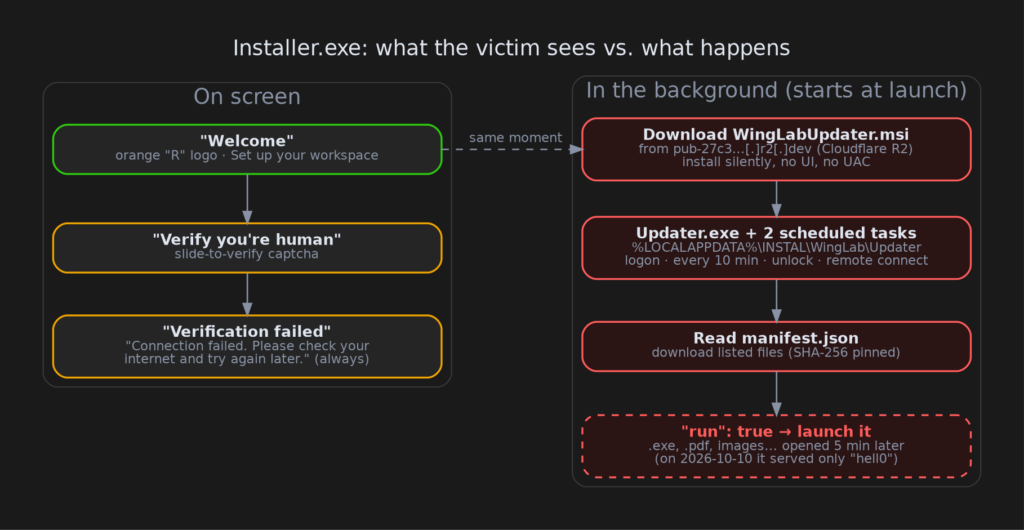
TL;DR: A file called Installer.exe, signed with a brand-new EV certificate, shows a "Verify you’re human" slider that is built to fail every time. While you wrestle with it, the program has already downloaded and silently installed a second, differently signed package. That package plants an "updater" in your user profile and re-runs it every ten minutes. The updater does whatever a file on a Cloudflare R2 storage bucket tells it to, including downloading and launching new programs. When we looked, the bucket was only serving a test file that says hell0. The machinery is armed and waiting for a payload.
- The lure: an orange "R" logo, "Welcome — Set up your workspace", then a slide-to-verify captcha that always ends in "Connection failed".
- The trick: the real work starts the moment the window opens, before you click anything.
- The persistence: two scheduled tasks named "INSTAL WingLab …" that run at logon, every 10 minutes, on unlock and on remote-desktop connect.
- The capability: remote "download this and open it", with
.exeon the allowed list. - Two signers: EV "HOLLIDAY DIGITAL LLC" on the installer, and an individual’s SSL.com certificate ("Evelyn Paredes") on the updater.
But it’s signed!
Code signing is a digital seal: it tells Windows who published a program and that nobody changed it afterwards. It says nothing about whether that publisher is honest. This installer carries an Extended Validation (EV) certificate issued by GlobalSign to HOLLIDAY DIGITAL LLC on 2026-09-16. The sample was built on 2026-10-01 and signed the next day.
A brand-new certificate that is immediately used to sign a product with no real existence is a pattern we see again and again with signed malware. The second-stage installer and the updater it drops are signed by a different identity: an individual certificate from SSL.com issued to Evelyn Paredes. Two unrelated signers in one chain is itself a red flag. Both certificates have been reported to their CAs and added to the CertGraveyard.
What you see
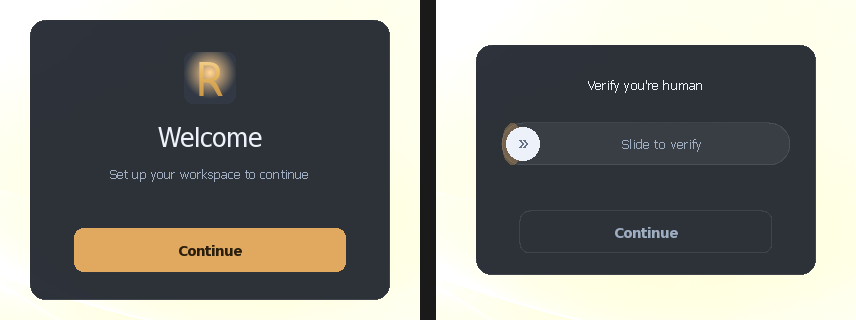
You click Continue, you’re asked to prove you’re human, you drag the slider… and after about a second you get "Verification failed — Connection failed. Please check your internet and try again later."
We checked the code that runs the slider. There is no success path. Once "Verifying" begins, a timer counts up and then unconditionally flips the "failed" flag. No matter what you do, the answer is no. The fake error pushes you to give up, or to try again a few times, while the real work finishes behind it.
Oddly, the program is full of text for an "interactive aerodynamic design" tool called WingLab (lift, drag, Reynolds number), and it carries an 18.9 MB table of genuine-looking aerodynamics numbers. We checked the table byte by byte: it’s ordinary numbers, not a hidden payload. That aero screen never showed in any of our runs. It’s set dressing that makes the file look like a real, heavy application.
What actually happens
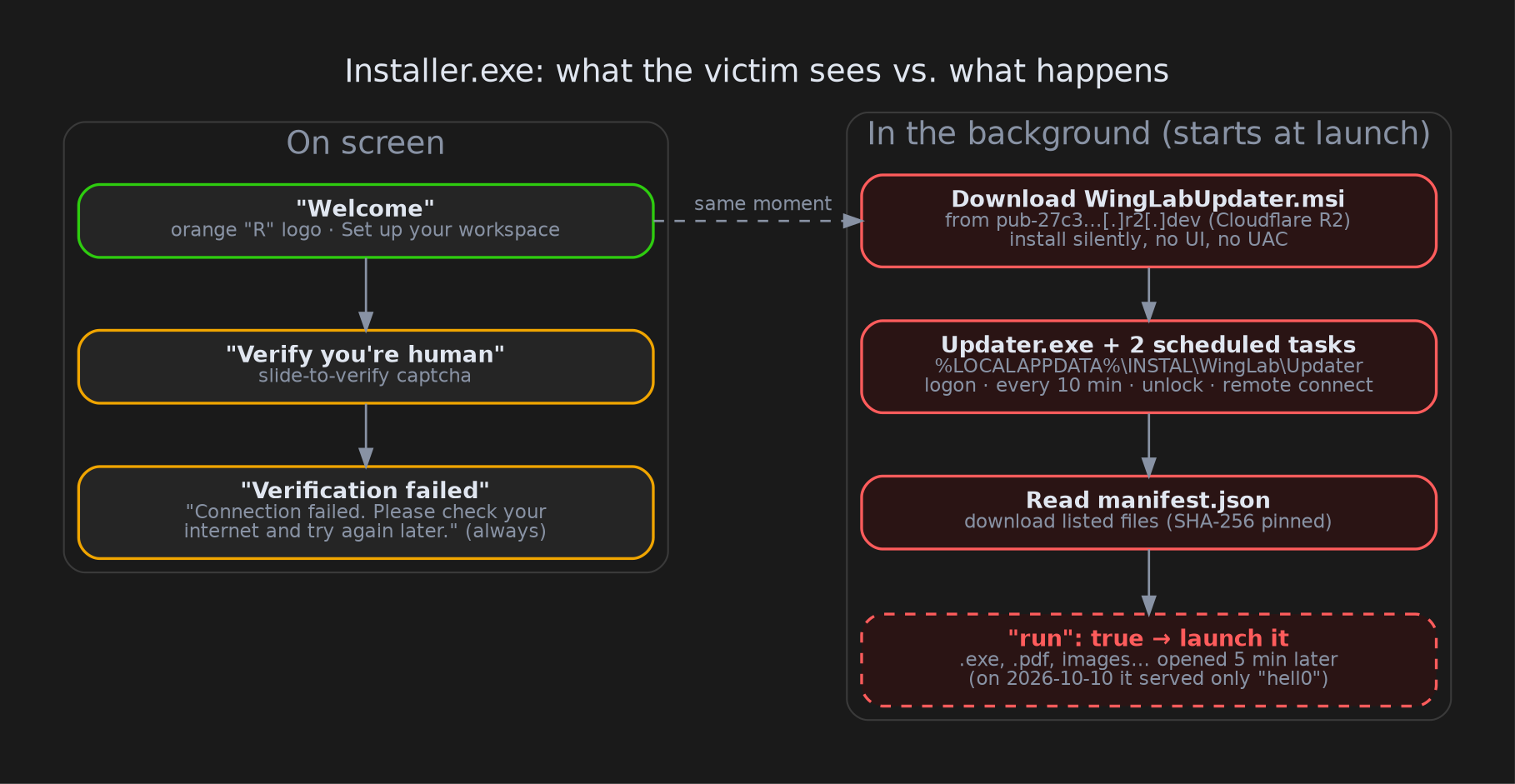
As soon as the window appears, the program starts a background thread. It downloads WingLabUpdater.msi from a public Cloudflare R2 storage bucket (R2 is Cloudflare’s file hosting; "public bucket" means anyone with the link can download from it). It checks that the MSI is the one it expects, then installs it silently (no setup window, no progress bar). Everything goes into your own user folder, so Windows doesn’t ask for administrator permission either.
We confirmed this in three places:
- in the code;
- in our own sandbox, where a log file recorded "starting self-heal" while the screen still showed "Welcome";
- in public sandbox runs on ANY.RUN and Triage, which both saw the MSI being fetched and installed.
The MSI drops Updater.exe into %LOCALAPPDATA%\INSTAL\WingLab\Updater\ and creates two scheduled tasks. A scheduled task is Windows’ built-in alarm clock for programs. These two fire when you log in, every ten minutes, when you unlock the PC, and when someone connects over Remote Desktop.
The "updater" is a remote control
Every time it runs, Updater.exe downloads a small instruction file, manifest.json, from the same R2 bucket. The manifest lists files: where to fetch each one, its fingerprint (a SHA-256 hash, so the file can’t be swapped in transit), where to save it, and a run flag. When run is true, the updater waits five minutes and then opens the file the way a double-click would. Allowed types include .exe, PDFs, images and text files.
Put plainly: whoever controls that bucket can put a program on every infected PC and start it, simply by editing one file. The updater sends nothing about your machine with its request, so every infected PC receives exactly the same instructions at the same time.
It’s tidy work. The updater refuses files from any other website, keeps everything inside its own INSTAL\WingLab folder, verifies every download, and its tasks are visible rather than hidden. That’s how a real updater behaves. What it is not is something you agreed to install. It arrived behind a captcha that can’t be passed and an error message that isn’t true.
What it was serving: "hell0"
A copy of Updater.exe had been submitted to the public Triage sandbox on its own, and that run caught the live traffic. Decrypting it showed the manifest as of 2026-10-10:
{"version": 20261001232313,
 "files": [{"name": "1.txt",
            "dest": "localappdata/bin",
            "size": 5,
            "action": "replace",
            "run": false}]}
The file 1.txt contains the word hell0. That’s a pipeline test: someone checking that the delivery system works end to end. No program was being pushed when we looked. That’s good news for anyone already infected today, and bad news for tomorrow: one edit to that manifest arms every installed copy within about ten minutes.
What we couldn’t see
- The real payload. None was being served when we looked. We did not poll the attacker’s bucket ourselves, since that means contacting their infrastructure.
- How victims get the file. The fake-captcha style suggests malicious ads or fake download pages, but we haven’t seen the delivery.
- The tasks firing for real. Sandbox runs are too short for the ten-minute timer. Task behaviour comes from reading the code, which we checked twice.
- Who’s behind it. We found no overlap with earlier samples we’ve analysed (certificates, infrastructure or code).
What should I do?
Regular users:
- A "verify you’re human" check inside a program you just downloaded is a warning sign. Real captchas live on websites, not in installers.
- If you ran an
Installer.exelike this, look in Task Scheduler for tasks starting with "INSTAL WingLab" and for a folder%LOCALAPPDATA%\INSTAL\WingLab. Uninstall "WingLab Update Infrastructure" from Apps & features, delete the folder and the tasks, and run a full scan.
Defenders:
- Hunt for scheduled tasks named
INSTAL WingLab Update Check/INSTAL WingLab Apply Pending Update(an older build may have usedInstaller Update Check/Installer Run Pending). - Hunt for the HKCU key
Software\INSTAL\WingLab\UpdaterInfrastructureand User-AgentsWingLab Bootstrap/1.3/WingLab-Updater/2.4. - Block the R2 bucket host below. Consider alerting on any
*.r2.devdownload made by a program in a user-profile folder.
Indicators
| Type | Value |
|---|---|
| SHA256 (Installer.exe) | 560f576d60dfb1e61eed758e06910b32a42145ecb8271f97fdc76789f6a27659 |
| SHA256 (WingLabUpdater.msi) | b50aedc0305444d6b3a2e71ae71bcb99f415af72570b099b7c025b7e4363d42c |
| SHA256 (Updater.exe) | 164b98f315ba8ed9fcd011843c3f55ead965f199e79c692b085da2a5a731566d |
| SHA256 (UpdaterTaskCA.dll) | f09f121d8a8116a6f875702224b12b242d65523ce1099eabc857db9ced4b0c2d |
| Host | pub-27c3bfa2dbc541f9917174d45462cd0e[.]r2[.]dev |
| URL | hxxps[://]pub-27c3bfa2dbc541f9917174d45462cd0e[.]r2[.]dev/WingLabUpdater[.]msi |
| URL | hxxps[://]pub-27c3bfa2dbc541f9917174d45462cd0e[.]r2[.]dev/manifest[.]json |
| Scheduled tasks | INSTAL WingLab Update Check, INSTAL WingLab Apply Pending Update |
| Folder | %LOCALAPPDATA%\INSTAL\WingLab\ |
| Registry | HKCU\Software\INSTAL\WingLab\UpdaterInfrastructure (Version = 1.7.0) |
| Mutexes | Local\INSTAL.WingLab.UpdaterBootstrap, Local\INSTAL.WingLab.Updater |
| User-Agents | WingLab Bootstrap/1.3, WingLab-Updater/2.4 |
| Cert (installer) | HOLLIDAY DIGITAL LLC, GlobalSign EV, serial 28357E2527944E5B7D3D2635 |
| Cert (MSI + updater) | Evelyn Paredes, SSL.com, serial 2FE4486D9B0541102A11F02F58A28755 |
About this post
This analysis and write-up were produced by Claude (Opus 5.5), working as an agent in Claude Code on a REMnux analysis VM. Tools used: Malcat, capa, objdump, msitools, tshark, a sandboxed Wine environment, ANY.RUN and Recorded Future Triage.
Stay safe, and be suspicious of any installer that asks whether you’re human. Public sandbox runs: ANY.RUN 475c2a83-7efd-485d-aa70-468ccace85e9, Triage 261010-x2rpzazvhs and 261010-x188mazvgt.