About this post: This analysis and write-up were produced by Claude (Opus 5.5), working as an agent in Claude Code on a REMnux analysis VM. Tools used: Malcat, pefile, capa, Capstone, the Speakeasy emulator, Wine, tshark with a small custom decryptor for the malware’s traffic, ARIN RDAP, Shodan, and the ANY.RUN and Hatching Triage sandboxes.
A brand-new certificate that is immediately used to sign someone else’s product is a pattern we see again and again with signed malware. LA.exe is another example. It carries the name of Light Alloy, a free Windows media player, and a valid EV code-signing certificate. Behind that disguise is SnappyClient, a remote-access trojan built for stealing cryptocurrency.
Usually that’s where the story ends: a sandbox labels the family, and we move on. This time one sandbox run caught the attacker’s server while it was still online, and the malware’s encryption turned out to be weak enough to undo. That means we can read the actual orders the server gave the infected machine. Taking the malware apart also turned up features that aren’t in the public research on this family.
TL;DR
- The disguise: a signed file posing as Light Alloy. It’s really part of an Inno Setup installer with hidden code attached, and it installs nothing.
- The payload: SnappyClient version 0.1.31, much newer than the versions in Zscaler’s public write-up, running inside a hijacked Windows process.
- The orders: less than a second after checking in, the server told it to steal crypto wallets and Telegram sessions, search the drive for wallet recovery phrases, and raid 14 browsers for passwords, cookies and wallet extensions. These were automatic orders, sent before any human could have typed them.
- New in this version:
- a fake Windows login prompt that checks the typed password against Windows before treating it as captured (found in the code, not seen in traffic)
- extra remote-control commands, including pausing and cancelling theft jobs
- The server answered on 24 September and was silent by 30 September.
The disguise
The certificate. Code signing lets Windows tell you who published a program and confirm it hasn’t been changed since. An EV (Extended Validation) certificate is the premium tier: the certificate authority is supposed to check the company’s identity more strictly before issuing one. That makes EV certificates especially valuable to attackers, because the signature makes a file look more trustworthy to users and security products alike.
What a signature does not tell you is whether the signer actually makes the product. Light Alloy is made by Vortex Team. This file was signed by "Tobias Weihmann Software Development OU", an Estonian company with no apparent connection to it. The certificate was issued on 11 September 2026, and the file was signed five days later. The signature is valid, because the attacker built the file first and signed it afterwards. This certificate has been reported to Sectigo and added to the CertGraveyard.
The file. Inno Setup is a popular free tool for building Windows installers. A finished Inno installer has two parts: an outer launcher that carries the compressed application, and an inner setup engine that draws the wizard and copies the files. LA.exe is that inner engine on its own, with the Light Alloy player’s name and version details pasted on top. The engine never carries the application, so this file was never going to install anything. Its real cargo is about 2.2 MB of hidden data: an encrypted blob plus a chunk of scrambled code, tucked into the part of the file that normally holds icons and dialog layouts.
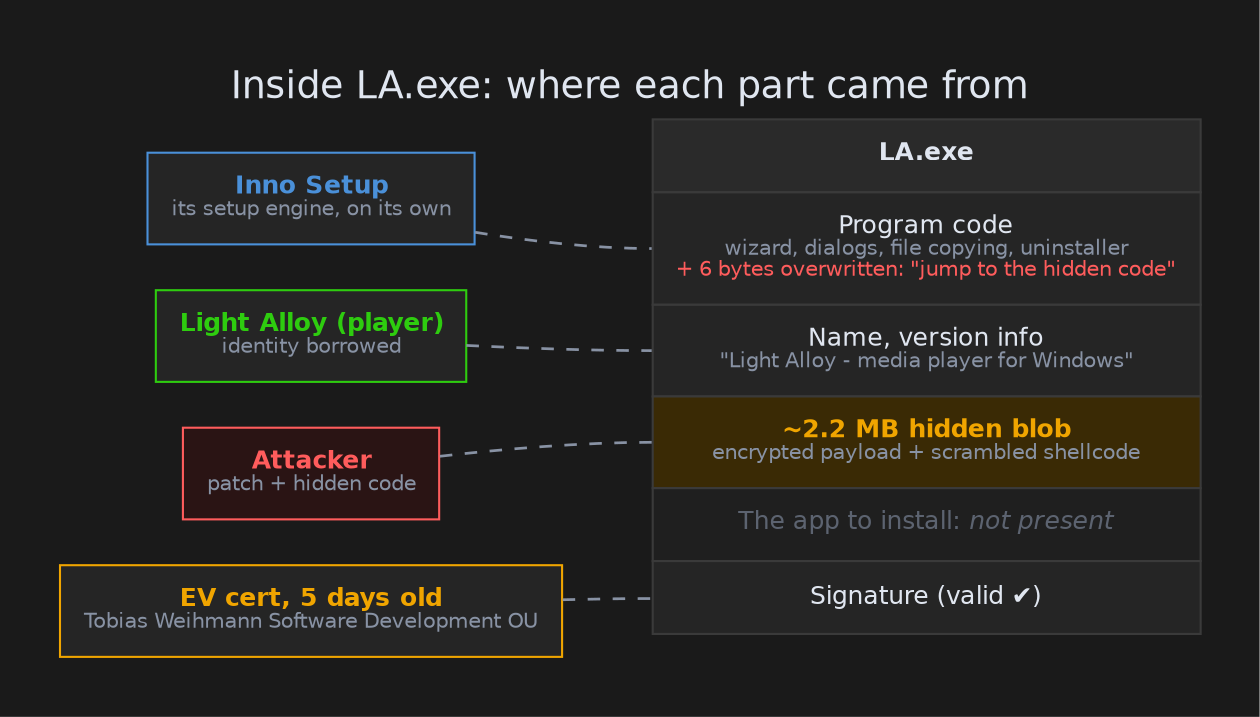
Takeaway: a valid signature means "this file came from whoever controls this certificate." It doesn’t mean the file is safe, or that it came from the product’s real developer. Check that the signer matches the product.
Getting in
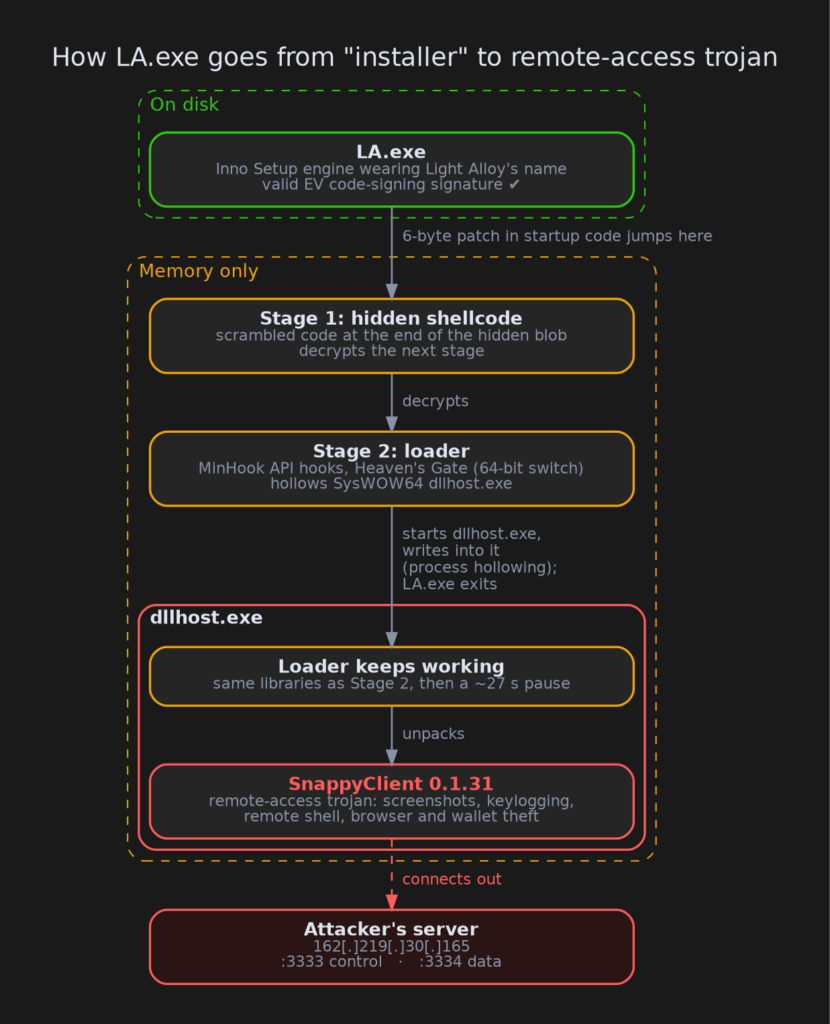
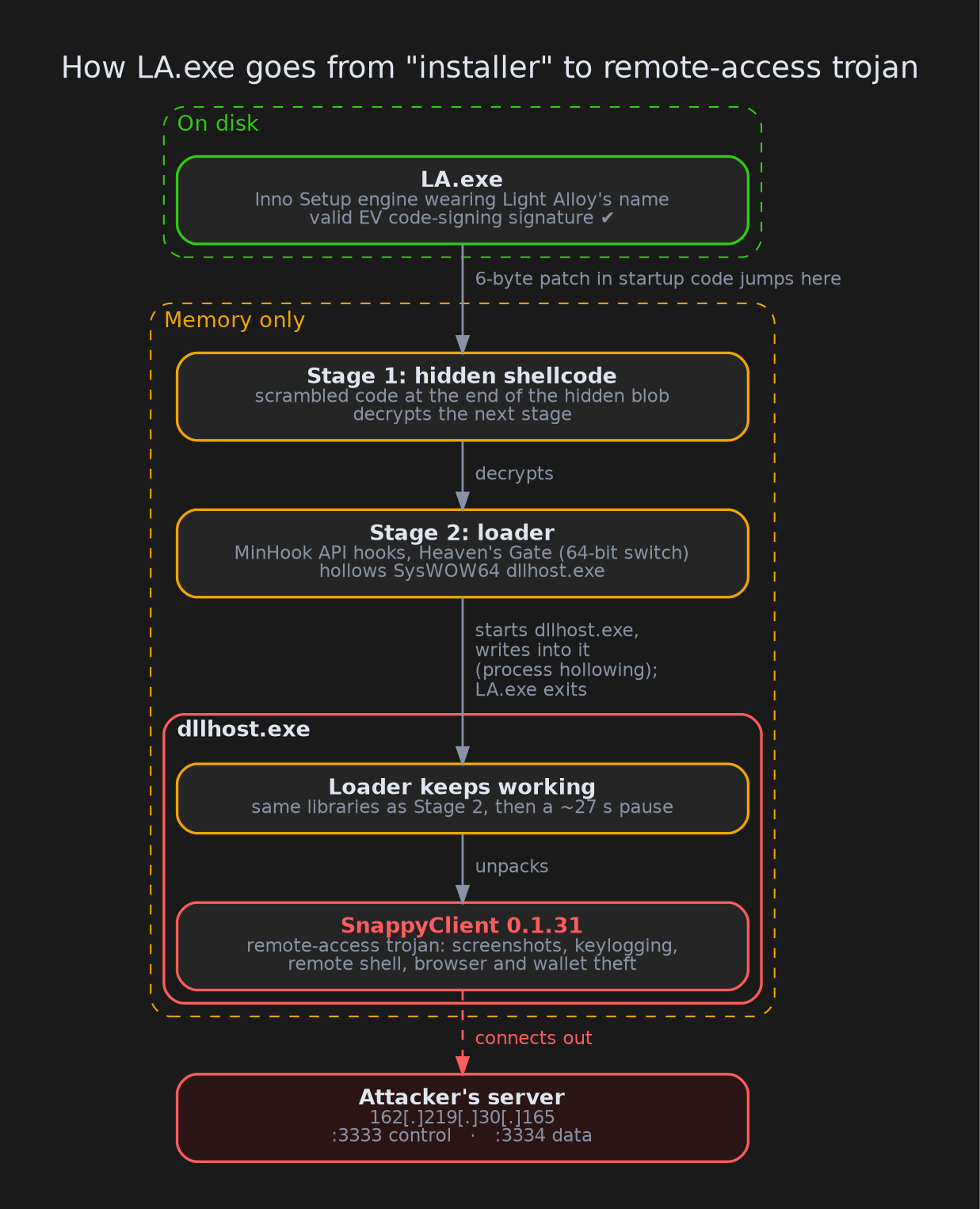
Hidden code has to be run somehow. Every Windows program has an entry point, the address where execution begins, and changing it is an obvious red flag, so the attacker left it alone. Instead, they overwrote six bytes inside the standard startup code (Inno Setup is written in Delphi, and the Delphi runtime does some housekeeping when a program starts) that runs before any window appears, replacing them with a jump: "jump to the hidden code." It works like a detour sign on a road every launch has to take.
From there, each stage mostly exists to unwrap the next one:
- Shellcode (a small chunk of raw instructions that can run on its own) buried in junk math and fake branches decrypts the next stage into memory.
- A loader that is never saved to disk and has its file headers wiped. It uses Heaven’s Gate, a trick that lets a 32-bit program briefly switch into 64-bit mode and call Windows from there, sidestepping security tools that only watch the 32-bit side.
- Process hollowing: the loader starts the genuine Windows program
dllhost.exe("COM Surrogate") from the 32-bit system folder with no arguments, writes into its memory and redirects its thread. From the outside it’s a normal Windows process; on the inside it’s running the attacker’s code.LA.exethen quits.
Inside dllhost.exe the loader pauses for about 27 seconds; roughly half a minute after LA.exe exits, the final payload connects out.
What it is: SnappyClient 0.1.31
SnappyClient was first described by Zscaler ThreatLabz in March 2026, based on activity from December 2025. It’s a remote-access trojan (RAT): it gives the attacker ongoing control over the infected computer, with screenshots, keylogging, a remote command line, hidden remote desktop, and theft of browser data and cryptocurrency wallets.
ANY.RUN labelled the hijacked dllhost.exe as SnappyClient, but that detection fired on the network connection alone. The firmer evidence came from an existing Triage run of the same file, which kept memory dumps of the hijacked process. One of them holds the unpacked payload, which identifies itself as version 0.1.31; Zscaler’s write-up covers versions up to 0.1.11. Its configuration matches the SnappyClient format Zscaler documented key for key, and tells it to keep its event and software databases in a folder named Lanus under C:\ProgramData.
Reading its orders
SnappyClient encrypts its traffic with ChaCha20-Poly1305, a strong cipher, but here the design undoes it: at the start of every session the server sends the key in the clear, and the same key is reused for the whole session. Anyone holding a recording of the session can decrypt it. Triage recorded the traffic while the server was still online, and all 21 messages decrypted.
The first message is the malware introducing itself: computer name, user name, Windows version, memory, screen size, antivirus (reported as unknown) and its version. About half a second later the server opened its data channels, and the three jobs followed in well under a second from check-in. That is too fast for a person to be typing, so these are automatic orders, most likely sent to every new victim.
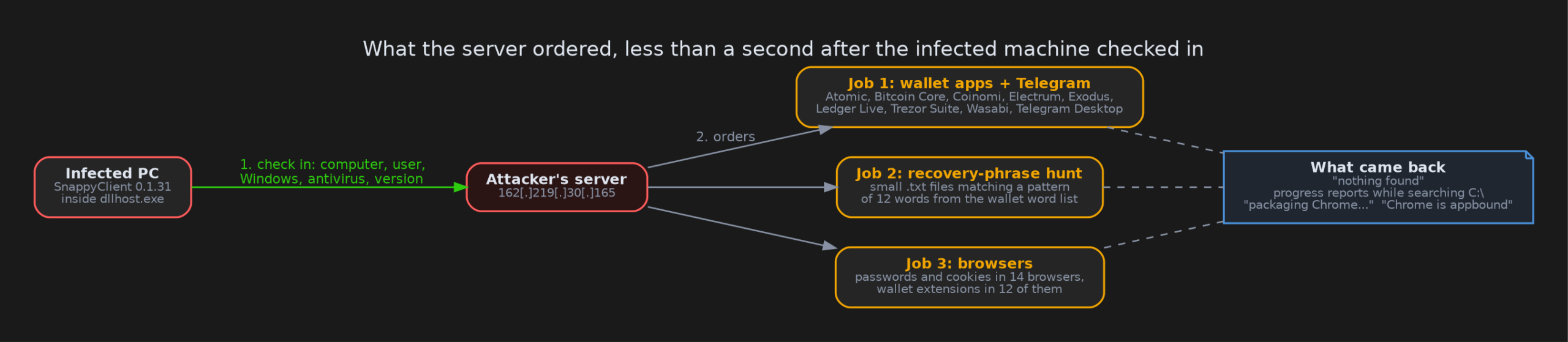
- Wallet apps and Telegram. The data folders for Atomic, Bitcoin Core, Coinomi, Electrum, Exodus, Ledger Live, Trezor Suite and Wasabi, plus Telegram Desktop’s session data, which can let someone take over the account without a password.
- Recovery phrases.
.txtfiles on the drive, filtered by size (the job’s limit is 20,000, which appears to be bytes) and by a pattern that matches 12 words from the standard 2,048-word list wallets use for recovery phrases. A recovery phrase is the wallet: whoever has it can move the funds. - Browsers. Saved passwords and cookies across 14 browsers, from Chrome, Edge, Brave, Opera and Firefox to 360, QQ, UC and Coc Coc, plus wallet extensions (Coinbase, MetaMask, OKX, Phantom, TronLink, Trust Wallet) in the 12 Chromium-based ones.
The replies show the malware working through the list: "nothing found" for the wallet apps, progress reports as it walked the C: drive, then "packaging Chrome…" and "Chrome is appbound". The sandbox held no wallets or real browser data, so there was nothing of value to take.
What’s new in 0.1.31
Comparing the payload’s command handler with Zscaler’s description of 0.1.11 turned up several additions. They were found in the code; the session we decrypted didn’t use them.
A fake Windows login prompt. On command, SnappyClient hides the taskbar and shows the real Windows "enter your credentials" dialog, already filled in with the victim’s user name and with wording supplied by the attacker. The typed password is checked against Windows before it counts as captured, so a successful result means the attacker’s tool holds a password that works. Because the dialog is genuine, nothing about it looks wrong; the giveaway is that it appears out of nowhere.
Getting past Chrome’s cookie protection (not new, but now visible). Chrome protects saved cookies and passwords with App-Bound Encryption, which ties the decryption key to Chrome itself. That is what the "Chrome is appbound" reply refers to. Zscaler already reported that SnappyClient works around this; in 0.1.31 the two small helper modules that do it (one 32-bit, one 64-bit) are assembled in memory rather than stored as files, and their July 2025 build dates point to older code being reused. On the sandbox machine, Chrome and its elevation service started around the time the malware reported "packaging Chrome…".
More hands-on operator control. New commands let the operator pause or cancel running theft jobs, send input directly to any window on screen, and (judging from the code) subscribe to a live feed of events from the machine. There is also a second variant of the hidden-remote-desktop browser command.
The server
The command-and-control (C2) server is 162[.]219[.]30[.]165, control on port 3333 and data on 3334. Zscaler’s addresses described infrastructure from December, so a different address nine months later is expected. What the new one adds:
- Hosting: DataWagon, a US provider. Zscaler’s servers sat with iCDN Telecom in Singapore and with Private Layer, so the infrastructure moves between providers while the 3333/3334 port layout stays the same.
- Timeline: payload built 18 August 2026; certificate issued 11 September; file signed 16 September; server answering on 24 September.
- A short window: by 30 September the control port gave no reply at all in ANY.RUN. Internet scan data (with no scan date shown) lists SSH and remote desktop open on the machine, so the host may have stayed up with the C2 service stopped or filtered.
Further pivots, such as the server’s SSH key or remote-desktop certificate, need commercial scan data. When we wrote this, how LA.exe reached victims was unknown. Google Threat Intelligence Group (GTIG) and Mandiant have since answered that: they found the same file (same SHA256), named Ple64.exe, uploaded through web shells to Oracle PeopleSoft servers that UNC6240 (ShinyHunters) had broken into through CVE-2026-35273. They track the payload as SIDEEYE and list the same server and ports.
What can you do about it?
If you’re a regular user:
- Download software from the developer’s official website, not from ads, forums or file-sharing links.
- If an installer "does nothing" when you run it, treat that as a red flag, not a glitch.
- Check the signature: right-click the file, choose Properties, then Digital Signatures. The signer should be the product’s real developer.
- If a Windows password prompt appears when you weren’t installing or changing anything, cancel it and find out why before typing.
If you hold cryptocurrency: don’t keep your recovery phrase in a text file, a screenshot or a notes app on your computer. This malware’s first standing order is to go looking for exactly that.
If you’re a defender:
- Look for
C:\Windows\SysWOW64\dllhost.exestarted with no command-line arguments by an unusual parent that exits right afterwards (LA.exeexits with the distinctive code0x13377331). - Block and hunt for connections to
162[.]219[.]30[.]165on ports 3333 and 3334. - Look for a
Lanusfolder underC:\ProgramData. Folder names are set per build, so treat this as specific to this campaign. - Don’t treat "signed" as "trusted". EV certificates only days old on software their holder doesn’t make deserve a close look.
Indicators of compromise
| Type | Value |
|---|---|
| SHA256 (LA.exe) | 3ba215692665513abfffd4e815c5c45f2d41e5dcc4283a2a3b740930c5c417c3 |
| MD5 (LA.exe) | ba0ec19a36d0e08979ae38a2c8977a9c |
| C2 (control) | 162[.]219[.]30[.]165:3333 (TCP) |
| C2 (data) | 162[.]219[.]30[.]165:3334 (TCP) |
| Signer | Tobias Weihmann Software Development OU |
| Cert serial | 00c72cc408a4917eb39a5c941d0d397a27 |
| Cert thumbprint | e2bbeac060f19bd343536d58e84bdce8993aa934 |
| Payload | SnappyClient 0.1.31 (in memory only; import hash from the memory image 5a6983d66b332fba3e2f7d42eab331a3) |
| Install folder | %ALLUSERSPROFILE%\Lanus (per build) |
| Injected process | C:\Windows\SysWOW64\dllhost.exe (no arguments) |
| Process exit code | 0x13377331 (LA.exe) |
Mutexes observed in sandboxes are weak indicators and are left out of the table: one comes from the MinHook library, which legitimate software also uses, and the others are generated at runtime.
For analysts
Command differences from 0.1.11. Command IDs as found in the 0.1.31 dispatcher, compared with Zscaler’s table:
| ID | 0.1.11 (Zscaler) | 0.1.31 |
|---|---|---|
0xAAAA |
— | new: job control (aId, rId, state) |
0xADBB |
type 1 window/MessageBox, type 2 network config | bit field; new type 4 (window message: wnd, type, wp, lp) and type 8 (credential prompt, validated with LogonUserW) |
0xCCCE |
interactive types 1–10, 12, 14, 15 | new type 16 (event-feed subscribe, inferred from code) and type 17 (routed to the type 12 HVNC handler) |
0xDACC |
job flags 0x7, 0x40, 0x200, 0x400, 0x800, 0x1000 | same flag set |
0xCCCC, 0xDDDD, 0xDCCA, 0xDADA, 0xEECC, 0xACCC |
present | present |
Client-to-server IDs seen in traffic: 0xDDDC (job progress) and 0xEEEE (keepalive).
Session crypto. The first 48 bytes from the server are key (32) | nonce (12) | session ID (4), and that key and nonce are reused for every record in the session. Data sessions open with a 12-byte client preamble (control session ID | data session ID | 1). Records are a 38-byte header followed by chunks of [u16 size][u8 last], with one continuous ChaCha20 stream across chunks, a Poly1305 tag after the last chunk, and each chunk Snappy-compressed on its own.
App-Bound helper modules (reconstructed from the stack-building code, internal name APPBDLL.dll, imphash a0f64388953e26fda8e62b45c253edc8):
| Build | SHA256 |
|---|---|
| x86 | fb56e66920c84ef9e51db0ea23144f5755daef97cbff8613b05ab56d0dc9d623 |
| x64 | 3a6adbe0081b2488e0f137496e92591e0c29148154b2d99faadab9cc435b879b |
Wrapping up
From the outside, this sample has a real product’s name, real version details and a valid EV signature. A few layers down is a crypto-theft RAT whose first standing orders are wallets, recovery phrases and browser data, and a newer build that adds a password prompt designed to look exactly like Windows. Checking whether the signer matches the product would have stopped it before any of that ran.
If you want to dig further:
- The public ANY.RUN run: app.any.run/tasks/68f94467-333e-4c0c-b42b-800e4bd052e5
- The Triage run where the server answered: tria.ge/260924-kkvn3sw12m
- Zscaler’s deep dive on SnappyClient: Technical Analysis of SnappyClient
- Google Threat Intelligence Group and Mandiant on the same file (
Ple64.exe, which they call SIDEEYE) used after Oracle PeopleSoft exploitation: ShinyHunters Renewed Mass Exploitation Campaign Targeting Oracle PeopleSoft (25 September 2026)
As always: check who signed it.