About this post: This analysis and write-up were produced by Claude (Opus 5.5), working as an agent in Claude Code on a REMnux analysis VM. Tools used: Malcat, msitools, osslsigncode, tshark, Censys, ANY.RUN and Triage.
TL;DR
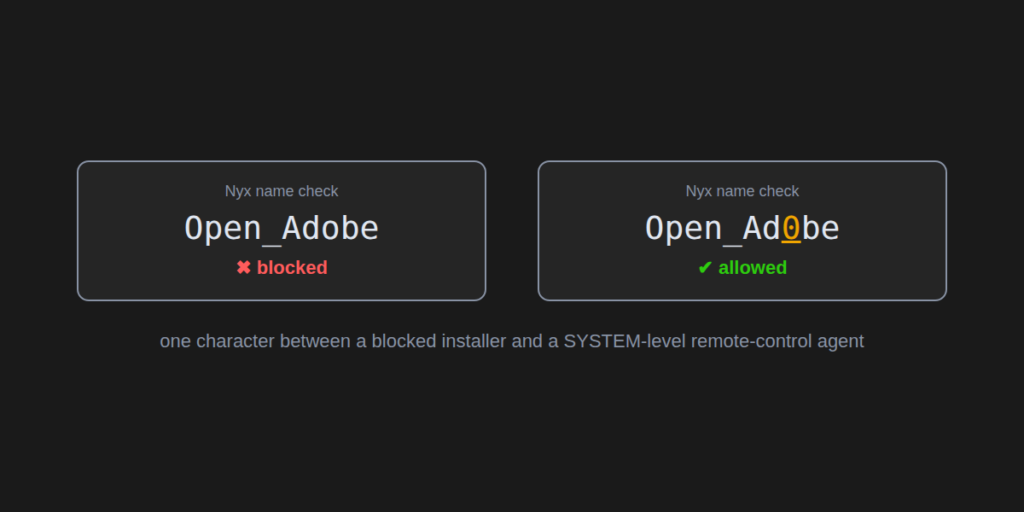
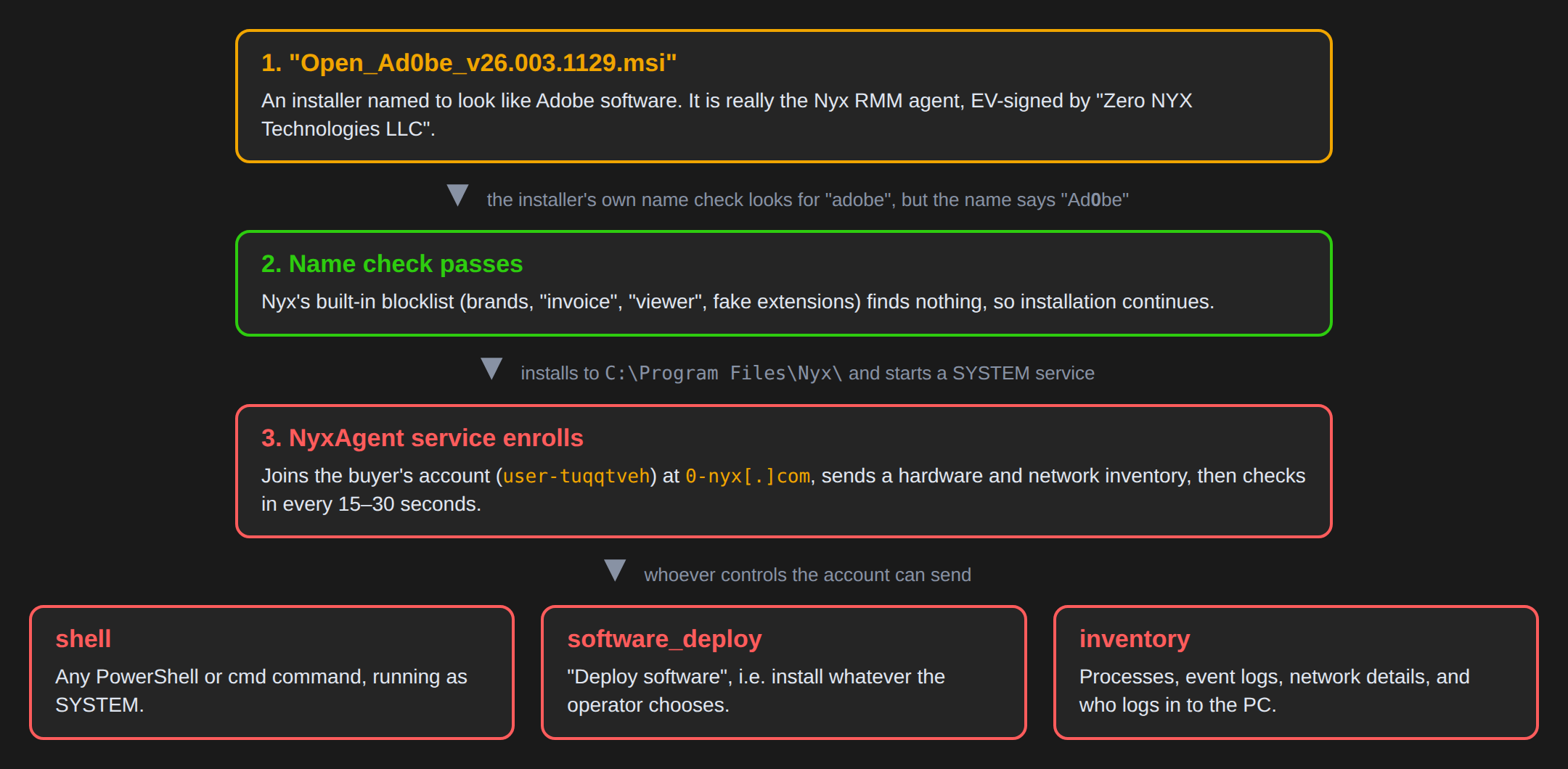
Open_Ad0be_v26.003.1129.msi is named to look like an Adobe installer. It actually installs the agent for "Nyx", a new remote monitoring and management (RMM) product. The agent runs as a Windows service with full SYSTEM rights and lets whoever controls the Nyx account run any command on the PC. Nyx is sold through Telegram and advertises its EV code-signing certificate as a feature. Its installer also contains a name check meant to stop people from disguising it as Adobe, and this file gets past that check by writing "Ad0be" with a zero.
- Disguise: an "Open Adobe" filename on an installer that never mentions Adobe inside.
- Signed: the MSI and the agent carry a valid EV signature from "Zero NYX Technologies LLC", issued on 23 October 2026.
- Remote control: PowerShell and cmd commands as SYSTEM, "software deployment", and inventory of processes, event logs, network settings and logged-in users.
- Server:
0-nyx[.]comon a single OVH server in Poland. In two sandboxes the agent joined the same buyer account,user-tuqqtveh. - Status: the certificate has been reported to the CA and added to the CertGraveyard.
What is an RMM, and why do criminals like them?
Remote monitoring and management tools are what IT departments and managed service providers use to look after many computers at once. They can see every machine, run scripts on it and install software. That is exactly the access an attacker wants, which is why abused RMM agents are a common first step in intrusions.
The attraction is that an RMM agent doesn’t look like malware. It is a "real product" with a website, a support address and a valid signature. Security tools are often reluctant to block it, because doing so might break somebody’s legitimate IT setup.
A product built for the wrong customers
Nyx presents itself as an "Enterprise Remote Monitoring & Management" platform for MSPs. A few things don’t fit that picture. The company behind the certificate, Zero NYX Technologies LLC in Colorado, carries a 2026 state registration number. Its first website certificates date from 12 October 2026, and the code-signing certificate followed on 23 October.
The product is sold through Telegram, which is not how real RMM vendors find enterprise customers. The website also lists "EV code-signed installers" as a selling point. An Extended Validation (EV) certificate is the strongest kind of code-signing identity, and it gives a file instant reputation with Windows SmartScreen. An IT team buying an RMM rarely cares about that. Someone who wants a victim to run a file without warnings cares a lot.
A brand-new company, a fresh EV certificate and a product whose main selling point is "it looks trusted" is a pattern we see again and again with signed malware.
The guard at the door
The most interesting part of this installer is a small script inside it. Before anything is installed, it checks the installer’s own filename against three lists:
- Brands: names like
adobe,acrobat,microsoft,docusign,zoom,anydeskand dozens more. - Lure words:
invoice,document,viewer,scan,payroll, and also words likecrack,loaderandstealer. - Fake extensions: names such as
statement.pdf.msithat pretend to be a document.
If the name matches, the installation stops with the message "Nyx blocked this renamed installer… because it impersonates software or disguises the MSI as a document". The script also writes an NYX_FILENAME_BLOCK_V1 entry into the Windows event log.
On paper this is a sensible anti-abuse measure. In practice it is a simple text search. The check looks for the letters a-d-o-b-e, and the file is named Open_Ad0be_v26.003.1129.msi, with a zero in place of the "o". Nothing on any of the three lists matches, so the installation goes ahead. The error message itself tells a blocked user why the name was refused, so trying spellings until one works takes very little effort.
What gets installed
Once past the check, the installer puts everything in C:\Program Files\Nyx\. The main program, NyxAgent.exe, is a Python program compiled into a Windows executable with a tool called Nuitka. The rest of the folder is the Python runtime it needs.
The installer registers NyxAgent as a Windows service. A service starts with Windows and runs in the background, here under the all-powerful SYSTEM account. If the service crashes, Windows restarts it after a minute. The buyer’s enrollment key and the server address are written to the registry under HKLM\SOFTWARE\Nyx.
Checking in
As soon as the service starts, it contacts 0-nyx[.]com and enrolls the computer. It sends a detailed description of the machine: hostname, Windows version, CPU, memory and disk size, user and domain name, MAC address, network interfaces, gateway, DNS servers, listening ports and Wi-Fi network name.
The server answers with a login token and the name of the account the PC now belongs to. In both sandbox runs this was the same account, user-tuqqtveh, which is tied to the key embedded in this installer. From then on the agent sends a status update every 30 seconds and asks for new commands every 15 seconds. It also keeps a second, long-lived connection open that the server can use to wake it up immediately when a command is waiting.
What the account holder can do
The agent understands a short list of commands:
shellruns any PowerShell command (there is also a cmd.exe route). Because the service runs as SYSTEM, so does every command.software_deployinstalls software the operator picks. We found no separate download code for it, so it most likely runs through the same command execution.process_list,event_logs,network_inforeport what is running, what Windows has logged and how the network is set up.opsbridge_identityreports which user accounts exist on the PC and who logged in last.
The code says the realtime channel has "NO remote desktop / screen control". That doesn’t make the agent harmless. Arbitrary commands as SYSTEM are enough to install anything, including a remote desktop tool, a stealer or ransomware.
What we couldn’t see
In both sandboxes the server accepted the new machine but sent no commands during the few minutes we watched. So we can’t say what the operator of user-tuqqtveh planned to do with the PCs that ran this file. We also couldn’t read the content of the second, always-on connection, because the sandbox decryption keys didn’t cover it. We don’t know how the file was delivered to victims.
What should you do?
If you’re a regular user: Adobe Reader and Acrobat come from adobe.com or your company’s software portal, not from a file sent in an email, chat or ad. If a "PDF viewer" or "Adobe update" asks for administrator rights to install a service, stop and ask for help.
If you’re a defender:
- Service: look for a service named
NyxAgent("Nyx Service") runningC:\Program Files\Nyx\NyxAgent.exe --service. - Registry: check for
HKLM\SOFTWARE\NyxwithEnrollmentKey,ServerUrlandTenantIdvalues. - Network: block and hunt for
0-nyx[.]com,nyx-official[.]topand146.59.115[.]178. Agent traffic goes to/api/agents/enroll,/heartbeatand/commandswith the user agentNyx/3.0. - Unsanctioned RMM: treat any RMM agent your IT team didn’t deploy as an incident, no matter how good its signature looks.
- Signer: block or alert on the signer and certificate serial below.
Indicators of compromise
| Type | Value |
|---|---|
| MSI SHA256 | 51ae32063e291a8401388d8d26c42083f855731cc9de8da024c9067e7b1ec6bf |
| MSI MD5 | a524cf565c48bab3c8ce01e31869c387 |
| NyxAgent.exe SHA256 | ec56368205fb8ccacdbf22f4d5e6942cc335b845c2d9f61f13527ffa00404f74 |
| Signer | Zero NYX Technologies LLC (SSL.com EV Code Signing Intermediate CA RSA R3) |
| Cert serial | 75402ff115e7c654f4aca2f322920f10 |
| Domain | 0-nyx[.]com |
| Domains (same server) | nyx-official[.]top, app.nyx-official[.]top, dl.0-nyx[.]com, hal0[.]es |
| IP | 146.59.115[.]178 |
| URL paths | /api/agents/enroll, /api/agents/heartbeat, /api/agents/commands, /api/agents/ws |
| User-Agent | Nyx/3.0 |
| Service | NyxAgent ("Nyx Service") |
| Registry | HKLM\SOFTWARE\Nyx |
| Mutex | Global\NyxAgentSingleton |
| Enrollment key | dfff52de0044cc68069e83d816a8a7d3a36172f02792f13b670e2df89b50b930 |
| Account | user-tuqqtveh (instance f5475bab) |
Wrapping up
The blocklist in this installer is a good example of why a filter is not the same as a control: the attacker only needs one spelling the filter didn’t think of. It is also a reminder that a "real product" with a valid EV signature can still be the payload. If you’ve seen other Nyx installers, especially ones that show how they reached victims, we’d love to hear about it.