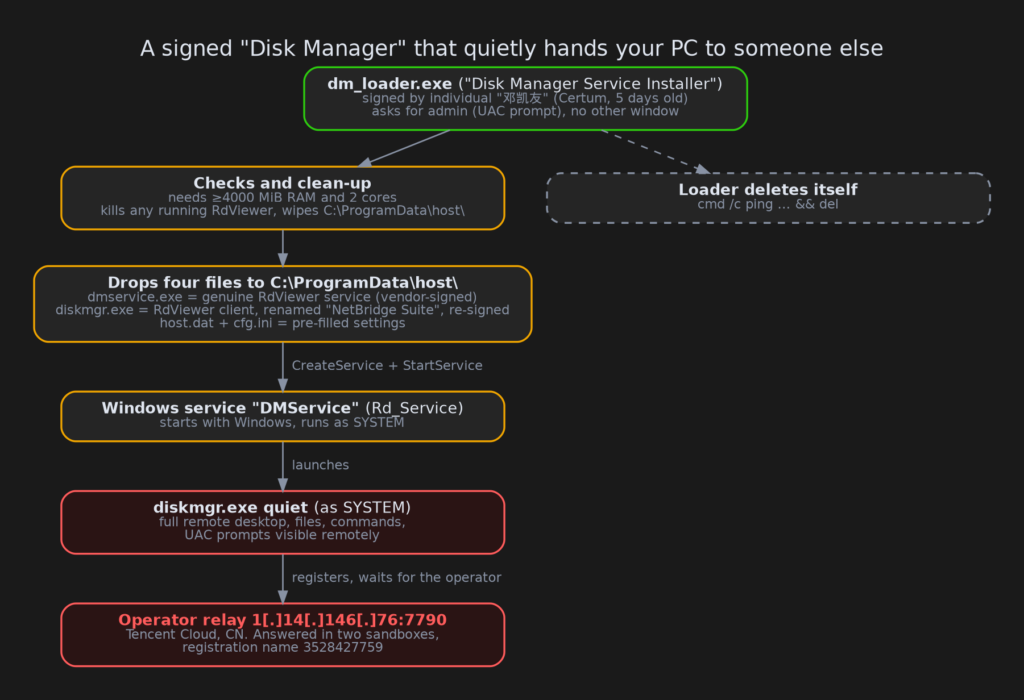
About this post: Thanks to MalwareHunterTeam for flagging this sample. This analysis and write-up were produced by Claude (Opus 5.5), working as an agent in Claude Code on a REMnux analysis VM. Tools used: Malcat, KesaKode, a sandboxed Wine environment with gdb/gcore, Ghidra, Triage and ANY.RUN.
TL;DR
dm_loader.exe calls itself a "Disk Manager Service Installer" from "SelfDev Studio". It carries a valid code signature. Nothing about disks happens when you run it. Instead it silently installs a commercial Chinese remote-desktop product, RdViewer, as a Windows service running with the highest privileges. That copy is pre-wired to an operator’s own server. Once it’s installed, whoever runs that server can see and control the PC.
- Signed by a brand-new certificate: an individual’s Certum code-signing certificate, issued five days before the loader was built.
- Real software, abused: the remote-desktop service is the genuine, vendor-signed RdViewer binary. The client is the real RdViewer program, relabelled as "Halcyon Networks NetBridge Suite" and re-signed.
- Pre-configured: an encrypted settings file points the client at 1[.]14[.]146[.]76:7790. That server answered in two public sandboxes.
- Persistent and quiet: a Windows service named "DMService" starts it at every boot as SYSTEM. The installer then deletes itself.
- Pushes aside existing installs: it kills any RdViewer that was already running before it sets up its own.
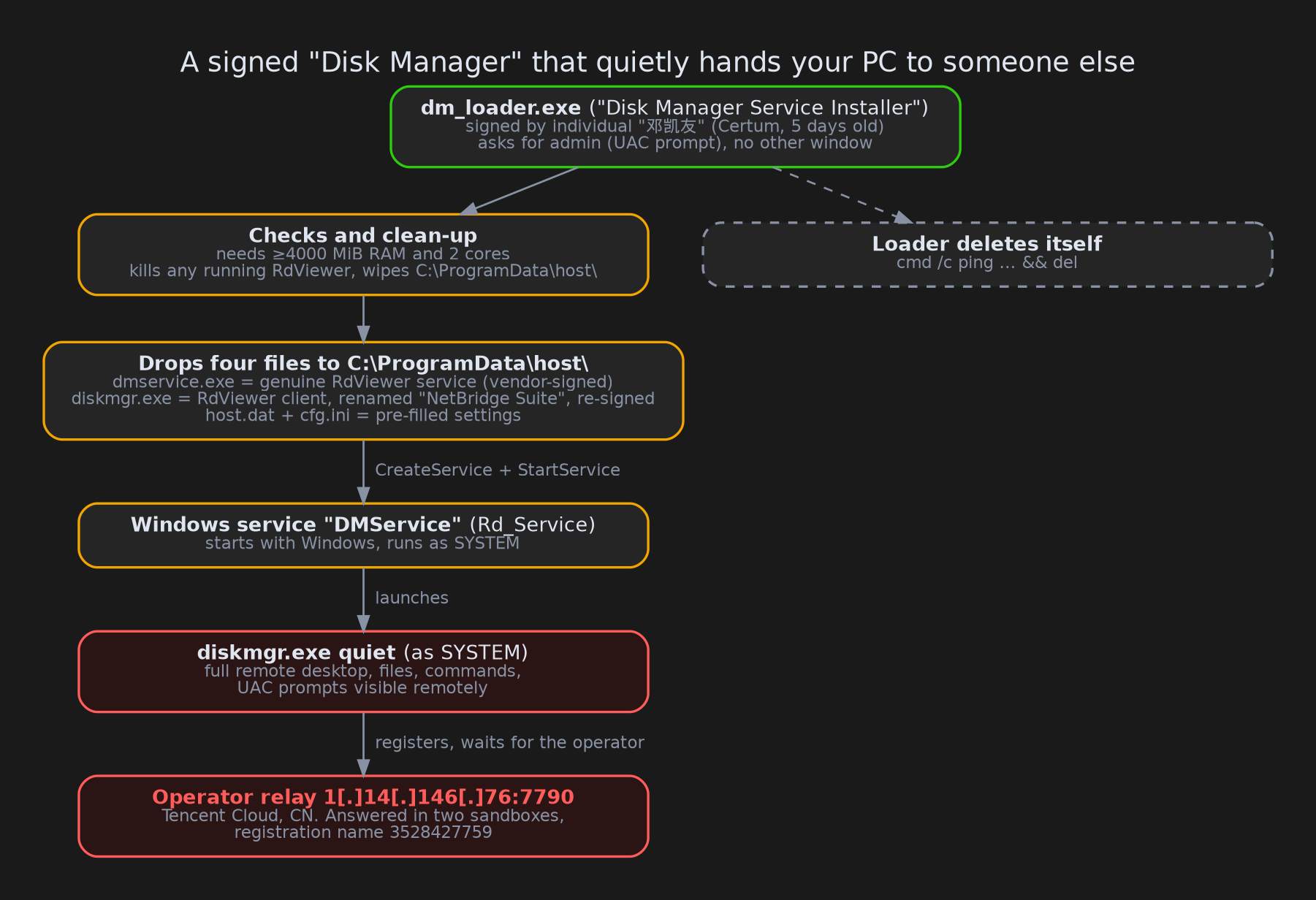
But it’s signed!
Code signing is a digital seal on a program that says "this file came from this publisher and hasn’t been changed since". Windows shows the publisher’s name in the "Do you want to allow this app…" prompt, and many people take a signature as a sign of safety.
This one is signed by an individual, "邓凯友", using a Certum certificate issued on 9 October 2026. The same day, it was used to sign the relabelled remote-desktop client. Five days later it signed the loader itself. A brand-new certificate that is immediately used to sign someone else’s product is a pattern we see again and again with signed malware. The certificate has been reported to the CA and added to the CertGraveyard.
What happens when it runs
The loader is packed with PECompact, a compressor that squeezes a program and unpacks it in memory when it starts. Everything it needs is inside: four files, about 24 MB in total.
When run, it asks for administrator rights (the usual UAC prompt) and then does this, without showing a window:
- Checks the machine. It quits if the PC has less than about 4 GB of RAM or fewer than two CPU cores. Very small machines are often analysis sandboxes.
- Clears the way. It looks for running copies of
rdservice.exe,rdclient.exe,dmservice.exeordiskmgr.exeand kills them. It stops an existing RdViewer service and wipes its own folderC:\ProgramData\host\if it’s already there. If you already had RdViewer for legitimate reasons, this copy takes its place. - Drops four files into
C:\ProgramData\host\:dmservice.exe: the genuine RdViewer service, still carrying the vendor’s valid signature.diskmgr.exe: the RdViewer client. Its file properties have been rewritten to "NetBridge Suite" by "Halcyon Networks", and it is re-signed with the 邓凯友 certificate.host.datandcfg.ini: small encrypted settings files.
- Installs a service. It creates a Windows service called
Rd_Servicewith the friendly name "DMService", set to start automatically with Windows, and starts it. - Deletes itself. It runs
cmd /c ping -n 2 127.0.0.1 >nul 2>&1 && del /f /q "<itself>". Thepingis just a two-second pause so the file is no longer in use whendelruns.
Opening the settings file
RdViewer encrypts its settings, but the key is the same for every installation: the password 123456, turned into an AES key. AES is a standard encryption algorithm, so with that fixed password anyone can unlock the files. Decrypted, they contain:
| File | Setting | Value |
|---|---|---|
| host.dat | host | 1[.]14[.]146[.]76:7790 |
| host.dat | mark | 3528427759 |
| cfg.ini | Self | diskmgr.exe |
| cfg.ini | User | admin |
host is the server the client connects to. In RdViewer this is a relay: a meeting point on the internet where the remote-control software and the operator’s viewer find each other. It means the operator never needs to know the victim’s IP address, and no firewall port has to be opened on the victim’s side. This relay sits on Tencent Cloud in China.
mark is sent to the relay as the client’s registration name when it signs in, and the client checks it against the name the relay sends back. In practice it ties this PC to the operator’s account on that relay.
Real product, unreal deployment
It’s important to separate what RdViewer does on its own from what this dropper added. Plenty of remote-desktop behaviour looks alarming but is simply how the product works:
- The service really is called
Rd_Service. - The client really is started with a
quietswitch. - The client really does run as SYSTEM so it can show the secure desktop.
- The client really does turn off the dimmed "secure desktop" for UAC prompts (
PromptOnSecureDesktop = 0), so the remote person can see and click them.
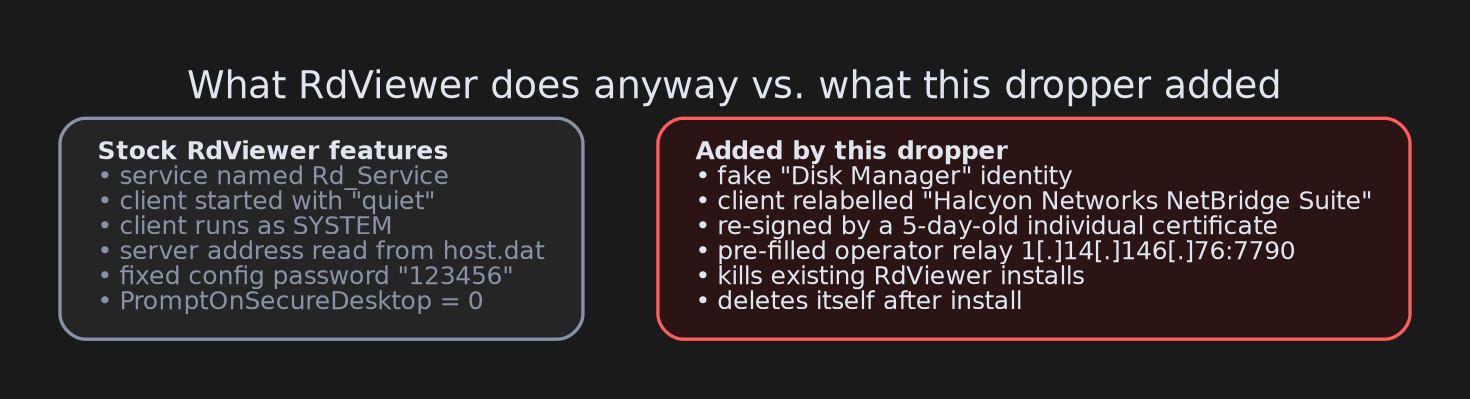
What the dropper adds is the opposite of a normal IT deployment:
- a fake "Disk Manager" name on the installer, the service and the files
- a fictitious vendor on the client
- a fresh personal certificate
- a hidden, pre-filled server address
- killing existing copies
- deleting itself afterwards
Put together, the result is a full remote-access backdoor built from legitimate parts. Security tools often treat the vendor’s signed files as known-good, so that disguise can help it slip past.
What the sandboxes saw
Both public sandboxes we checked ran the installer and showed the same chain: the loader, then the service, then diskmgr.exe quiet running as SYSTEM.
- Triage (15 October) scored it 10/10.
- ANY.RUN (16 October) scored it 100/100 and tagged it
rdviewerandrmm-tool. Its network rules flagged an "RdViewer Init" packet to 1[.]14[.]146[.]76:7790.
In both runs the relay accepted the client’s sign-in and then kept the line open with a tiny one-byte message every five seconds. That is a client registered and waiting. During the few minutes of recording, no operator connected.
What we couldn’t reach
- How it’s delivered. We only have the installer; how victims get it is unknown. It needs administrator rights, so someone has to click "Yes" on the UAC prompt.
- Whether the operator needs a password. The client has password-related settings, but none were pre-filled. We couldn’t confirm whether access is fully unattended or needs an extra step on the relay side.
- Inside the relay traffic. RdViewer uses its own encrypted protocol. We identified the sign-in fields from the client’s code but didn’t decrypt the captured packets.
Advice
For everyone:
- Be suspicious of "tools" from unknown publishers. A valid signature only tells you who signed a file, not that it’s safe.
- If a disk tool asks for administrator rights and then shows no window at all, that’s a red flag.
- Check for a service called DMService or a folder **C:\ProgramData\host**. If you didn’t install RdViewer yourself, disconnect from the network and get help cleaning the machine.
For defenders:
- Hunt for the service
Rd_Servicewith ImagePath underC:\ProgramData\host\, and fordiskmgr.exe quietrunning as SYSTEM. - Block or alert on outbound TCP to 1[.]14[.]146[.]76:7790.
- If RdViewer isn’t approved in your environment, treat any RdViewer binary (
rdservice.exe,rdclient.exe, or files signed by 济南快安网络科技有限公司) as unauthorised remote access. The same goes for its vendor domainsrdviewer[.]comandrdviewer[.]oss-cn-hangzhou[.]aliyuncs[.]com. - Watch for
PromptOnSecureDesktopbeing set to 0 on endpoints.
IOCs
| Type | Value |
|---|---|
| SHA256 (loader) | e71149d889cc558e6328ea7ce3498cd858c26ab282cda9410ccc51f6275f7da6 |
| SHA256 (diskmgr.exe, relabelled RdViewer client) | fb60876621b2932fa2681d81a17ce8b79952fa3fb9a7ea77d5ba177433d8d76d |
| SHA256 (dmservice.exe, genuine RdViewer service) | 7ed2a077a1ce34fcb182e5135ae75ad7bd96207c3204c9f343095f967bfa109f |
| SHA256 (host.dat) | dcb372ff16de08fd126d9fceb866343ad03795f58427e4c78e1c837f6cd140d8 |
| SHA256 (cfg.ini) | 9db36c4f42395b676d31bf7dad3dce15a3e6f4acf3003f7383fb326c9062c29a |
| Relay | 1[.]14[.]146[.]76:7790 |
| Certificate | 邓凯友, Certum Code Signing 2021 CA, serial 2c858b90fca6b39036b52387e3ff0aa2 |
| Service | Rd_Service, display name DMService |
| Folder | C:\ProgramData\host\ |
| Registration name | 3528427759 |
Wrapping up
This sample needed no custom malware at all: a real remote-desktop product, a fake name, a fresh certificate and a few pre-filled settings were enough to turn a "Disk Manager" into a backdoor. If you run into other "Disk Manager", "NetBridge Suite" or "Halcyon Networks" files, we’d love to hear about them.