About this post. Thanks to MalwareHunterTeam for flagging this sample. This analysis and write-up were produced by Claude (Opus 5.5), working as an agent in Claude Code on a REMnux analysis VM. Tools used: Malcat (with KesaKode), capa, capstone, speakeasy, a sandboxed Wine environment, ANY.RUN and tshark.
TL;DR
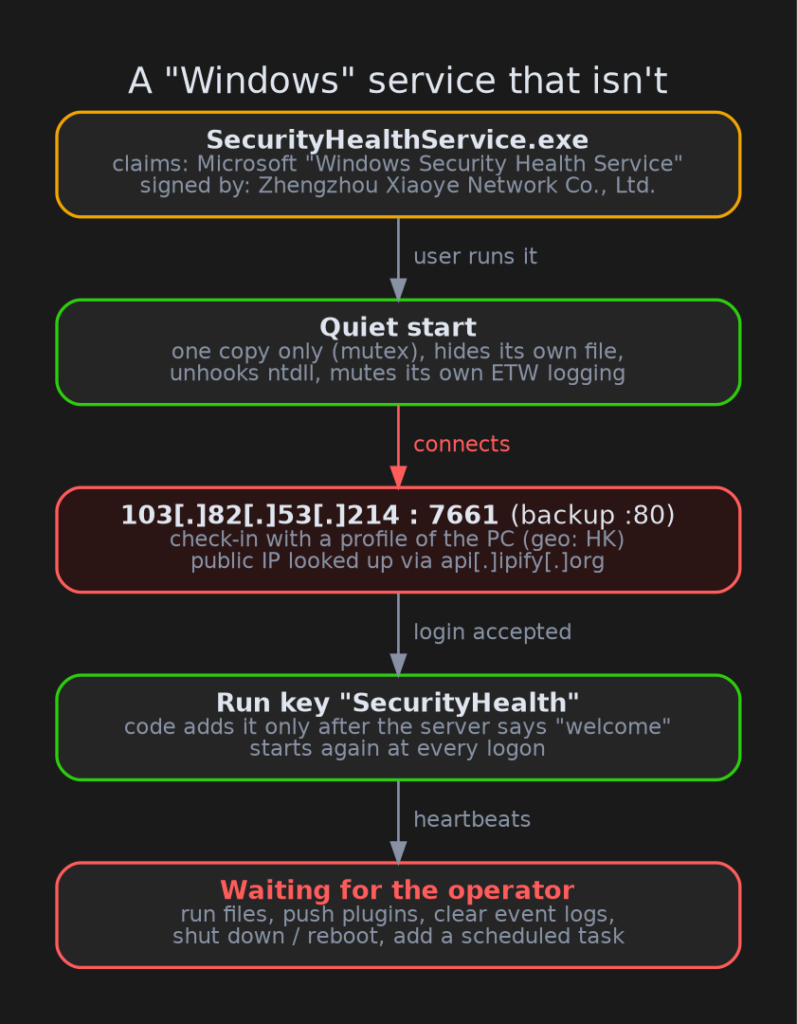
SecurityHealthService.exe borrows the name and description of a real Windows component, the Windows Security Health Service. It isn’t a Windows component. It’s a remote-access backdoor, validly code-signed by a Chinese company that has nothing to do with Microsoft. Once it runs, it sends a profile of the PC to its command-and-control (C2) server, the machine the attacker uses to control infected PCs. Then it waits for an operator to tell it what to do. The server is geolocated to Hong Kong, on a Beijing-registered hosting network.
- What it is: a remote-access backdoor from the long-lived Gh0st RAT code family, most likely the Winos 4.0 / ValleyRAT branch (medium confidence).
- The disguise: Microsoft name, description and version number, plus a real Certum code-signing certificate issued to Zhengzhou Xiaoye Network Co., Ltd.
- The server:
103[.]82[.]53[.]214on port 7661 (port 80 as a backup). It was alive and answered during our sandbox run on 16 October 2026. - Staying around: a Run registry value called
SecurityHealth, written only after the server accepts the infected PC. - What we didn’t see: the server never sent any extra modules ("plugins") while we watched, so we can’t say which ones the operator uses.
A familiar name in an unfamiliar place
The real Windows Security Health Service lives in C:\Windows\System32 and is signed by Microsoft. This file copies the name, the "Windows Security Health Service" description and a Windows 10 version number into its version information. That is what Explorer and Task Manager show you, so at a glance it looks right at home.
The signature tells a different story. Code signing is like a tamper-evident seal with a name printed on it: it proves who sealed the box, not that what’s inside is safe. Here the seal says Zhengzhou Xiaoye Network Co., Ltd. (Henan, China), issued by Certum in January 2026, and the file was signed on 15 October 2026. A Microsoft system file signed by an unrelated company is a pattern we see again and again in signed malware: the signature gets the file past "unknown publisher" warnings, and the borrowed name does the rest.
But it’s signed!
The signature is technically valid. The certificate chain checks out and the file hasn’t been altered since signing. That’s exactly why we report these certificates. The certificate has been reported to the CA and added to the CertGraveyard.
What happens when it runs
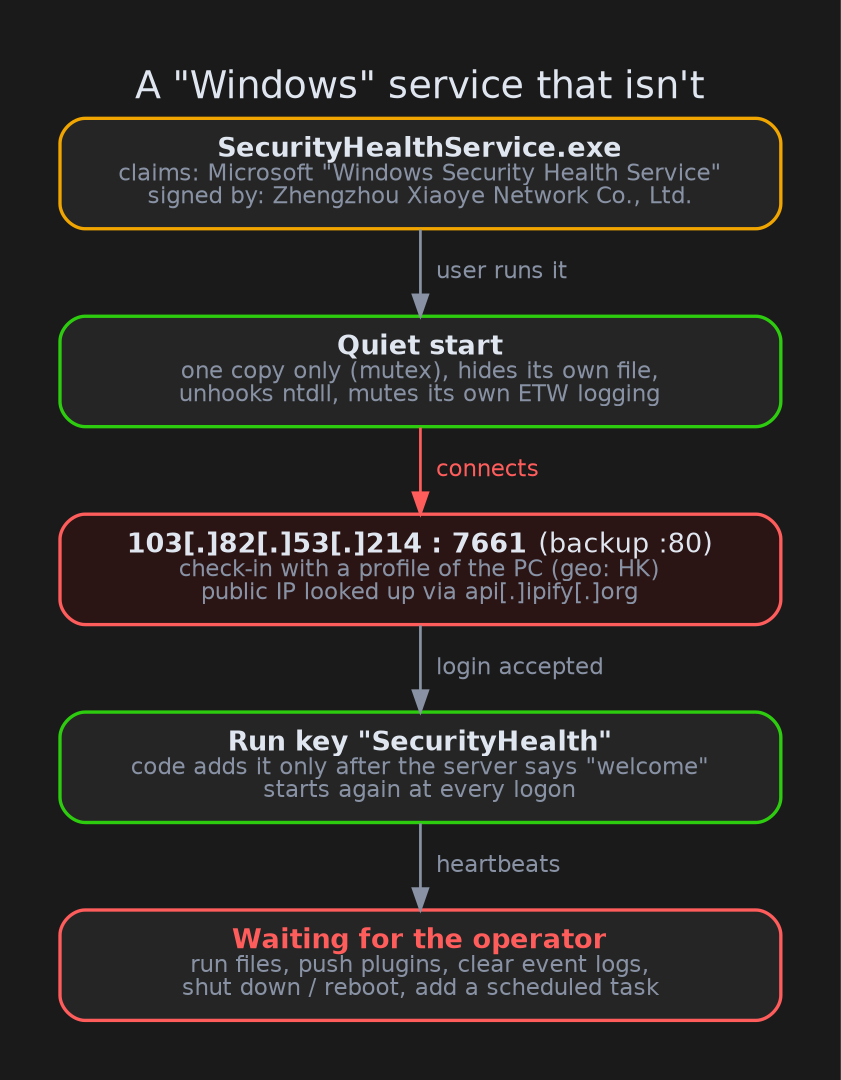
A quiet start. It makes sure only one copy is running, using a named lock (a "mutex") called Global\MyMainProcessMutex. It marks its own file as hidden and system so it disappears from a default folder view. It also reloads a clean copy of a core Windows library (ntdll.dll), which strips out the hooks security products place there to watch programs. Then it mutes its own calls to Windows event tracing (ETW), a logging feature that security tools listen to. Think of it as switching off its own microphone: Windows’ deeper, kernel-level sensors can still see it, but it stops volunteering information about itself.
Checking in. It looks up the PC’s public IP address with the legitimate service api[.]ipify[.]org, using the unusual user-agent IPQuery/1.0, and connects to 103[.]82[.]53[.]214:7661. The first thing it sends is a profile of the machine: computer name, user name, Windows version, disk and memory, graphics card and screen size, installed antivirus, the title of the window you have open, how long you’ve been idle, and a machine ID. It also reads a registry key used by Tencent’s QQ, a popular Chinese messenger. It also carries a hidden list of security-product process names that is heavy on Chinese products (Baidu, Tencent PC Manager, Jiangmin, Kingsoft), which hints at the expected victims.
Staying around. The code only adds itself to the Run key after the server answers "welcome". The Run key is a list of programs in the current user’s part of the registry (HKCU\...\CurrentVersion\Run) that Windows starts at every logon, and this entry is named SecurityHealth. In the ANY.RUN sandbox the server did answer, and the Run value was written. A second copy then started with exactly that command line and quit within a third of a second, because the first copy already held its lock.
Waiting for orders. From there it sends regular heartbeats, small "I’m still here" messages. They also carry the current window title and idle time, so the operator can tell when someone is at the keyboard. The operator can:
- run files on the PC,
- load extra modules ("plugins") sent from the server, either inside the backdoor itself or inside a freshly started copy of
wermgr.exe(Windows Error Reporting), so the code runs under a legitimate Windows process name, - clear the Application, Security and System event logs,
- log off, reboot or shut down the PC,
- add a scheduled task named like
WindowsUpdate_<number>and relaunch with admin rights, - point the backdoor at a new server, by storing replacement settings in
HKCU\Consoleregistry values (IpDate/IpDatespecial).
There’s even a "KillAv" (kill antivirus) command, but in this build it only replies, in Chinese, that the module has been removed.
Where it comes from
The code is built the way Gh0st RAT is built. Gh0st’s source leaked years ago and has spawned a large family of Chinese-language remote-access tools. The configuration layout, the plugin markers, the registry locations it uses for settings and the Chinese status messages are all consistent with the Winos 4.0 / ValleyRAT branch of that family. ANY.RUN’s network rules agree independently: its traffic triggered the Emerging Threats signatures "Winos4.0 Framework CnC Login Message" and "…CnC Server Response". That traffic format is shared across many Winos forks, so it tells us the branch, not the exact build.
Malcat’s KesaKode code-similarity service agrees only partially. It rates the code 41% similar to PNGPlugLoader (a loader name used in this same Chinese-language malware ecosystem) and 22% similar to ValleyRAT. Scores at that level mean shared code, not a confirmed family match. So we call this Winos 4.0 / ValleyRAT lineage, medium confidence, not "confirmed ValleyRAT".
What the analysis couldn’t reach
- No plugins. The server only accepted the login and exchanged heartbeats for the roughly one minute of the sandbox run. It never sent a module, so we don’t know which capabilities the operator adds later (screen capture, keylogging and so on are typical for this family, but we didn’t observe them).
- No delivery vector. We had the EXE on its own. We don’t know if it arrived through a fake download, a phishing email or another loader.
- Emulation stopped early. Our emulator couldn’t run the program’s message loop, so the network behaviour comes from the sandboxed Wine run and ANY.RUN instead.
What to do about it
For regular users:
- Windows’ real Security Health Service lives in
C:\Windows\System32and is signed by Microsoft. A file with that name in your Downloads, Temp or AppData folder is not Windows. - In the file’s Properties → Digital Signatures tab, check who signed it. Microsoft components are signed by Microsoft.
- If you ran this file, disconnect from the network. Remove the
SecurityHealthRun entry and check Task Scheduler for tasks namedWindowsUpdate_<number>. Turn on "show hidden files" and "show protected operating system files" to find and delete the file, because it hides itself. Then change your passwords from a clean device.
For defenders:
- Block and hunt for
103[.]82[.]53[.]214(ports 7661 and 80), and for HTTP requests with user-agentIPQuery/1.0. The Emerging Threats Winos4.0 rules (SIDs 2052875, 2059975) fired on this traffic. - Alert on
SecurityHealthService.exerunning from anywhere other thanSystem32, or signed by anyone other than Microsoft. - Hunt for the mutex
Global\MyMainProcessMutex, the Run valueSecurityHealth, and the registry valuesHKCU\Console\IpDate/IpDatespecial. - Watch for
wermgr.exestarted by an unusual parent process. - Block the certificate serial
4369f1615ca645fdd9d03b6652aa55a3and check for other files signed with it.
Indicators of compromise
| Type | Indicator |
|---|---|
| SHA256 | ca47e13a2980817e7849ddfef70312542ed11efaeba7b1b583161c06a440baf2 |
| SHA1 | 098608525d999524864a75e578e3a7425c0f6f74 |
| MD5 | 0890f44bbc61230652c6d3b0052ed5e9 |
| C2 | 103[.]82[.]53[.]214:7661 (primary), 103[.]82[.]53[.]214:80 (backup) |
| IP lookup | hxxp://api[.]ipify[.]org/ with user-agent IPQuery/1.0 (legitimate service, behavioural indicator) |
| Mutex | Global\MyMainProcessMutex |
| Run key | HKCU\Software\Microsoft\Windows\CurrentVersion\Run → SecurityHealth |
| Config | HKCU\Console\IpDate, HKCU\Console\IpDatespecial |
| Scheduled task | WindowsUpdate_<number> |
| Signer | Zhengzhou Xiaoye Network Co., Ltd., serial 4369f1615ca645fdd9d03b6652aa55a3 (Certum Code Signing 2021 CA) |
| Sandbox | ANY.RUN report |
Wrapping up
This one is a good reminder that a familiar name and a valid signature together still don’t make a file trustworthy. The name was borrowed from Microsoft and the signature from a company that has no business signing Windows components. If you come across other files signed by the same certificate, or other samples talking to the same server, we’d love to hear about them. You can also look up and report suspicious certificates on the CertGraveyard.