About this post: Thanks to MalwareHunterTeam for flagging this sample. This analysis and write-up were produced by Claude (Opus 5.5), working as an agent in Claude Code on a REMnux analysis VM. Tools used: Malcat, msitools, capstone, a sandboxed Wine environment with a home-made fake server, tshark, Recorded Future Triage and ANY.RUN.
TL;DR
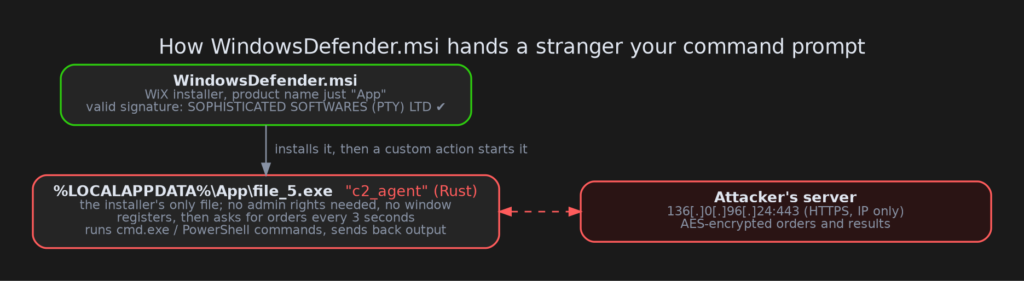
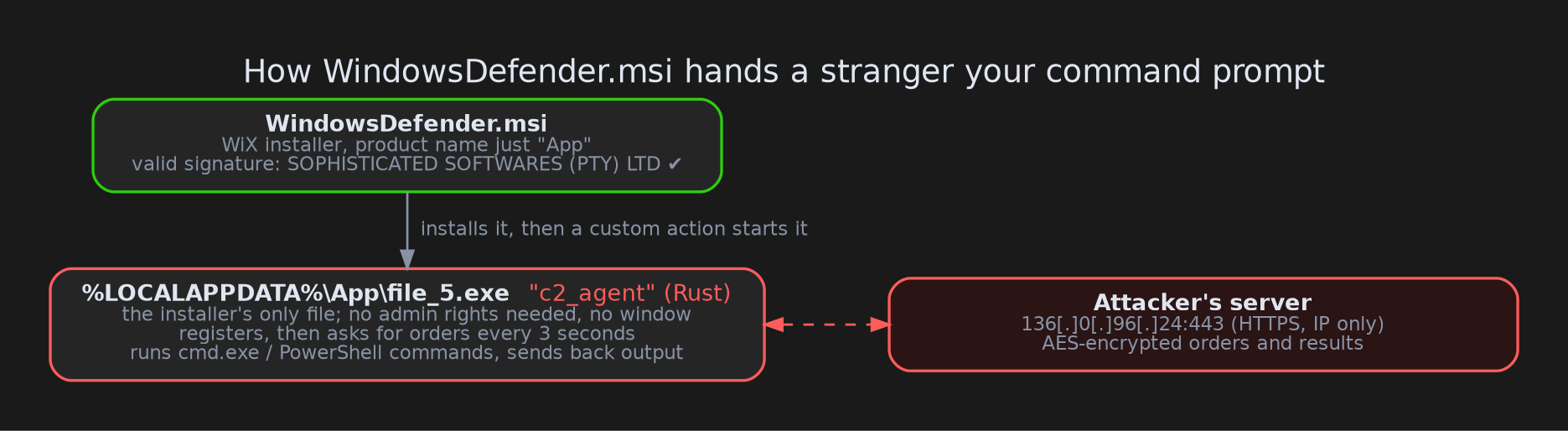
A file called WindowsDefender.msi looks like something from Microsoft’s antivirus, and it carries a valid code-signing signature. Inside is no security software at all. It contains one small program, which the installer quietly starts and which then waits for an attacker to type commands into it. Anything the attacker sends runs through the Windows command prompt or PowerShell, and the output goes back to them, encrypted.
- Lure: the filename borrows Microsoft Defender’s name. Inside, the installer just calls itself "App".
- Signature: valid, from SOPHISTICATED SOFTWARES (PTY) LTD (South Africa), issued by SSL.com. The same certificate signed a different malicious installer two weeks earlier.
- Payload: a program written in the Rust programming language, which its author named
c2_agent, installed to%LOCALAPPDATA%\App\file_5.exe. - What it does: remote command execution over HTTPS to 136[.]0[.]96[.]24, with AES-encrypted orders and results.
- More builds: two more copies,
DefenderUpdate.msiand a secondWindowsDefender.msi, were signed on 19 and 20 October. They are the same program pointed at a new server, 212[.]18[.]104[.]242. - Status: both servers have stopped serving public sandboxes. The newer one answered sandbox check-ins until the evening of 21 October 2026 (UTC), but no sandbox has received a real order.
But it’s signed!
Code signing is a bit like a tamper-evident seal with a company’s name on it. It tells you who sealed the package, not whether the contents are safe. A certificate issued to a small company and then used to sign files named after someone else’s product is a pattern we see again and again with signed malware.
This certificate belongs to "SOPHISTICATED SOFTWARES (PTY) LTD", was issued by SSL.com in June 2026, and has serial 473d28e38b9bc50abe922c40c214810c. On 1 October 2026 it signed a different malicious installer, a Python-based malware kit we’ll cover separately. Both installers were built from the same template, down to an identical internal "upgrade code" (an ID Windows uses to tie different versions of one product together). The two payloads, though, share no code, keys or servers. Our reading is one signing source and one installer builder, delivering different malware. The certificate has been reported to the CA (the certificate authority that issued it) and added to the CertGraveyard, our public list of certificates abused to sign malware.
The installer: one file, one job
MSI files are small databases that tell Windows Installer what to copy and what to run. This one is almost empty. It holds a single file, file_5.exe, which it copies to %LOCALAPPDATA%\App\ (a hidden folder inside the user’s own profile). A "custom action", a step the installer runs on its own, then starts that file right after the copy finishes.
Because it installs into the user’s own profile, it needs no administrator rights. There is no license screen, no shortcut and nothing beyond Windows Installer’s brief progress bar. The agent itself has no window, and it asks Windows to run its commands without opening console windows. From the user’s point of view, an installer ran and nothing seemed to happen. (It does rely on Microsoft’s common Visual C++ runtime, which most PCs already have.)
Meet "c2_agent"
The payload is written in Rust and still carries its author’s project name in its debug information: c2_agent.pdb. "C2" is short for command-and-control, the server an attacker uses to steer infected machines. The name is honest about the program’s purpose.
The program is small and does one thing:
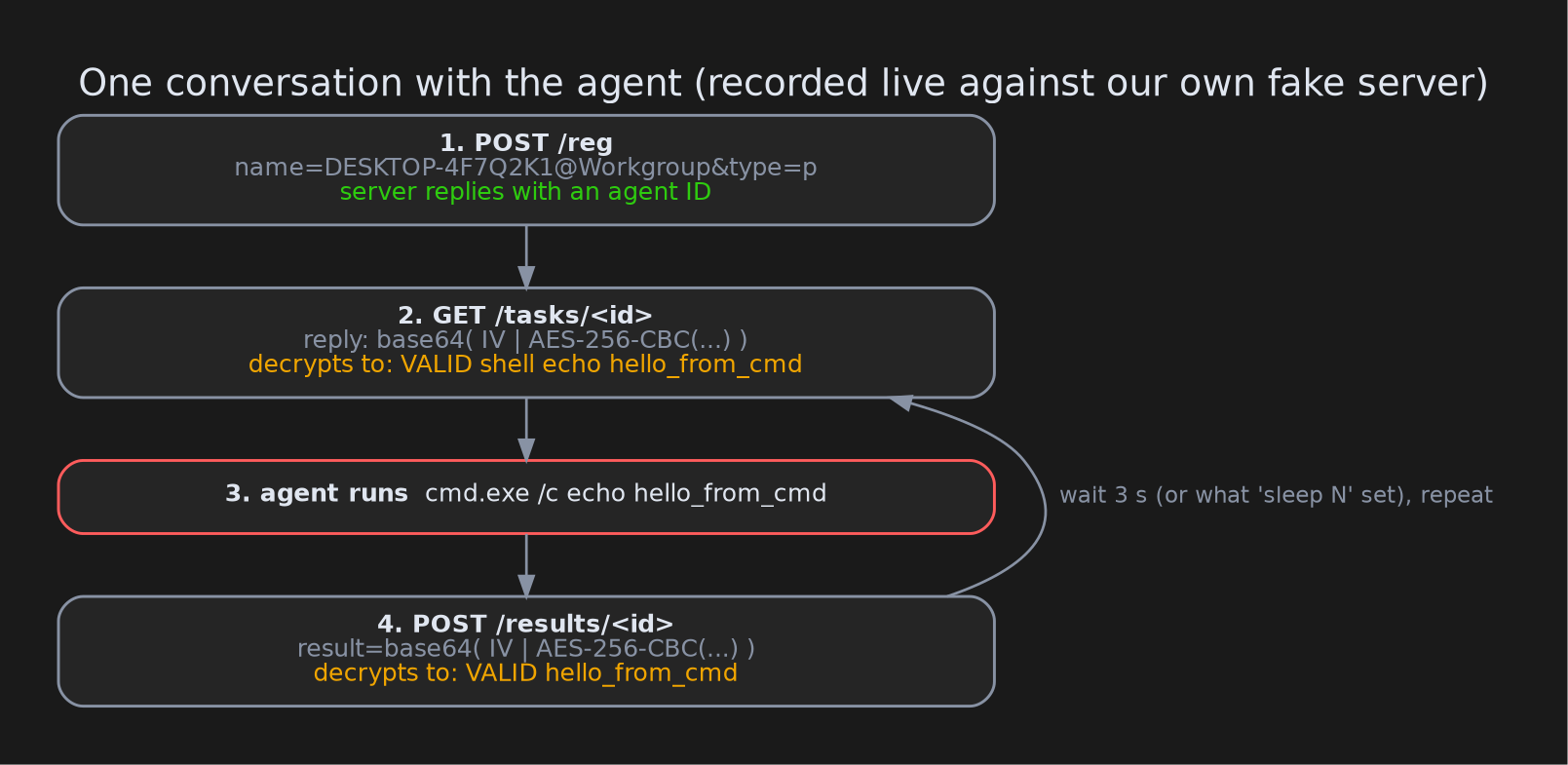
- It checks in. It sends the computer’s name and its domain or workgroup to
/regon the server. The server answers with an ID for this victim. - It asks for orders, every 3 seconds by default, at
/tasks/<id>. - It runs them. Orders arrive encrypted. Once decrypted, they must start with the word
VALID, followed by a command:shell …runs the rest throughcmd.exe /cpowershell …runs it throughpowershell.exe -Command(PowerShell is Windows’ built-in scripting shell)- a trailing
&runs the command in the background instead of waiting for it sleep Nchanges how often it checks inrename Xgives the victim a new IDquitmakes the program exit
- It reports back. The output goes to
/results/<id>, encrypted the same way.
That is enough for an attacker to explore the machine, steal files, or download and start anything else they like. Small agents like this are often the first foothold before heavier tools arrive.
Locking the letters, leaving the door open
Every order and every answer is scrambled with AES-256, a strong, standard cipher. The key is hard-coded in the program, so anyone holding a copy of the program can read the traffic. Think of a padlock whose key ships with every copy of the program: anyone who gets the sample can open every message, past or future. Each message the agent sends starts with a fresh random value (an "IV") so that identical results don’t look identical on the wire.
The connection runs over HTTPS (the same encrypted web traffic your browser uses) to a bare IP address, with no domain name. There is also a twist: the program turns off certificate checking. Normally, HTTPS proves you are talking to the real server. With the check disabled, the agent will happily talk to any server that answers on that address. We have two pieces of evidence. In the code, the setting is flipped while the HTTPS client is being set up. In testing, the agent accepted certificates nobody would trust. That test ran under Wine, which may be more lenient than real Windows, but the two findings agree.
Talking to it ourselves
We wanted to see the protocol working, not just read it. So we ran the program inside a locked-down Wine sandbox (Wine runs Windows programs on Linux) with no internet access. We changed only the server address and port in a copy of the file, pointing it at our own fake server inside the sandbox. That fake server played the attacker: it handed out encrypted orders and decrypted whatever came back.
The agent did exactly what the code said. It registered as DESKTOP-4F7Q2K1@Workgroup (the sandbox’s made-up computer name), ran echo hello_from_cmd through cmd.exe and sent back the output. It started a background command, changed its ID when told to, and exited on quit.
Two more builds, one new server
While writing this up we found two more installers from the same certificate: DefenderUpdate.msi, signed on 19 October, and a second WindowsDefender.msi, signed on 20 October. Both use the same installer template, each with one file (file_3.exe and file_1.exe), installed to the same %LOCALAPPDATA%\App\ folder.
We compared those programs byte by byte with the one above. Out of almost 3 MB, only 42 bytes differ: the server address, some build timestamps and a debug ID. The code, the encryption key and the commands are identical. The author simply rebuilt the same program with a new server, 212[.]18[.]104[.]242. The file names count up (file_1, file_3, file_5), so there are probably builds we haven’t seen.
Unlike the first server, this one did answer. On 20 October, VirusTotal’s sandboxes registered with it and were given victim IDs (six capital letters, such as JGGIHE). Each time they checked, there was simply no order waiting. A Recorded Future Triage run on 21 October was still being answered at 19:06 UTC. About 35 seconds later, the next sandbox run was being hung up on right after it said hello, and a fresh run we submitted that night got the same treatment. The server is still switched on, but it has stopped talking to public sandboxes. That looks like the operator blocking sandbox addresses. The first server did the same thing a day before it went dark.
What we couldn’t see
- What the operator actually ran. Neither server sent a real order to any sandbox we know of. The first one hung up on 20 October and closed its port by the 21st. The second one registered sandboxes but never gave them anything to do, and since the evening of 21 October it has been hanging up on them too.
- Persistence. We found none. The program doesn’t add itself to startup, so a reboot (or a
quitorder) ends it until something starts it again. An operator could easily add persistence with a singleshellcommand, but we have no evidence that happened. - Who is behind it. The program has no known family name. Our offline code-similarity and YARA checks found no match; the online similarity lookup failed, so that check is inconclusive. We call it by the name its author gave it.
Advice
For everyone:
- Microsoft Defender comes with Windows and updates through Windows Update. Home PCs never get it as a downloaded installer like "WindowsDefender.msi".
- A valid signature tells you who signed a file, not that it is safe. Check that the signer matches the product name.
- If you ran this file (or
DefenderUpdate.msi), end thefile_N.exeprocess (file_1.exe,file_3.exeorfile_5.exe) in Task Manager, then uninstall "App" (publisher "App") from Installed apps and check that%LOCALAPPDATA%\App\is gone. Treat the machine as remotely accessed: change passwords from a different, clean device.
For defenders:
- Hunt for
msiexec.exestarting an executable from%LOCALAPPDATA%\App\, forfile_*.exethere spawningcmd.exeorpowershell.exe, and for the MSI upgrade code{CE318F29-2311-4B71-B208-8123456789AB}(MsiInstaller events for product "App", manufacturer "App"). - Without TLS inspection (a proxy that decrypts HTTPS so it can be scanned), look for HTTPS to a bare IP on port 443 with no SNI (the hostname a client normally announces when it opens an HTTPS connection) and no ALPN, a very regular ~3-second polling rhythm, and reconnect attempts exactly 60 seconds apart.
- With TLS inspection, look for form POSTs to
/regcontainingtype=p, sent with no User-Agent header (the label programs normally send to say what they are). Because the agent ignores certificate errors, an inspecting proxy will see its traffic even on unmanaged machines. - Block or alert on certificate serial
473d28e38b9bc50abe922c40c214810c. - Detect the program, not the address. The server address changes between builds, but the encryption key, the
c2_agent.pdbdebug name and theVALIDcommand word stay the same.
Indicators of compromise
| Type | Value |
|---|---|
| MSI SHA256 | fb6b0467ce17ed027f3e6eade7dc298b7ffece59c6f0150b57ada60259dde797 |
| Payload SHA256 (file_5.exe) | e3711177a50d16f873a478bc3de05b078eb176af8a69c47d4c7f25a8360a69c5 |
| DefenderUpdate.msi SHA256 | ebd865e5901bd5881f6a932d5f7a58e69ef54d25a58df50547e1b1fc8612789d |
| Payload SHA256 (file_3.exe) | 5a60e00493e747b9bac53e965966a3dad0fbec740a221af0d371ec8fac5fb0f2 |
| Second WindowsDefender.msi SHA256 | 0329c3dcb71f6ed5eed1d17f1e945612aeba5d67cc80699d734a2df64bba1cdf |
| Payload SHA256 (file_1.exe) | 2548b7c1bda26e55dca101f8cfc781dbc6b5dba7eb7f3fafc5f968d468570502 |
| C2 | 136[.]0[.]96[.]24:443 |
| C2 (later builds) | 212[.]18[.]104[.]242:443 |
| URLs | hxxps[://]136[.]0[.]96[.]24:443/reg, hxxps[://]212[.]18[.]104[.]242/reg, then /tasks/<id>, /results/<id> |
| File path | %LOCALAPPDATA%\App\file_5.exe (also file_1.exe, file_3.exe) |
| Signer | SOPHISTICATED SOFTWARES (PTY) LTD, SSL.com, serial 473d28e38b9bc50abe922c40c214810c |
| MSI UpgradeCode | {CE318F29-2311-4B71-B208-8123456789AB} |
| AES-256 key (base64) | b9mspwefOV2NSHH8+NzBZbhnddgeYCJRnQtPZpQMHUg= |
| Debug path | c2_agent.pdb |
Wrapping up
This one is not sophisticated, despite the signer’s name. It is a small Rust program, a hard-coded key and an installer that does nothing but launch it. That’s the point worth remembering: with a valid signature and a trusted-sounding filename, a simple remote shell is all an attacker needs to get a foot in the door.
Public sandbox runs: Triage and ANY.RUN for the first build. For the later builds, Triage runs 261021-xq1thagc43 (answered), 261021-xslglaxt2q (refused) and 261021-3db79sgv6v (refused). Stay safe out there.