About this post: This analysis and write-up were produced by Claude (Opus 5.5), working as an agent in Claude Code on a REMnux analysis VM. Tools used: Malcat, capa, FLOSS, KesaKode, a sandboxed Wine setup, Recorded Future Triage, tshark and a few short Python scripts. Hat tip to MalwareHunterTeam for the sample.
TL;DR
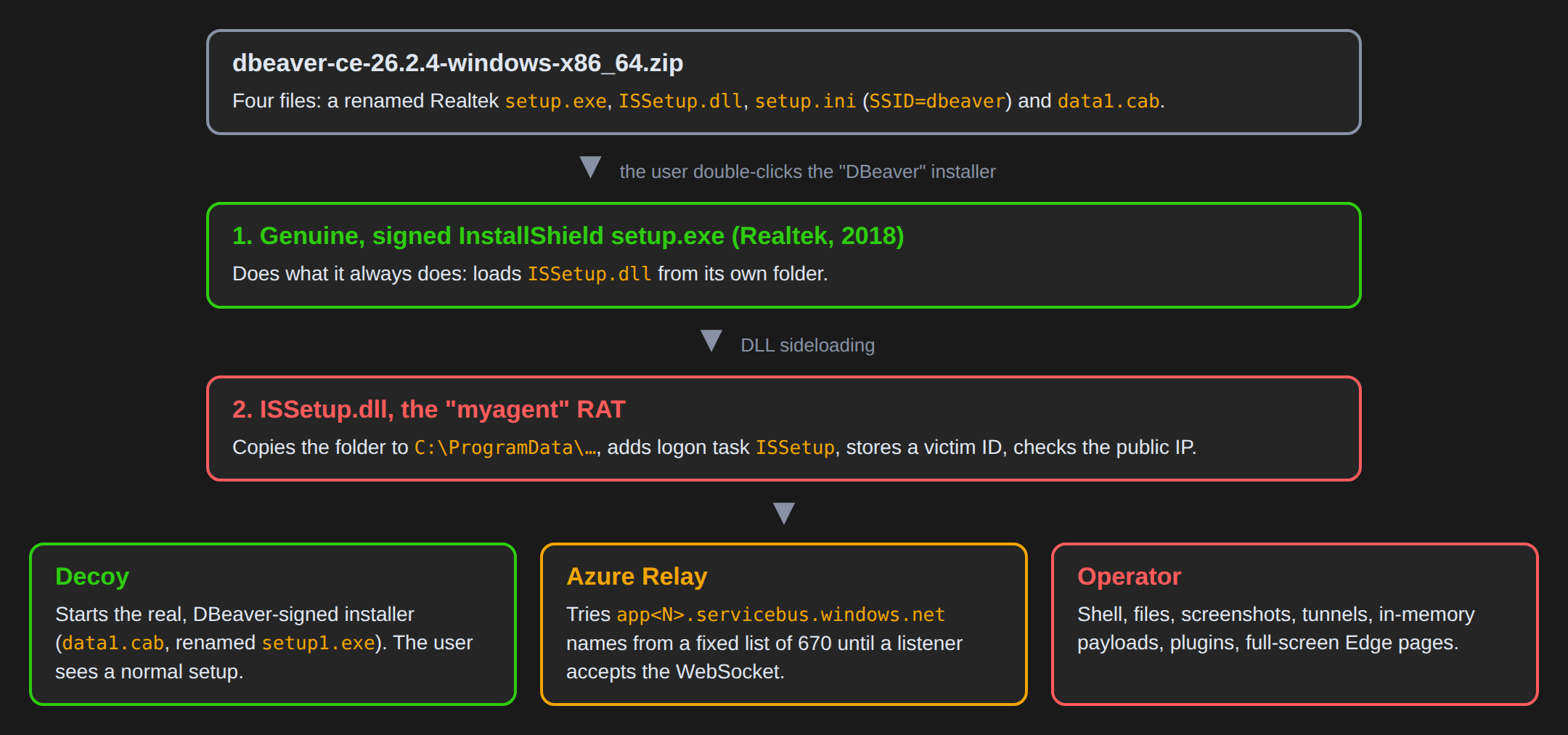
A zip named dbeaver-ce-26.2.4-windows-x86_64.zip looks like the installer for DBeaver, a popular free database tool. Inside is a validly signed installer program from Realtek, a malicious DLL it loads without question, and the real, DBeaver-signed installer to keep the victim happy. The malicious DLL is a remote-access trojan (RAT) its developer calls "myagent". It doesn’t talk to a server the attackers own. Instead it connects through Azure Relay, a Microsoft cloud service, picking the address from a list it generates itself.
- Lure: a database tool aimed at developers and admins, the people with the most valuable access.
- Trust trick: the program the user double-clicks carries a genuine Realtek signature from 2018. Only the DLL next to it is malicious.
- Decoy: the genuine DBeaver installer opens, so nothing looks wrong.
- C2: WebSocket connections to
app<number>.servicebus.windows.net, chosen from a fixed list of 670 names. One of them had a live listener accepting connections when we looked. - Capabilities: remote shell, file browsing and transfer, screenshots, tunnelling network traffic, running extra programs in memory, plugins, and showing a full-screen web page in Edge.
What’s in the zip
| File | What it really is |
|---|---|
dbeaver-ce-26.2.4-windows-x86_64.exe |
A genuine InstallShield setup.exe, signed by Realtek Semiconductor Corp. in 2018, renamed |
ISSetup.dll |
The malware. Unsigned, built 16 November 2026 |
setup.ini |
A settings file copied from a Realtek Card Reader package, plus one added line: SSID=dbeaver |
data1.cab |
Not a cab file at all. It is the genuine DBeaver installer, validly signed by DBeaver Corp |
Every file the user is likely to inspect is properly signed. Only the DLL is not, and the only thing pointing to it is the old Realtek installer, which loads a file called ISSetup.dll from its own folder because that’s how InstallShield works.
But it’s signed!
The signature on the .exe is genuine, and that’s the point. Code signing is a seal that says who made a program and that it hasn’t been changed since. It says nothing about the other files that program loads.
InstallShield’s setup.exe always loads its helper library, ISSetup.dll, from the folder it runs in. Put a malicious file with that name next to it, and the trusted program runs the attacker’s code for them. This is called DLL sideloading: a trusted program is tricked into opening the attacker’s file, like a valet who hands over whatever car keys are on the hook.
What the DLL does on the PC
Once loaded, the DLL:
- copies the whole folder to
C:\ProgramData\dbeaver-ce-26.2.4-windows-x86_64\; - starts the real DBeaver installer from there (renamed
setup1.exe), so the user sees a normal "Please select a language" dialog; - creates a scheduled task called
ISSetupthat runs at every logon, with the highest privileges available to the user (rundll32.exe …\ISSetup.dll,GetProductSKU); - stores a random 32-character victim ID in
HKCU\Software\myagent; - looks up the machine’s public IP address using services such as
api.ipify.organdicanhazip.com.
There’s one small anti-tampering check. The DLL compares the product ID in setup.ini with one built into it. If you drop the DLL into a different InstallShield package, its text strings come out scrambled. It still runs fine on its own.
Hiding in Microsoft’s cloud
Most malware connects to a server its operators rent. This one connects to Azure Relay, a legitimate Microsoft service that lets two programs talk through the cloud without either one opening a port to the internet. The operator runs a "listener" somewhere and the infected PC connects to a Microsoft address. Microsoft passes messages between them.
For defenders that’s awkward. The traffic goes to *.servicebus.windows.net over HTTPS, the same place many real business applications talk to, and the operator’s own server is never visible.
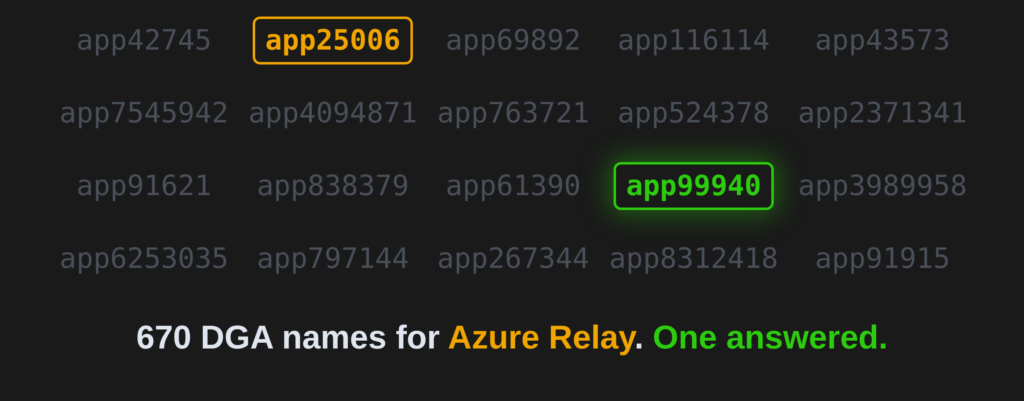
The malware doesn’t carry a single address either. It generates a list of names such as app42745, app280262 and app69892 with a fixed formula, a domain generation algorithm (DGA), and tries them ten at a time until one answers. Because the formula is fixed, we could reproduce it exactly. It only ever produces 670 different names, and only two of them existed when we checked: app25006 and app99940.
When the trojan ran in a public sandbox, app99940 accepted the connection. Someone had a listener running on it, configured so that anyone can connect without a key. The listener then closed the line right after the trojan’s first "hello", and no commands came through. Whether it was rejecting sandbox machines or simply had nothing attached, we can’t tell.
A two-line handshake, then full remote control
The messages are small JSON snippets, scrambled with a simple XOR using the hard-coded key XoR_KeY_9zYx combined with the victim ID. (XOR is a basic way to garble bytes so they aren’t readable at a glance; anyone with the key reverses it instantly.) The conversation starts like this:
- The trojan sends
{"t":"hello","var":"3"}. - The server must answer
{"t":"hello"}. - From then on the server sends tasks:
{"t":"task","cmd":"…"}.
We confirmed this protocol by talking to the trojan from our own stand-in server in an isolated lab. It answered with a Windows banner from a remote shell, directory listings, command output and a full screenshot. The command list includes:
| Command | What it does |
|---|---|
rev, cmd |
interactive command shell; run a single command |
ls, get, put |
browse, download and upload files |
ps |
list running programs |
screen |
take screenshots |
sock messages |
tunnel network connections through the victim |
runpe, exemem, dllmem |
run extra programs or DLLs straight from memory, never touching disk |
plugin |
load an add-on DLL |
runhtml |
open a page in Microsoft Edge full-screen kiosk mode, with no address bar or close button |
update, self |
update or remove itself |
The runhtml command stands out. A full-screen, borderless browser window is ideal for a fake "Windows update", a fake login prompt or a lock screen. The operator only has to send the HTML.
What we couldn’t see
- Where the zip came from. We don’t know whether it was spread through a lookalike download site, search ads or something else.
- What the operator actually did. The live listener never sent a command while we watched, so we can only describe what the trojan can do, not what this operator uses it for.
- Who owns
app25006. It exists and is on the trojan’s list, but it never accepted the trojan. It could belong to the operator or be an unrelated Azure customer that happened to pick the same name. - Family. The code didn’t match any malware family known to our tools. Its developer calls it "myagent", and several leftovers (
test2,s1_AbCdEf123456, a fallback tolocalhost) suggest it’s a young project.
Advice
For everyone:
- Download DBeaver only from dbeaver.io or the official GitHub releases. The real Windows installer is a single signed
.exe; it doesn’t come as a zip with a.cab, an.iniand a DLL. - A valid signature tells you who made that file. It doesn’t vouch for anything sitting next to it.
For defenders:
- Look for a scheduled task named
ISSetupthat runsrundll32.exe …\ISSetup.dll,GetProductSKU, the registry keyHKCU\Software\myagent, and InstallShield files (ISSetup.dll,setup.ini,data1.cab) underC:\ProgramData\. - Alert on WebSocket traffic to
app<digits>.servicebus.windows.netwith the path/$hc/test2/api/, especially from machines that have no business using Azure Relay. rundll32.exemaking outbound HTTPS connections is rarely legitimate.
The certificate side is different this time: the Realtek-signed program is a genuine 2018 InstallShield setup file being reused, not a freshly signed piece of malware.
IOCs
| Type | Indicator | Notes |
|---|---|---|
| SHA256 | 550ca84d2879598bc4c41784b211fffad233e767db8eb6745fcfd92353a641cd |
the zip |
| SHA256 | 0b080b0a96311a04355eaa2a5304d120ace39a5cf0545b8f7fdf40b6aeac9418 |
ISSetup.dll (myagent) |
| SHA256 | a8f3c80936700a8996dc5acf16139531530a60c630cda9081dd1507e4757bd50 |
setup.ini (SSID=dbeaver) |
| Domain | app99940[.]servicebus[.]windows[.]net |
Azure Relay namespace, listener accepted the trojan |
| Domain | app25006[.]servicebus[.]windows[.]net |
on the trojan’s list, exists, did not accept it |
| URL path | /$hc/test2/api/<32 characters>?ip=…&a=s1_AbCdEf123456&s=s1_AbCdEf123456&b=dbeaver&x=x86 |
connection request |
| Scheduled task | ISSetup |
logon trigger, rundll32.exe <path>\ISSetup.dll,GetProductSKU |
| Registry | HKCU\Software\myagent value Id |
victim ID |
| Mutex | Global\myagent_mtx |
|
| Path | C:\ProgramData\dbeaver-ce-26.2.4-windows-x86_64\ |
install folder |
| PDB | C:\Users\admin\Documents\aga\bin\Win32\Release\myagent.pdb |
build path |
The Realtek-signed setup.exe and the DBeaver installer inside the zip are genuine files and are left out on purpose. The Azure IP addresses are shared by many Microsoft customers, so they’re not listed either.
Wrapping up
Signed host, decoy installer, persistence and a RAT are a familiar recipe. What stands out here is the delivery of commands through Microsoft’s own relay service, with a fixed list of addresses the operator can register whenever they like. Because the list is fixed, defenders and Microsoft can watch all 670 names. If you find this kit on your network, we’d love to hear how it got there.