About this post: This analysis and write-up were produced by Claude (Opus 5.5), working as an agent in Claude Code on a REMnux analysis VM. Tools used: Malcat, binary-refinery, msitools, osslsigncode/OpenSSL, Recorded Future Triage and Censys.
TL;DR
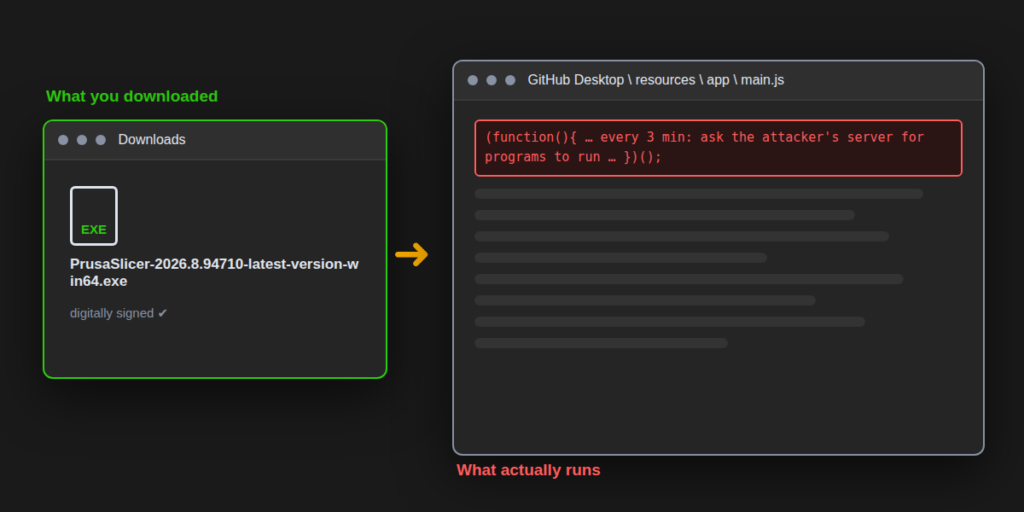
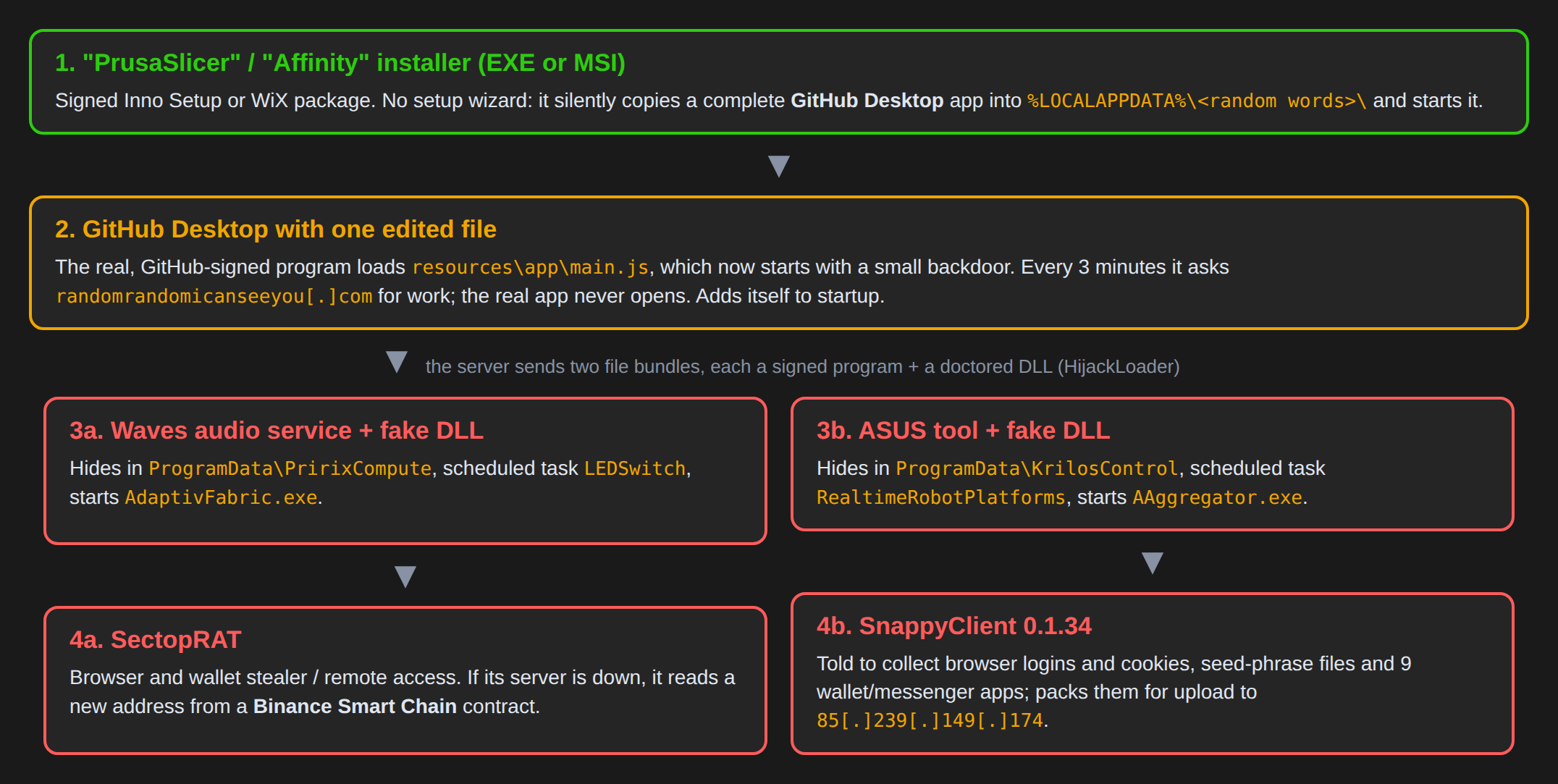
Three signed installers posing as PrusaSlicer (3D-printing software) and Affinity (design software) don’t install either program. Each one silently copies a complete, genuine copy of GitHub Desktop onto the computer and starts it. One file inside it, main.js, has been edited: before the app does anything else, it checks in with the attackers’ server every three minutes and runs whatever it is sent. The real GitHub Desktop window never opens.
In our sandbox runs, the server sent two more packages. Each pairs a genuine signed program with a doctored DLL (the well-known HijackLoader), and they end in two data stealers:
- SectopRAT, a remote-access tool and browser and wallet stealer. If its main server is down, it reads a fresh address from a smart contract on the Binance Smart Chain.
- SnappyClient 0.1.34, which was told to collect browser passwords and cookies, crypto-wallet browser extensions, desktop wallet and messenger apps, and text files containing seed phrases.
Key points:
- Signing: the EXE carries a valid signature from a 3-day Microsoft Trusted Signing certificate issued to "BG Sound". The two MSIs were signed with SSL.com certificates that have since been revoked.
- Host: the program that runs is GitHub’s own, correctly signed
GitHubDesktop.exe. Only a JavaScript file next to it was changed. - Link to earlier activity: the SectopRAT sample uses the same server address, smart contract and encryption key as a SectopRAT we analysed earlier this month, delivered through a different fake installer (
_RJP9CMD.msi).
Step 1: an installer with nothing to show
We looked at three files:
| File | Type | Signed by |
|---|---|---|
PrusaSlicer-2026.8.94710-latest-version-win64.exe |
Inno Setup installer | "BG Sound" (Microsoft Trusted Signing) |
PrusaSlicer-2026.8.94710-latest-version-win64.msi |
Windows Installer (WiX) | "Christina Carroll" (SSL.com, revoked) |
Affinity-2026-5.64.7-latest-win-x64.msi |
Windows Installer (WiX) | "Iperia Newell" (SSL.com, revoked) |
All three are about 130 to 160 MB, the size you would expect for real creative software. That size comes from a full copy of GitHub Desktop (version 3.5.7-beta2), about 900 files.
None of them shows a setup wizard:
- The EXE runs a short script as soon as it starts. The script unpacks the files into a folder with a made-up name under
%LOCALAPPDATA%(for exampleAutoWareEasyPack), launchesGitHubDesktop.exeand exits. - The MSIs install the same files into
%LOCALAPPDATA%\ProPackQuickSuiteware\or%LOCALAPPDATA%\ProCorewareMegaSoftpro\and launch the app as their final step.
The two MSIs install byte-identical files. Both include a readme.txt that just says tag-gwyn. The same "gwyn" tag later turns up inside the SnappyClient stealer.
Step 2: GitHub Desktop, with one file changed
GitHub Desktop is an Electron app: a signed program that runs JavaScript stored in resources\app\. Every file in the planted copy matches the real release except main.js (and the extra readme.txt). The attackers added a small block to the very top of main.js. It:
- reads or creates a bot ID in
%APPDATA%\daemon.log; - sends the bot ID, computer name, user name and campaign tag to
hxxps[://]randomrandomicanseeyou[.]com/kdf/every 180 seconds; - runs any JavaScript the server returns, or saves any files the server returns into a new folder under
%TEMP%and starts them; - registers itself to start at logon, under the Run key name
electron.app.GitHub Desktop; - never hands control back to the real app, so no GitHub Desktop window appears.
Because the program that runs is GitHub’s own and properly signed, a quick check of the running process shows nothing wrong. The malicious part sits in a plain-text file next to it.
Step 3: two doctored DLL packages
In every sandbox run, each infected machine received two packages, each a folder of files dropped into %TEMP% and started.
Package A contains a genuine, signed Waves audio service renamed Electro_E.exe, a fake MaxxAudioAPOShell64.dll and an encrypted data file called stackpolicy.conf.
Package B contains a genuine, signed ASUS program (Architect-Str.exe), a fake cpprest141_2_10.dll and an encrypted data file called event.lib.
Both use the same trick, called DLL side-loading. The trusted program starts and loads the DLL sitting next to it, which is the attacker’s. That DLL is HijackLoader. It decrypts the next stage hidden in the data file, copies itself into a folder under C:\ProgramData\ and sets up a scheduled task so it keeps running:
| Package | Hides in | Scheduled task | Final payload runs as |
|---|---|---|---|
| A (Waves) | C:\ProgramData\PririxCompute\ |
LEDSwitch |
AdaptivFabric.exe → SectopRAT |
| B (ASUS) | C:\ProgramData\KrilosControl\ |
RealtimeRobotPlatforms |
AAggregator.exe → SnappyClient |
Step 4a: SectopRAT and a server address on the blockchain
SectopRAT (also known as ArechClient2) is a .NET remote-access tool that also steals browser and wallet data. This sample first tries a server at 93[.]152[.]220[.]219. In our sandbox runs that server accepted connections but never replied.
When the main server fails repeatedly, the malware asks a public Binance Smart Chain node for the value stored in a smart contract (0xb11613acf39ad3b4dde427c27068d278fafa8998). The value is encrypted. With the key stored in the malware, it decrypts to a new server address, 144[.]124[.]227[.]186. This lets the operators move the server without changing the malware: they just update the contract.
The same server address, contract and key appear in the SectopRAT we analysed from _RJP9CMD.msi earlier this month. Both campaigns therefore report to the same SectopRAT backend.
Step 4b: SnappyClient goes shopping
SnappyClient is a newer stealer and remote-access tool. This one reports version 0.1.34, with tag gwyn and build ID gwyn1. It talks to 85[.]239[.]149[.]174 on ports 3333 and 3334.
Its traffic is encrypted, but the key travels with it, so we could read the whole conversation from the sandbox. On connection, the server sent a long target list:
- 16 browsers and 69 browser extensions, almost all crypto wallets;
- 9 desktop apps, wallets and messengers;
- 3 collection jobs:
- browser data;
- any
.txtfile that looks like it holds a 12-word wallet recovery phrase; - installed software.
We then watched it open Chrome, Edge and Firefox, copy their saved logins, cookies and form data, and pack the result into a password-protected 7-Zip archive. Chrome’s elevation service was also triggered several times while SnappyClient ran a hidden Chrome. That fits a known SnappyClient technique for getting around Chrome’s newer cookie protection, but we did not confirm it directly. The malware began uploading the archive. The capture does not show whether the upload finished.
But it’s signed!
- The EXE is signed by "BG Sound" through Microsoft Trusted Signing. The certificate was valid for only three days (2026-11-04 to 2026-11-07), and the file was signed inside that window. The signature checks out, and the certificate had not been revoked when we checked. Windows will show the file as properly signed.
- The two MSIs were signed with SSL.com certificates issued in the names of two individuals. Both certificates have since been revoked, with a revocation date earlier than the start of their validity, so every signature made with them is now treated as invalid.
- GitHub Desktop, Waves and ASUS: the programs that actually run are genuine and correctly signed by their real publishers. The attackers use them as hosts and put their own code in files those programs load.
A signature tells you who signed a file, not what the file does.
What we couldn’t see
- The first server’s replies. The connection between the edited GitHub Desktop and
randomrandomicanseeyou[.]comis encrypted, and we couldn’t decrypt it. We know what it sent from the files it dropped, not from the messages themselves. - Where SectopRAT’s main address comes from.
93[.]152[.]220[.]219isn’t stored in the malware’s readable settings, and we didn’t find where it’s built. - Whether the stolen data arrived. The upload began, but the capture ends before it can be shown complete.
- What the scheduled tasks contain. We know their names but did not recover the task files themselves.
Advice
For regular users:
- Download PrusaSlicer from Prusa Research (prusa3d.com or its official GitHub) and Affinity from affinity.serif.com. Be wary of "latest-version" files from ads, search results or file-sharing sites.
- If you ran one of these installers, GitHub Desktop will appear on your computer even though you never installed it. Remove it, and check
C:\ProgramData\forPririxComputeorKrilosControlfolders. - Assume your browser passwords, cookies and crypto wallets were taken. Change passwords from a clean device, sign out of all sessions, and move any crypto to a new wallet with a new recovery phrase.
For defenders:
- Hunt for
GitHubDesktop.exerunning from unusual%LOCALAPPDATA%folders such asAutoWareEasyPack,ProPackQuickSuitewareorProCorewareMegaSoftpro, and compareresources\app\main.jsagainst the official release. - Look for
%APPDATA%\daemon.logand the scheduled tasksLEDSwitchandRealtimeRobotPlatforms. - Alert on
MaxxAudioAPOShell64.dllorcpprest141_2_10.dllloaded from%TEMP%orC:\ProgramData\. - Watch for non-browser processes calling Binance Smart Chain RPC nodes (
bsc-dataseed*.binance.org,*.defibit.io,*.ninicoin.io).
IOCs
| Type | Value | Note |
|---|---|---|
| SHA256 | dba93a0a010043b6ca620e7bd63f111359832083c14b987c6900eb6b7de1c3b3 |
PrusaSlicer EXE (Inno Setup) |
| SHA256 | 29b848e8f0c4a045cc51ea61d84446f6b5a3ebc48997ef67974b067104d5f3a6 |
PrusaSlicer MSI |
| SHA256 | 25e0264394fd3fb6ab8a37216b32e394614757c0ba26f2ffd582372fa16296f3 |
Affinity MSI |
| MD5 | e9dfaf2c4bde7b1af1a424a2cf71db75 |
edited GitHub Desktop main.js |
| SHA256 | bafbe12e86011ba3e7d523644da3086dc7faca1e166219f0ac84ba4e9057ea4d |
MaxxAudioAPOShell64.dll (HijackLoader, package A) |
| SHA256 | 83eb3df2b070968ce002635ac3feefee6703cd6569951fe55e9e9a2f09c020d7 |
stackpolicy.conf (package A) |
| SHA256 | 5b70342e512d83cf76c6241736533b55424009a2f0d643e525f6a57f609ac304 |
cpprest141_2_10.dll (HijackLoader, package B) |
| SHA256 | 0177c92a85751a6ac261a530bb3ab822796bc2dce7583d2bdc1d126b0e022465 |
event.lib (package B) |
| SHA256 | d5a2d062f0df351fbe4726e2fbb223029010e2c3d531941f855b42a5d74c99da |
SectopRAT (from memory) |
| SHA256 | 6ea4f81209aa2c17b80eb0ee493c4dbb8e1176022a96c01f8270ac1684b12f0f |
SnappyClient 0.1.34 (from memory) |
| URL | hxxps[://]randomrandomicanseeyou[.]com/kdf/ |
edited GitHub Desktop check-in |
| IP | 85[.]239[.]149[.]174 (ports 3333, 3334) |
SnappyClient server |
| IP | 93[.]152[.]220[.]219 (port 443) |
SectopRAT main server |
| IP | 144[.]124[.]227[.]186 (port 443) |
SectopRAT backup server (from the smart contract) |
| BSC contract | 0xb11613acf39ad3b4dde427c27068d278fafa8998 |
SectopRAT address dead-drop |
| Signer | "BG Sound", serial 33000adc717b1590b1bd90eb090000000adc71 |
Microsoft ID Verified CS AOC CA 03 |
| Signer | "Christina Carroll", serial 65A5EEC5E134C6F9EEE1CD0FAB4D7519 |
SSL.com, revoked |
| Signer | "Iperia Newell", serial 2185A35B6F46B7DCD9E4994E71B8EFEA |
SSL.com, revoked |
| Scheduled task | LEDSwitch, RealtimeRobotPlatforms |
persistence |
| Registry | HKCU\...\Run\electron.app.GitHub Desktop |
persistence |
| File | %APPDATA%\daemon.log |
bot ID |
| Campaign tag | gwyn / gwyn1 |
readme.txt and SnappyClient settings |
Closing
Hiding a backdoor in one JavaScript file of a real, signed Electron app is cheap for attackers and easy to miss for defenders: the process, its signature and almost every file on disk are genuine. If you have seen other installers drop GitHub Desktop into odd %LOCALAPPDATA% folders, or other samples with the gwyn tag, we would love to compare notes.