About this post: Thank you to MalwareHunterTeam for the sample. This analysis and write-up were produced by Claude (Opus 5.5), working as an agent in Claude Code on a REMnux analysis VM. Tools used: Malcat, capa, ANY.RUN, Censys, tshark.
TL;DR
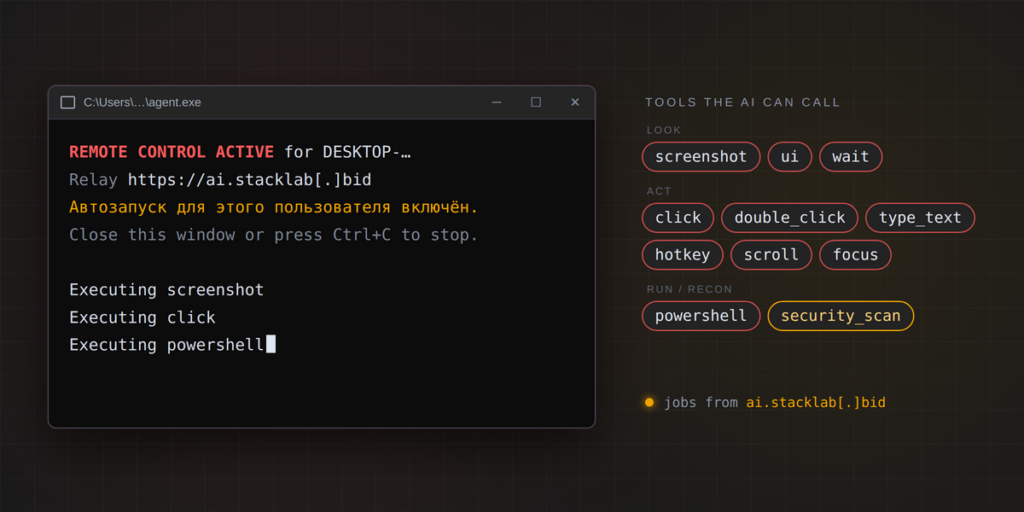
This sample is a small, unsigned Windows program that calls itself Remote AI Agent. It never steals anything by itself. It sits on a PC, asks a server called a “relay” what to do next, and carries out simple actions: take a screenshot, click here, type this, run this PowerShell. That is the same small set of actions an AI “computer-use” agent uses to operate a Windows desktop. Two things point to it being built for one: the tool calls itself an AI agent throughout, and its controls are shaped for an AI working one step at a time rather than for a person. We never saw who or what actually sent it commands. The relay’s domain, stacklab[.]bid, also hosts a Russian-language control panel for an RDP password-spraying fleet.
- What it is: a remote-control agent with 11 tools, including arbitrary PowerShell and a built-in “security scan” that lists a PC’s weak spots.
- Persistence: once registered, it adds itself to the user’s Run key as
Remote AI Agentand says so on screen, in Russian. - Not hidden: it runs in a visible console window that announces “REMOTE CONTROL ACTIVE”.
- Infrastructure: the relay
ai.stacklab[.]bidsits behind Cloudflare. A sibling hostname,direct.stacklab[.]bid, points at a server running “RDP_C”, a coordinator for RDP password-guessing workers that collects working logins as “goods”. - Status: when we ran it in a sandbox, the relay refused to register it, so it never received a job.
A remote control built for an AI driver
“Computer-use” AI agents work in a simple loop. The model looks at a screenshot, decides on an action (click a button, type some text), and then looks again. Anything that wants an AI to operate a real Windows PC needs a small program on that PC to take the screenshots and perform the clicks.
This sample is such a program. It asks the relay for a job, which is just a tool name plus arguments, and performs it:
| Tool | What it does |
|---|---|
screenshot |
Captures the screen (or part of it), returned as a base64 image capped at 3 MB |
ui |
Lists the visible windows and their buttons, text boxes, menus and links |
click, double_click, scroll |
Moves and clicks the mouse, by coordinates or by naming a button |
type_text, hotkey |
Types text (pasting via the clipboard) or presses key combinations |
focus, wait |
Brings a window to the front, or waits for one to appear |
powershell |
Runs any PowerShell script the relay sends and returns the output |
security_scan |
Runs a built-in PowerShell audit of the PC (more on that below) |
Every result is a short JSON object such as {"ok":true,"x":…,"y":…}, and errors are short phrases like “window not found”.
Why we think it was built for an AI
It says so. The author named it for an AI throughout. The program’s internal build name is remote-ai-agent, it identifies itself to the server as remote-ai-agent/1, the relay lives at ai.stacklab[.]bid, the Run key is called Remote AI Agent, and its temporary script files start with rai- (“remote AI”). That tells us what the author meant it for, though a name alone proves nothing.
Its controls are shaped for an AI, not a person. The agent can only do the things in the table above, one at a time. Each action is a separate job: the relay sends one instruction, the agent carries it out and sends back the result, and only then can the next instruction follow. To click a button, the other side first asks for a screenshot or the list of buttons, decides where to click, and sends the click as a new job. That is exactly how AI “computer-use” agents work: look, decide, act, look again.
For a person it would be painfully slow. There is no live view of the screen, only still screenshots on request. The usual extras of remote-access malware are also missing: there is no file browser, no upload or download, no keylogger and no live remote desktop. Anything beyond the basic actions has to go through the PowerShell tool.
What this doesn’t prove. A fixed script could drive the agent the same way an AI would. We never saw a single job reach the agent, and nothing in the program names an AI model or service, so we can’t say what actually sits behind the relay.
Signing up for remote control
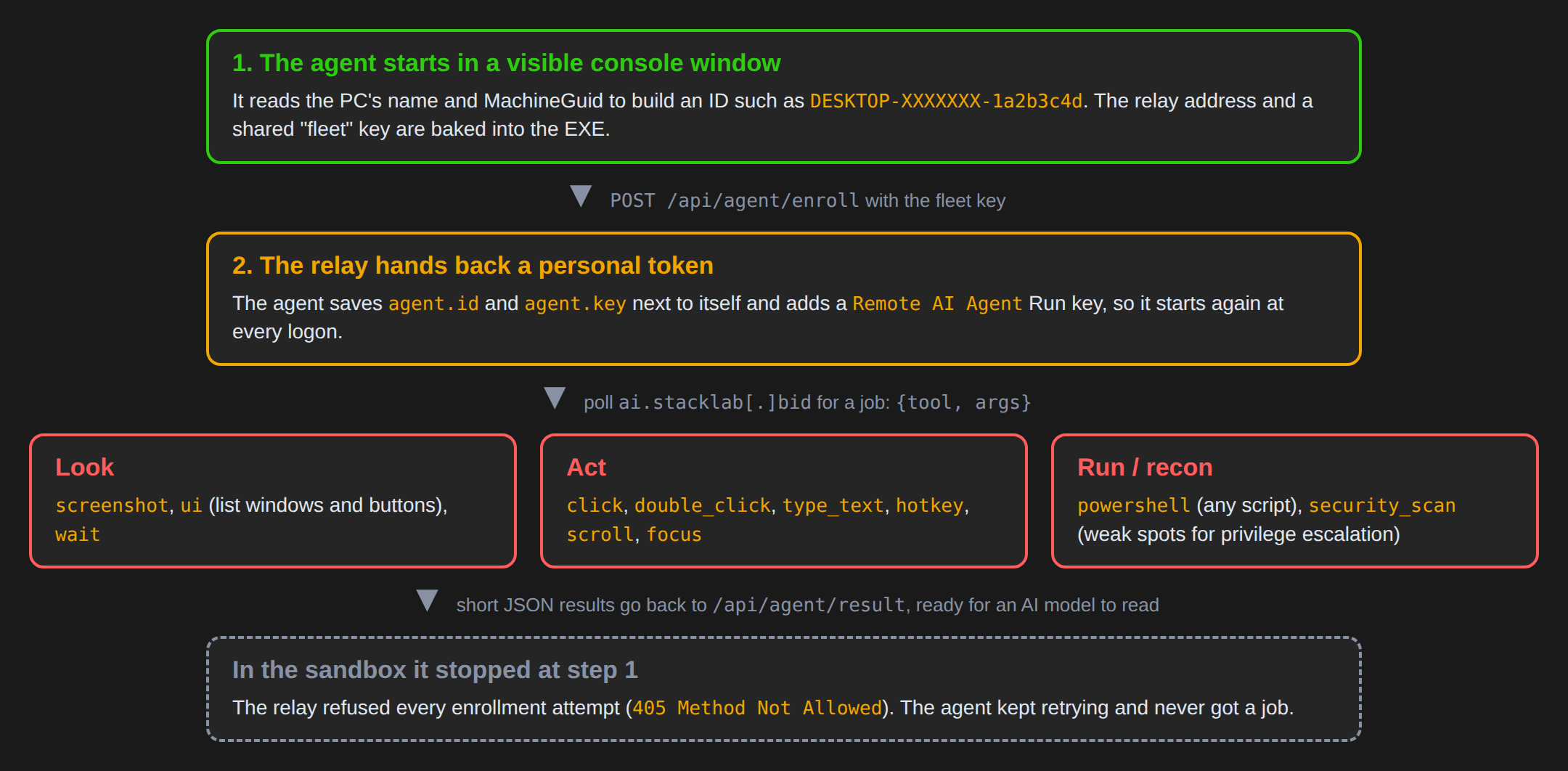
The program carries three settings in plain text: the relay address https://ai.stacklab[.]bid, a default name (pc1), and a 64-character fleet key. A fleet key is a shared password that every copy of the agent uses to introduce itself to the server.
On start-up it builds an ID for the PC from the computer name and a short hash of the Windows MachineGuid, in the form DESKTOP-XXXXXXX-1a2b3c4d. It then sends that ID to /api/agent/enroll together with the fleet key. If the relay accepts, it returns a personal token. The agent saves the ID and token as agent.id and agent.key next to its own EXE.
From then on, every start does the following:
- Writes the Run key
HKCU\Software\Microsoft\Windows\CurrentVersion\Run\Remote AI Agent, so it comes back at every logon. - Prints
REMOTE CONTROL ACTIVE for <id>, followed by “Автозапуск для этого пользователя включён.” (“Autostart for this user is enabled.”). - Polls
/api/agent/pollfor work and posts results to/api/agent/result.
The “security scan”
The most telling tool is security_scan. It is a roughly 10 KB PowerShell script baked into the EXE. It reports Defender and firewall status, UAC settings, local administrators, missing Windows updates, installed software and listening ports. It finishes with a summary line of “gaps”.
Some of those gaps are ordinary hardening advice, such as BitLocker being off or a short minimum password length. Others are the classic shortcuts an attacker looks for to go from a normal user to administrator (“privilege escalation”):
- Services whose program path contains spaces but no quotes (“unquoted service paths”).
- Service programs or folders that ordinary users can overwrite.
- The
AlwaysInstallElevatedpolicy, which lets any user install MSI packages with full rights. - Guest accounts that are enabled, or sit in the Administrators group.
On its own, a script like this could belong to an IT health checker. Combined with a “run any PowerShell” tool, it hands whoever, or whatever, is sending the jobs a ready-made list of next steps.
It doesn’t hide, and it speaks Russian
This is not a stealthy implant. It runs in a normal console window, prints the relay address, and tells whoever is sitting there to “Close this window or press Ctrl+C to stop.” Most messages are English. The two that matter most to the person at the keyboard, “could not register this computer, retrying” and “autostart is enabled”, are in Russian.

That makes two readings plausible:
- Victim implant: the agent runs on a victim’s PC, somewhere the user simply never looks at the window.
- Fleet tool: the operator runs it on machines they control themselves, so an AI agent or a script can manage those PCs remotely.
The infrastructure leans towards the second reading, and either way the tool belongs to the same people.
Follow the domain: an RDP password-spraying fleet
The relay hides behind Cloudflare, so its real server isn’t visible. The same domain has another hostname, direct.stacklab[.]bid, that is not behind Cloudflare. It points to 136[.]0[.]213[.]135, a server at the US host Interserver (it also answers to netframe.ddns[.]net). Internet-scan data from Censys shows it running two Russian-language web panels.
The first panel is “RDP_C Админ”, titled “Координатор флота” (fleet coordinator). The scanner’s copy of the page was enough to rebuild what it looks like. The login screen opens with the line “Только авторизованное пентест-тестирование” (“authorised pentest testing only”), and the login field is already filled in as root.
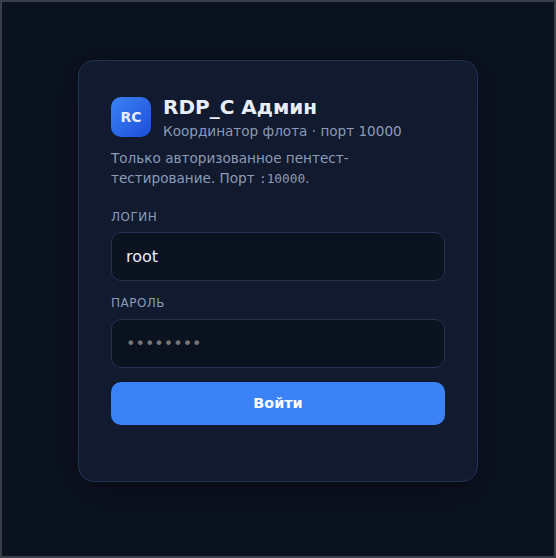
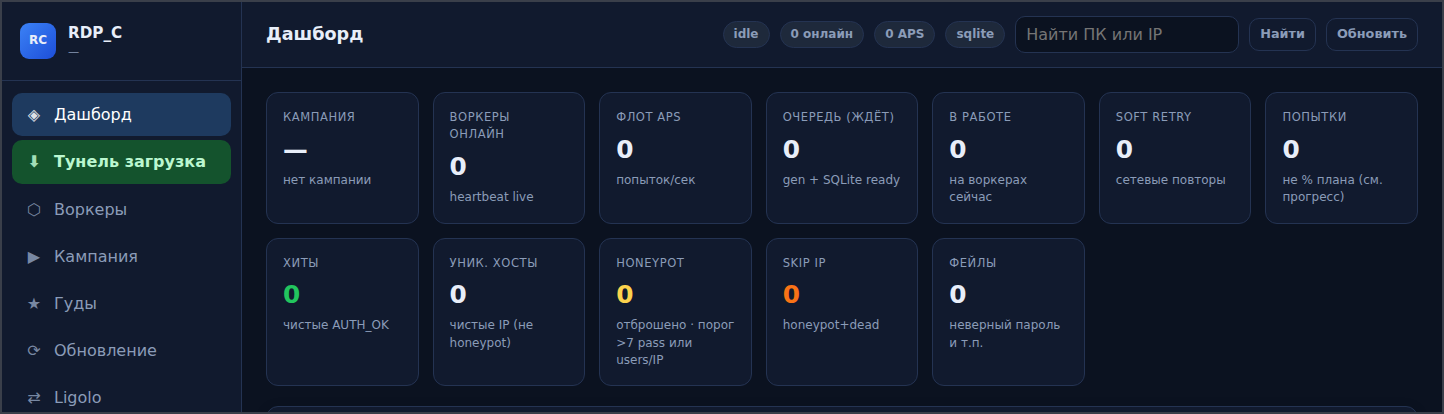
Behind the login, the panel manages “workers”: PCs that try username and password combinations against remote desktop (RDP) servers, a technique known as password spraying. The dashboard tracks:
- The active campaign and the number of workers online.
- Attempts per second across the fleet.
- Clean
AUTH_OKhits and unique hosts. - Hosts discarded as honeypots (decoy servers set up to catch attackers). A host is flagged when more than seven passwords or usernames work on it, or when it accepts a deliberately wrong password.
Working logins are collected under a tab called “Гуды” (“goods”, the usual slang for stolen access). They can be exported per campaign in the form IP:port@user;pass, with separate lists for honeypots and for hosts where the login worked but RDP access did not. The campaign settings offer several spraying strategies, including one described as gentler on account lockouts. One campaign folder named on the page is dated 2026-08-08.
Workers are set up from a pack containing worker.exe, a tunnel tool (Ligolo) and batch files. A one-line PowerShell installer downloads the pack, trying the server directly first and falling back to Cloudflare at c.stacklab[.]bid.
The second panel, on port 8000, is called “ADLab Pro — панель оператора” (“operator panel”). Its content wasn’t visible in the scan data.
What we can and can’t say. The AI agent’s relay and the RDP_C panel share a domain. Their first certificates were issued minutes apart on the same day, and both servers answer in the same web-framework style. That points to the same operator. We have not proven that the relay’s backend runs on that particular server.
What the sandbox showed, and the limits
In the sandbox the agent did exactly what the code says: it kept trying to enroll, and the relay kept answering “405 Method Not Allowed”. It never registered, so it never wrote the Run key and never received a job.
That leaves several open questions:
- Delivery: we don’t know how the agent reaches a PC. No installer, archive or lure came with it.
- The other side: we don’t know whether an AI model, a script or a person sits behind the relay, or what jobs it sends.
- Why the relay refused: the server may have been redesigned, retired, or simply moved on to newer builds.
The sandbox rated the run “no threats detected”. That is not surprising for a tool that waits politely for instructions that never came.
Advice
For regular users:
- If you see a console window that says REMOTE CONTROL ACTIVE, or you find a Run entry called Remote AI Agent, close the window and remove the entry and its EXE.
- Then change the passwords you use on that PC, especially remote-desktop passwords.
For defenders:
- Hunt for the user agent
remote-ai-agent/1and the headersX-Agent-IDandAuthorization: Bearersent to/api/agent/*. - Hunt for
powershell.exe -NoProfile -NonInteractive -ExecutionPolicy Bypass -File %TEMP%\rai-run-*.ps1, and foragent.id/agent.keyfiles sitting next to an unknown EXE. - If you expose RDP, watch for password spraying from
136[.]0[.]213[.]135. Better still, put RDP behind a VPN and enforce lockout and MFA.
IOCs
| Type | Indicator | Notes |
|---|---|---|
| SHA256 | 99e56532d35d71be3c13c26343f2537922635db99e3f2fb953952148c9445896 |
Remote AI Agent EXE (unsigned) |
| Domain | ai.stacklab[.]bid |
Relay (C2), behind Cloudflare |
| URL paths | /api/agent/enroll, /api/agent/poll?id=, /api/agent/job?id=, /api/agent/result |
C2 API |
| User agent | remote-ai-agent/1 |
HTTP header |
| Domain | direct.stacklab[.]bid |
RDP_C / ADLab Pro panels |
| Domain | c.stacklab[.]bid |
RDP_C worker install fallback (from panel text) |
| Domain | netframe.ddns[.]net |
Same server as direct.stacklab[.]bid |
| IP | 136[.]0[.]213[.]135 |
RDP_C fleet coordinator (Interserver) |
| Registry | HKCU\Software\Microsoft\Windows\CurrentVersion\Run → Remote AI Agent |
Persistence |
| Files | agent.id, agent.key (beside the EXE); %TEMP%\rai-cmd-*.ps1, %TEMP%\rai-run-*.ps1 |
Credentials and temporary scripts |
Closing thoughts
Tools built for AI agents to drive a computer are spreading quickly, and the plumbing is simple: a small program that takes screenshots, clicks, and runs commands on request. This one comes with automatic persistence, a privilege-escalation checklist and a domain shared with an RDP password-spraying fleet. That is a reminder to judge such tools by who runs the relay, not by how friendly the console text looks.
Stay safe out there.