About this post: Thanks to MalwareHunterTeam for flagging this new payload. This analysis and write-up were produced by Claude (Opus 5.5), working as an agent in Claude Code on a REMnux analysis VM. Tools used: Malcat, Go toolchain (go version -m, go tool nm), capstone, osslsigncode, a sandboxed Wine setup and ANY.RUN.
TL;DR
ZSATunnel_x86.exe presents itself as the Zscaler Client Connector, the agent many companies use to route staff traffic through Zscaler’s security cloud. It is actually a remote-access backdoor written in Go. It is signed with a valid EV certificate issued to an unrelated Irish company, "MARQUEE AUDIO VISUAL LIMITED". Once running, it takes orders from a server, runs commands, moves files in and out, and can turn the infected PC into a proxy into the victim’s network.
- Disguise: Zscaler names and version info (11.103.9.6), a legitimate-looking
ZSATunnelfolder, and a brand-new EV certificate. - Remote control: shell commands (cmd or PowerShell), file upload and download, and folder theft as
.tar.gzarchives. - Network pivot: a built-in SOCKS5 tunnel lets the attacker reach other machines through the victim.
- No address inside: the server address is not in the file. It is read from an environment variable named
URSPLUNKand otherwise defaults tolocalhost. - Status: the certificate has been reported to the CA and added to the CertGraveyard.
But it’s signed!
Code signing is a digital seal: it tells Windows who published a program and that nobody changed it afterwards. This file’s seal is valid. The problem is who signed it.
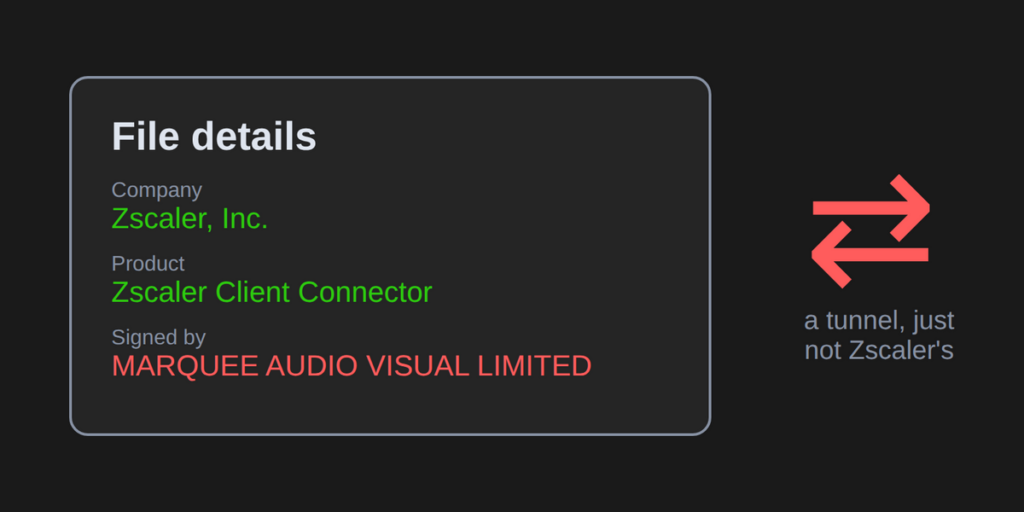
The file details say "Zscaler, Inc." and "Zscaler Client Connector". The signature says "MARQUEE AUDIO VISUAL LIMITED", a company in Dublin. Its Extended Validation (EV) certificate was issued on 23 October 2026 and used to sign this file about three weeks later.
A brand-new certificate that is immediately used to sign someone else’s product is a pattern we see again and again with signed malware. The build timestamp inside the file had also been changed after compilation to a date in 2022, years before the Go version used to build it existed.
Where’s the server?
Most backdoors carry their server address inside the file, often encrypted. This one doesn’t. Its built-in default is https://localhost, which points back at the infected computer itself.
The real address comes from an environment variable called URSPLUNK. Think of an environment variable as a sticky note that Windows hands to every program it starts. Whatever launches this backdoor (an installer, a script or an earlier stage) has to write the server address on that note first.
That keeps the signed file free of any server address, which is convenient for the attacker. It also means we don’t know where this copy reports to. We did not have the component that sets the variable.
A quiet worker
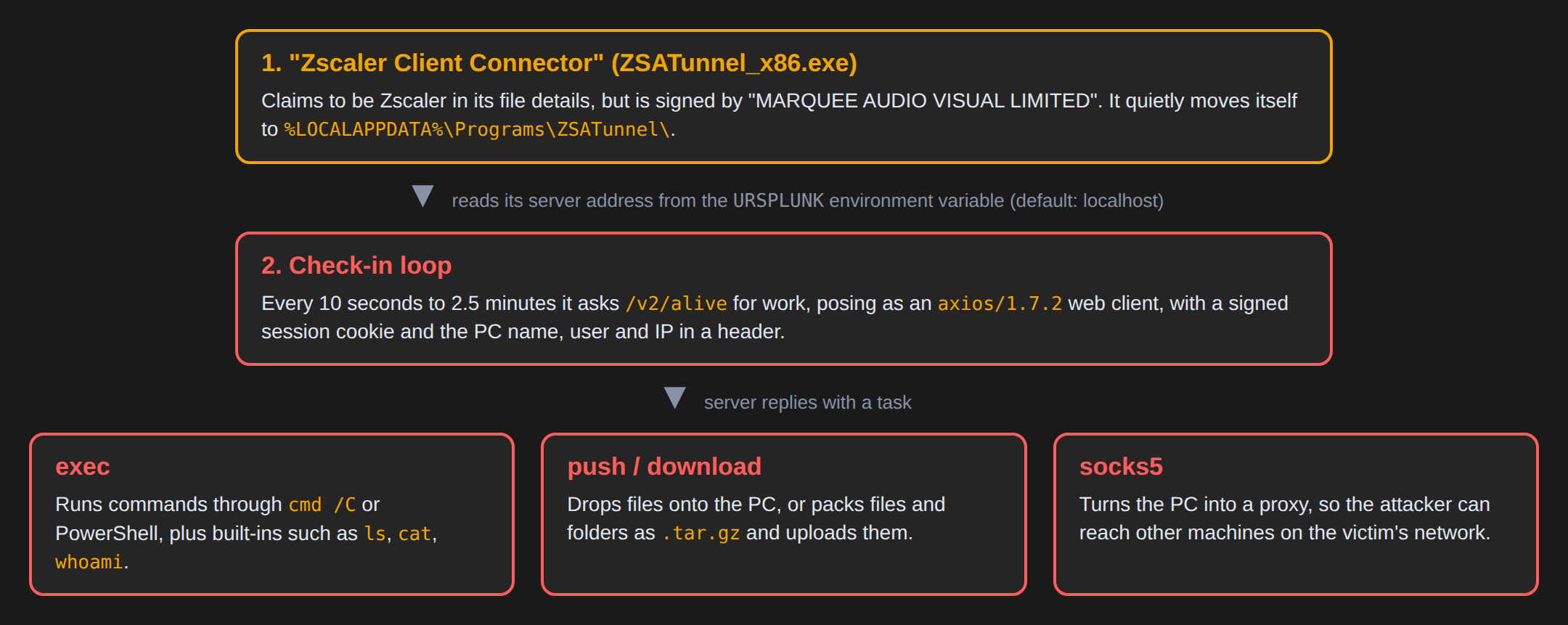
On first run, the program moves itself to %LOCALAPPDATA%\Programs\ZSATunnel\ZSATunnel_x86.exe. That spot looks like a normal per-user install of a real Zscaler component. It also opens a hidden window named like a standard Windows text-input window.
It then checks in with its server at an address ending in /v2/alive. To blend in, it identifies itself as axios/1.7.2, a common web-developer library, and sends browser-like headers. Each check-in carries:
- a random ID for the infected PC, plus a time-stamped signature proving the request comes from a genuine implant;
- the computer name, user name and local IP address, base64-encoded in a header called
X-Metadata.
Between check-ins it sleeps for a random time. Usually that is about a minute to two and a half minutes, and sometimes just 10–13 seconds. It speeds up briefly after receiving work. It gives up after 500 failed check-ins in a row or after 30 days, and on the way out it renames itself to a random .tmp file.
What the attacker can do
Each task from the server is one of a short list:
| Task | What it does |
|---|---|
exec |
Runs a command through cmd /C or PowerShell. Simple commands (ls, cat, cd, pwd, env, whoami, hostname, localip, tree) are answered by the backdoor itself |
push |
Downloads a file from the server and saves it on the PC |
download |
Uploads a file, folder or wildcard match to the server, packed as .tar.gz and sent in chunks |
socks5 |
Opens a SOCKS5 tunnel through the server, so the attacker can connect onward to anything the PC can reach |
sleep |
Changes how often it checks in |
shutdown |
Exits (and renames itself) |
The socks5 task deserves a closer look. SOCKS5 is a standard proxy protocol. Here it lets the attacker point their own tools at, say, an internal file server or admin panel, and the traffic comes out of the victim’s PC as if a colleague had made the connection. For a program dressed as a corporate network-security agent, a tunnel into the corporate network is an awkwardly apt feature.
Hiding in plain sight
The code makes life harder for analysts in a few ways:
- Every internal function name has been replaced with a random social-media word, such as
hashtag,friendUpgradeorgenderFlush. - Startup code is padded with meaningless arithmetic.
- Encrypted connections use a library that mimics a web browser’s TLS handshake, so the traffic looks less like a script.
The code also contains a second, switched-off way of talking to its server. When enabled, it wraps every request in an ordinary-looking web form submission sent to a relay. That option is empty in this build, but other builds may use it.
What we couldn’t see
Because the server address is supplied from outside, neither our sandbox runs nor the public sandbox run showed this copy talking to a real server. When we ran it in an isolated environment and gave it a local fake server, it moved itself into place as expected. It never checked in, though, so the network behaviour described above comes from reading the code rather than from watching it. We also don’t know how the file was delivered or what sets URSPLUNK on a victim’s machine.
What should you do?
If you’re a regular user: a Zscaler component is installed by your company’s IT team, never by you from an email, chat message or download link. If you’re asked to run a "Zscaler" file yourself, check with IT first.
If you’re a defender:
- File location: look for
ZSATunnel_x86.exeunder%LOCALAPPDATA%\Programs\ZSATunnel\. - Environment variable: check for a
URSPLUNKvariable in user or system settings, and in the environment of running processes. - Proxy logs: hunt for requests to
/v2/alive,/v2/hook,/v2/submit,/v2/exportand/v2/relaywith the user agentaxios/1.7.2, especially together withAccept-Language: en-NZ,en;q=0.9and a_session=cookie. - Leftovers: a random
.tmpfile left in the same folder can mark a former infection. - Signer: block or alert on this signer and certificate serial.
Indicators of compromise
| Type | Value |
|---|---|
| SHA256 | fe9829f1c102a79b4ca33c8c8bda8ef2236dc94c6d1de88249c89e82681adc8c |
| SHA1 | eae2226416cdd4b72b68d1408e8a8a1ba1e28819 |
| MD5 | 1576a17f54c5b149139e6c8f1b2e6b20 |
| Signer | MARQUEE AUDIO VISUAL LIMITED (Sectigo Public Code Signing CA EV R36) |
| Cert serial | 00c616578bd978935d9fe5b9751d00ffee |
| Install path | %LOCALAPPDATA%\Programs\ZSATunnel\ZSATunnel_x86.exe |
| Environment variable | URSPLUNK (holds the server address) |
| URL paths | /v2/alive, /v2/hook, /v2/export?id=, /v2/submit, /v2/relay |
| User-Agent | axios/1.7.2 |
| Cookie | _session=<16 hex>.<unix time>.<64 hex> |
Wrapping up
This one is a good reminder that the name on the box and the name on the seal should match. A valid signature only tells you who signed a file, not that it is what it claims to be. If you’ve seen other copies of this tunnel, especially one that shows where URSPLUNK points, we’d love to hear about it.